
Lsetf Application Form PDF Details

The Lagos State Employment Trust Fund (LSETF) Application Form for Micro-Enterprises is a crucial step for businesses seeking loans up to N500,000.00 (Five Hundred Thousand Naira). Designed with the goal of fostering business growth and employment in Lagos State, the form encompasses sections that require personal information, business details, and a declaration of the authenticity of the information provided. Applicants are required to fill out the form carefully, adhering to the instructions which include not adding extra pages and including signatures on each page, along with two passport photographs signed at the back. Additionally, the form probes into the applicant’s background, asking about education, work experience, and the current status of the business, including type, sector, and financial specifics. It emphasizes the importance of truthful information with the warning of penalties for falsehoods. Applicants are also asked about their objectives in applying for the program, which ranges from funding to mentorship and business development support. The form extends further to understand the potential impact on employment within the applicant's business and queries about previous government intervention benefits. With a checklist at the end to ensure all required documents are submitted, the LSETF Application Form is comprehensive, serving as a bridge for entrepreneurs to access financial and developmental support, while also ensuring alignment with the objectives of the Lagos State Employment Trust Fund.

QuestionAnswer
Form NameLsetf Application Form
Form Length1 pages
Fillable?No
Fillable fields0
Avg. time to fill out15 sec
Other namesloans lstef ng, lsetf loan, lagos state empowerment trust fund, lagos state trust fund empowerment programme registration form

How to Edit Lsetf Application Form Online for Free

Whenever you need to fill out how do i apply for a lagos state trust fund, you won't need to download any sort of programs - simply give a try to our PDF editor. To keep our tool on the leading edge of efficiency, we aim to implement user-driven capabilities and enhancements on a regular basis. We are routinely grateful for any suggestions - play a vital role in remolding how you work with PDF documents. All it requires is several simple steps:

Step 1: Hit the "Get Form" button at the top of this page to get into our PDF tool.

Step 2: This tool enables you to customize the majority of PDF documents in a range of ways. Improve it by writing any text, correct what is originally in the PDF, and put in a signature - all readily available!

Pay attention while filling in this pdf. Make sure all necessary blanks are completed properly.

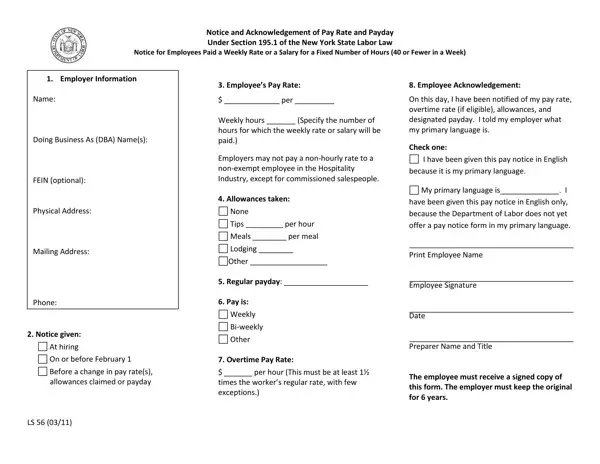
1. The how do i apply for a lagos state trust fund needs particular details to be inserted. Ensure that the next blanks are completed:

Step no. 1 in filling in https forms glelo 0trj6lules 9s932k7

2. Once your current task is complete, take the next step – fill out all of these fields - Name Doing Business As DBA Names, Notice given, At hiring, On or before February, Before a change in pay rates, Regular payday Pay is, Weekly, Biweekly, Other, Overtime Pay Rate, per hour This must be at least, times the workers regular rate, and Print Employee Name Employee with their corresponding information. Make sure to double check that everything has been entered correctly before continuing!

https forms glelo 0trj6lules 9s932k7 conclusion process explained (portion 2)

Be very mindful while completing Weekly and Print Employee Name Employee, because this is where most people make mistakes.

Step 3: Revise all the information you've entered into the blank fields and then press the "Done" button. Grab your how do i apply for a lagos state trust fund when you subscribe to a 7-day free trial. Quickly access the pdf inside your personal account, together with any modifications and changes conveniently preserved! FormsPal guarantees your information confidentiality with a protected method that in no way saves or shares any sensitive information involved in the process. Rest assured knowing your files are kept confidential any time you work with our tools!