
Mandatory Forbearance Request Form PDF Details

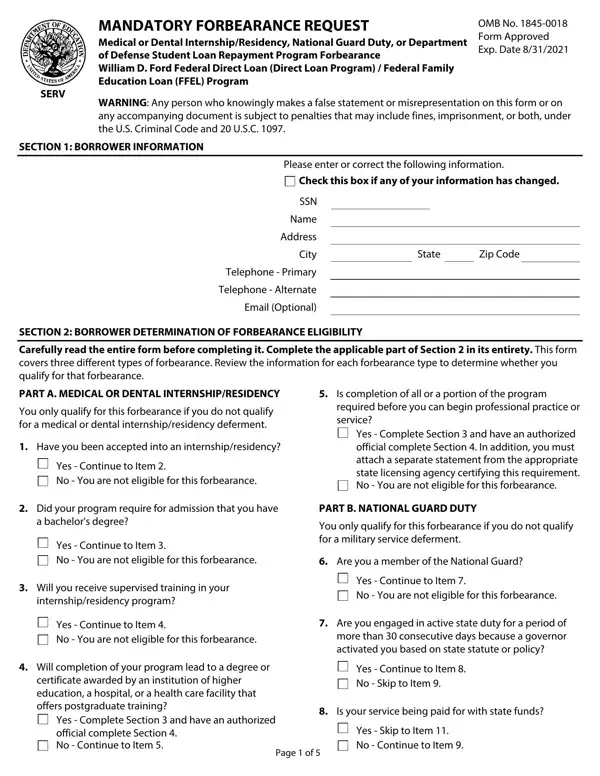
The Mandatory Forbearance Request form, recognized by its OMB No. 1845-0018, plays a crucial role for borrowers under the William D. Ford Federal Direct Loan (Direct Loan) Program and the Federal Family Education Loan (FFEL) Program who find themselves in specific situations that hinder their ability to continue making payments on their loans. This document provides a pathway for individuals undergoing medical or dental internships/residencies, fulfilling duties in the National Guard, or participating in a Department of Defense Student Loan Repayment Program to temporarily suspend their loan payments. The form requires detailed information from the borrower, including a thorough self-assessment of eligibility for forbearance under one of the applicable categories. It emphasizes the necessity for integrity in the process, warning of legal consequences for false statements. Borrowers must carefully complete the form, understanding that approval lies in the hands of authorized officials who verify the accuracy and validity of the information provided. The request for forbearance can significantly impact a borrower's payment schedule, offering relief during periods of financial difficulty, yet it comes with conditions and acknowledgments, especially regarding the potential capitalization of interest. It is designed to provide temporary relief, ensuring that borrowers are aware of the responsibilities and implications of entering into forbearance.

QuestionAnswer
Form NameMandatory Forbearance Request Form
Form Length5 pages
Fillable?No
Fillable fields0
Avg. time to fill out1 min 15 sec
Other namesWashington, false, SSN, OMB

How to Edit Mandatory Forbearance Request Form Online for Free

Should you need to fill out seq, it's not necessary to download and install any programs - simply make use of our online tool. FormsPal professional team is ceaselessly endeavoring to expand the editor and insure that it is much easier for clients with its extensive functions. Bring your experience to a higher level with constantly improving and unique opportunities we offer! Should you be seeking to begin, here's what it requires:

Step 1: Press the "Get Form" button at the top of this webpage to open our PDF tool.

Step 2: As soon as you start the PDF editor, there'll be the document ready to be filled out. Other than filling in various blank fields, you might also do other actions with the Document, namely adding any textual content, editing the initial text, inserting graphics, signing the document, and much more.

This PDF requires specific data to be filled out, thus be sure to take whatever time to provide precisely what is required:

1. To begin with, when completing the seq, start out with the part that includes the subsequent fields:

How one can fill in Comakers part 1

2. Once your current task is complete, take the next step – fill out all of these fields - a bachelors degree, Yes Continue to Item No You are, Will you receive supervised, internshipresidency program, You only qualify for this, Are you a member of the National, Yes Continue to Item No You are, Yes Continue to Item No You are, Are you engaged in active state, Will completion of your program, certificate awarded by an, Yes Complete Section and have an, Yes Continue to Item No Skip to, Is your service being paid for, and Yes Skip to Item No Continue to with their corresponding information. Make sure to double check that everything has been entered correctly before continuing!

Writing segment 2 in Comakers

It's easy to make errors while filling in your Yes Continue to Item No You are, so ensure that you take another look before you decide to finalize the form.

3. This next section is considered pretty uncomplicated, Borrower Name, Borrower SSN, SECTION BORROWER DETERMINATION OF, PART C DEPARTMENT OF DEFENSE, partial repayment of your loans, Yes Complete Section and have an, Are you engaged in active state, more than consecutive days under, Yes Continue to Item No You are, Is your service being paid for, Yes Continue to Item No You are, Were you activated no more than, and last date on which you were - these blanks will have to be filled out here.

Comakers completion process shown (stage 3)

4. Filling out last date on which you were, Yes Complete Section and have an, SECTION BORROWER REQUESTS, I request, My loan holder grant forbearance, approved for a forbearance I would, Make smaller payments in the, per month, My loan holder grant my, If checked to make interest, I understand, I am not required to make payments, My forbearance will begin on the, and the authorized official My loan is paramount in the fourth part - always don't hurry and fill out every blank!

SECTION  BORROWER REQUESTS, approved for a forbearance I would, and I am not required to make payments of Comakers

5. The form needs to be finished by going through this segment. Here one can find a detailed list of form fields that require accurate information in order for your form usage to be accomplished: Borrower Name, Borrower SSN, SECTION BORROWER REQUESTS, I certify that, The information I have provided, I will provide additional, I will notify my loan holder, I have read understand and meet, I authorize the entity to which I, Borrowers Signature, Date, and SECTION AUTHORIZED OFFICIALS.

SECTION  BORROWER REQUESTS, I certify that, and I authorize the entity to which I inside Comakers

Step 3: Check all the details you have typed into the form fields and then hit the "Done" button. Go for a free trial subscription at FormsPal and gain immediate access to seq - available from your personal account. FormsPal ensures your information privacy by having a protected system that in no way saves or shares any sort of private information typed in. Be confident knowing your documents are kept safe each time you use our editor!