
MC 171 Form PDF Details

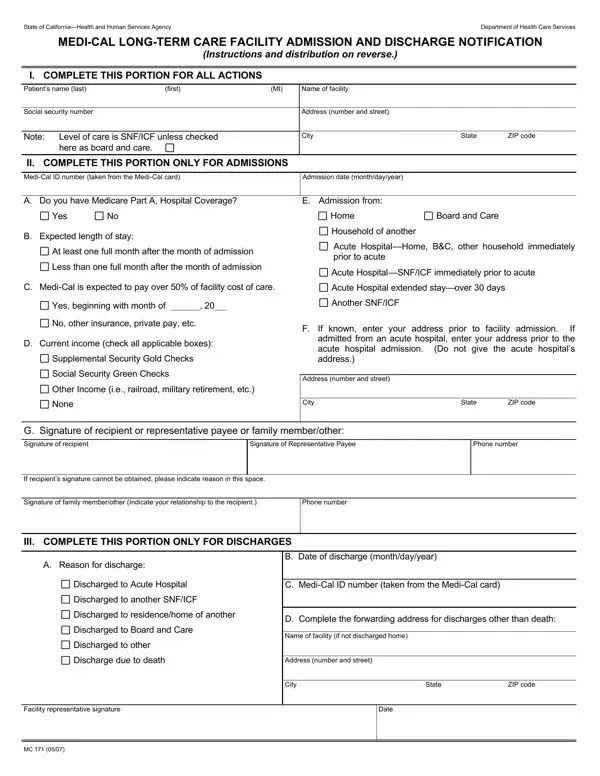
The MC 171 form, designated by the State of California's Health and Human Services Agency and administered by the Department of Health Care Services, plays a pivotal role in the coordination and administration of care for individuals admitted to or discharged from long-term care facilities. This document, essentially a notification form, bridges critical communication gaps between facilities, Health Department agencies, and social security or welfare departments. Its design ensures that for every admission or discharge, a detailed record is maintained, including the patient's personal information, Medi-Cal ID number, admission and discharge details, insurance coverage, expected duration of stay, income sources, and previous living arrangements for admitted individuals. For discharged individuals, it captures reasons for discharge and forwarding address or death, if applicable. Additionally, the form specifies the responsibility of facility representatives in preparing and distributing copies to pertinent parties, such as local social security offices or county welfare departments, underlined by detailed instructions for both admissions and discharges. This structured approach not only aids in the seamless transition of residents into or out of long-term care settings but also facilitates the accurate and timely communication necessary for the management of Medi-Cal benefits and related services.

QuestionAnswer
Form Name MC 171 Form
Form Length 2 pages
Fillable? No
Fillable fields 0
Avg. time to fill out 30 sec
Other names you mc171 form, mc171 forms, mc 171 long term, care form facility

How to Edit MC 171 Form Online for Free

Any time you intend to fill out mc171 form, there's no need to install any software - just try our PDF editor. To have our editor on the forefront of practicality, we work to implement user-driven capabilities and improvements on a regular basis. We are at all times looking for suggestions - help us with remolding PDF editing. Should you be seeking to start, here is what it takes:

Step 1: First of all, access the pdf tool by clicking the "Get Form Button" above on this webpage.

Step 2: After you start the editor, you will notice the document made ready to be filled in. Apart from filling in various blank fields, you might also perform some other things with the file, namely writing custom text, modifying the initial text, inserting illustrations or photos, signing the form, and a lot more.

It is actually an easy task to finish the pdf using out helpful guide! Here's what you need to do:

1. Whenever filling in the mc171 form, make certain to incorporate all of the essential fields within the relevant section. It will help speed up the work, allowing for your information to be processed without delay and properly.

Stage no. 1 of completing care facility admission

2. The next step is usually to fill in these blank fields: D Current income check all, Supplemental Security Gold Checks, Social Security Green Checks, Other Income ie railroad military, None, G Signature of recipient or, Signature of recipient, Signature of Representative Payee, If recipients signature cannot be, Signature of family memberother, Phone number, III COMPLETE THIS PORTION ONLY FOR, If known enter your address prior, Address number and street, and City.

Filling out segment 2 in care facility admission

Lots of people often get some points incorrect while filling out Supplemental Security Gold Checks in this area. Ensure you read twice what you type in here.

3. This 3rd segment should also be rather simple, Discharged to residencehome of, Discharged to Board and Care, Discharged to other, Discharge due to death, Facility representative signature, D Complete the forwarding address, Name of facility if not discharged, Address number and street, City, Date, State, and ZIP code - all of these empty fields will have to be filled out here.

ZIP code, Discharged to Board and Care, and State of care facility admission

Step 3: Ensure that the details are right and press "Done" to finish the project. Obtain the mc171 form the instant you join for a free trial. Immediately access the pdf in your FormsPal cabinet, with any modifications and adjustments being conveniently synced! FormsPal guarantees risk-free document tools with no personal data recording or distributing. Feel at ease knowing that your details are secure with us!