
Mc 223 Form PDF Details

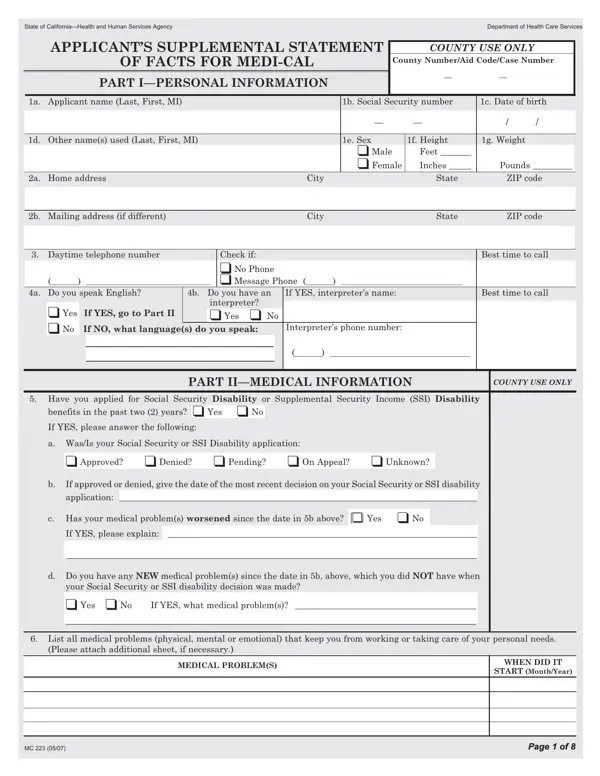
The MC 223 form is a comprehensive document designed by the State of California—Health and Human Services Agency, Department of Health Care Services, to gather extensive personal, medical, social, and educational information from applicants seeking Medi-Cal benefits. It serves as a supplemental statement to support the application process, providing a detailed account of the applicant's medical history, work history, daily living activities, and any other information relevant to determining their eligibility for such benefits. The form spans eight pages, covering everything from basic personal details, such as name, social security number, and contact information, to intricate questions about the applicant's health issues, treatments received, and their impact on the applicant's ability to work or perform daily tasks. Additionally, it inquires about any Social Security Disability or Supplemental Security Income Disability benefits the applicant might have applied for in the past two years, delving into the specifics of the application outcomes and any changes in the applicant’s medical condition since then. This form not only aids in capturing the necessary information to process Medi-Cal applications but also ensures that applicants provide a thorough account of their situation, thereby enabling a more accurate and fair assessment of their eligibility for benefits.

QuestionAnswer
Form NameMc 223 Form
Form Length8 pages
Fillable?No
Fillable fields0
Avg. time to fill out2 min
Other namesmc382 form, form mc 382, form mc 223, form mc223

How to Edit Mc 223 Form Online for Free

In case you desire to fill out form mc382, you won't need to install any software - just make use of our PDF editor. Our team is focused on providing you with the absolute best experience with our editor by constantly presenting new capabilities and upgrades. Our tool is now much more useful thanks to the most recent updates! At this point, editing PDF files is simpler and faster than ever. Here is what you will want to do to start:

Step 1: Just click the "Get Form Button" at the top of this webpage to start up our pdf file editor. This way, you'll find everything that is required to work with your document.

Step 2: The tool will give you the opportunity to modify your PDF document in various ways. Modify it by writing customized text, correct existing content, and include a signature - all doable in minutes!

When it comes to fields of this particular PDF, this is what you should consider:

1. While filling in the form mc382, ensure to complete all of the needed blanks in its relevant part. It will help speed up the work, allowing for your details to be handled fast and properly.

Step number 1 for completing mc 382 spanish

2. Immediately after the first section is done, go to type in the suitable information in all these - a WasIs your Social Security or, Approved Denied Pending On, If approved or denied give the, application, c Has your medical problems, If YES please explain, d Do you have any NEW medical, your Social Security or SSI, If YES what medical problems, List all medical problems, Please attach additional sheet if, MEDICAL PROBLEMS, WHEN DID IT, START MonthYear, and Page of Page of.

Step # 2 in submitting mc 382 spanish

Regarding a WasIs your Social Security or and START MonthYear, be certain you get them right here. Both these could be the most significant ones in this PDF.

3. Completing Have you received care in a, months Yes No, COUNTY USE ONLY, If YES please fully answer the, Name of clinichospital, Patientclinic or member number, Clinichospital telephone number, ADDRESS of clinichospital number, Name of doctors seen, Reason for the visits, Did you stay in the hospital, Date first seen, Date last seen, Date of next appointment, and City is essential for the next step, make sure to fill them out in their entirety. Don't miss any details!

How one can fill out mc 382 spanish part 3

4. The following subsection will require your attention in the following areas: List ALL medicines received, List ALL treatments received and, List any additional clinic or, Name of clinichospital, Patientclinic or member number, Name of doctors seen, Clinichospital telephone number, ADDRESS of clinichospital number, City, Date first seen, Date last seen, Reason for the visits, Did you stay in the hospital, ZIP code, and MC Signed. Just be sure you enter all of the required information to move further.

Clinichospital telephone number, City, and List ALL treatments received and inside mc 382 spanish

5. This very last section to complete this PDF form is pivotal. Make certain to fill in the displayed blank fields, consisting of If YES dates entered dates left, If YES dates seen, List ALL medicines received, List ALL treatments received and, If you have been seen at, in the last months complete page, and Page of, before finalizing. If you don't, it may end up in an unfinished and probably unacceptable form!

Stage no. 5 for filling out mc 382 spanish

Step 3: Go through everything you have typed into the blank fields and then click the "Done" button. Get your form mc382 after you join for a free trial. Readily view the form from your personal account, together with any edits and adjustments automatically saved! FormsPal ensures your information confidentiality by using a protected system that never saves or distributes any type of sensitive information involved in the process. Feel safe knowing your docs are kept safe whenever you work with our tools!