Please rate Medical Examination Form Louisiana R 07-2026

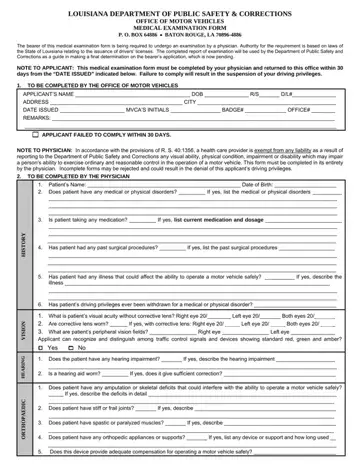
Medical Examination Form DPSMV2302 (R 07/2026) is issued by the Louisiana Department of Public Safety and Corrections, Office of Motor Vehicles, when a driver's license applicant must be examined by a physician. The Office of Motor Vehicles completes Section 1 when it issues the form and marks the sections the physician must complete: History, Orthopedic, Hearing, Cardiopulmonary, Neurological, Mental and Diabetes. The completed form must be returned within thirty (30) days of the Date Issued, or the applicant's driving privileges will be suspended. Under R. S. 40:1356, a health care provider is exempt from liability for reporting a condition that may impair safe driving. The patient signs an authorization for the physician to release the findings to the Department, and the physician states whether it is safe for the patient to drive and whether periodic medical reports should follow. The form is valid only within sixty (60) days of the physician's signature.
| Question | Answer |
|---|---|
| Form Name | Medical Examination Form Louisiana |
| Form Length | 3 pages |
| Fillable? | Yes |
| Fillable fields | 190 |
| Avg. time to fill out | 30 sec |
| Other names | louisiana dmv medical forms, louisiana department of motor vehicle forms, louisiana motor vehicle department forms, louisiana dmv medical examination form |
Medical Examination Form Louisiana isn’t the one you’re looking for?
Please rate Medical Examination Form Louisiana R 07-2026
