
NAVCOMPT Form 3065 at a glance
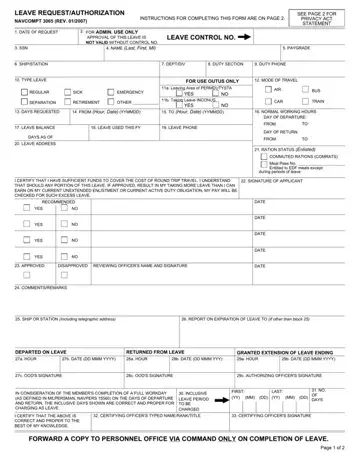
What it is: NAVCOMPT 3065 (REV. 01/2007) is the LEAVE REQUEST/AUTHORIZATION, and its principal purpose is to authorize military leave of absence.
Where and when to file: Request leave sufficiently in advance to allow processing via official channels.
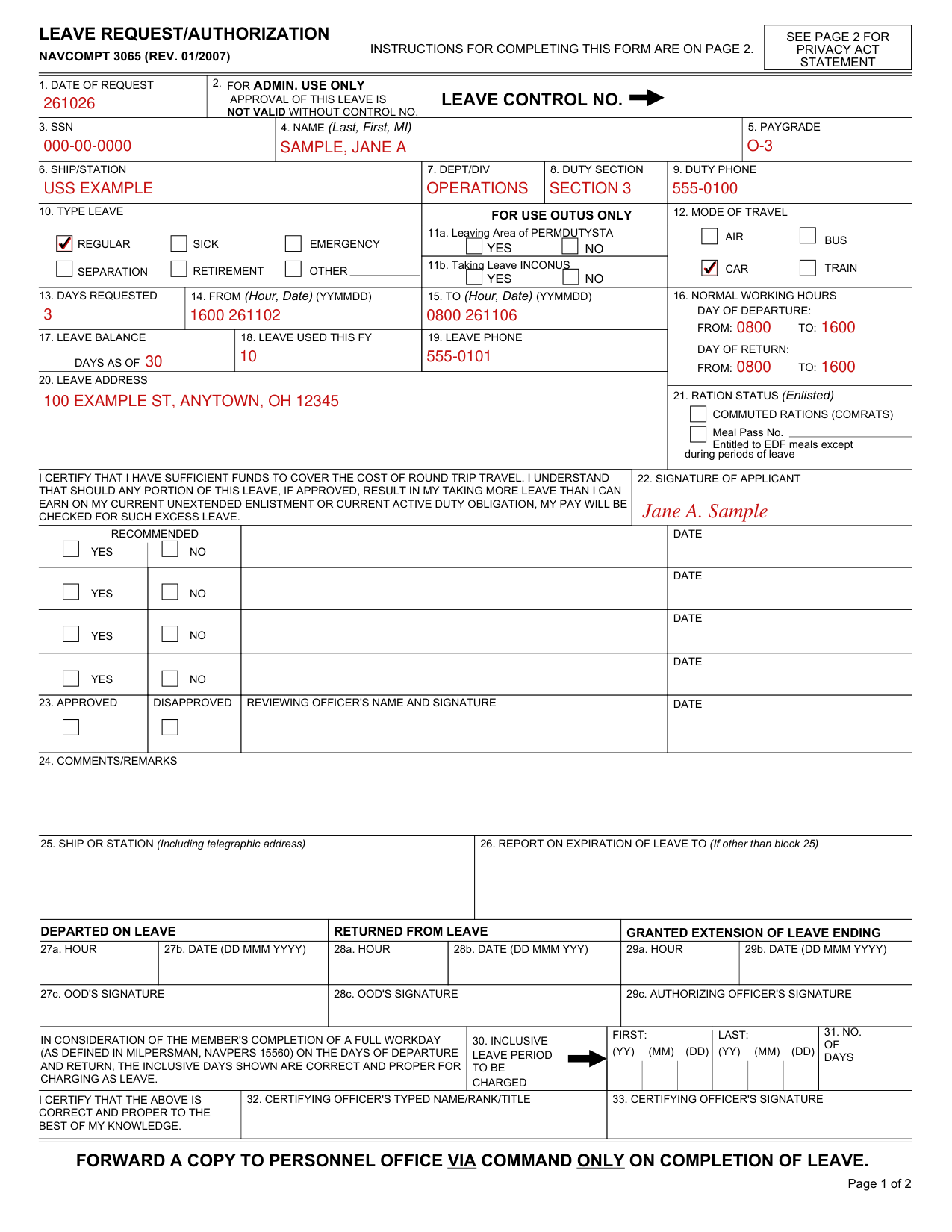
A filled-in NAVCOMPT Form 3065 example: an officer requests three days of regular leave
How to fill out NAVCOMPT Form 3065, box by box
Date of request, SSN, name and paygrade

Enter the 1. DATE OF REQUEST, the 3. SSN, the 4. NAME (Last, First, MI) and the 5. PAYGRADE.
Ship or station, dept/div, duty section and duty phone

Enter the 6. SHIP/STATION, the 7. DEPT/DIV, the 8. DUTY SECTION and the 9. DUTY PHONE.
Type leave

10. TYPE LEAVE: REGULAR, SICK, EMERGENCY, SEPARATION, RETIREMENT, OTHER.
Leaving area of PERMDUTYSTA and taking leave INCONUS

FOR USE OUTUS ONLY: 11a. Leaving Area of PERMDUTYSTA, YES NO, and 11b. Taking Leave INCONUS, YES NO.
Mode of travel

12. MODE OF TRAVEL: AIR, BUS, CAR, TRAIN.
Days requested and the from and to hours and dates

Enter the 13. DAYS REQUESTED, the 14. FROM (Hour, Date) (YYMMDD) and the 15. TO (Hour, Date) (YYMMDD).
Block 14: the hour for starting leave may not be prior to the end of your normal workday if leave starts on a workday. If leave starts on a non-workday, the starting hour may be 0001 if not contrary to command policy.
Block 15: the hour for ending leave may not be later than the beginning of your normal workday if the day of return is a workday. If leave ends on a non-workday, the ending hour may be 2400 if not contrary to command policy.
The day of departure on leave, shall be counted as a day of duty, except when leave commences prior to the end of the normal workday; the day of return from leave shall be counted as a day of leave, except when such return is made at or before commencement of your normal workday in which case it shall be counted as a day of duty.
Normal working hours, leave balance and leave used this FY

Enter the 16. NORMAL WORKING HOURS for day of departure and for day of return. If day of departure or return is not a workday, enter "NONE".
Enter the 17. LEAVE BALANCE and the 18. LEAVE USED THIS FY.
Leave phone and leave address
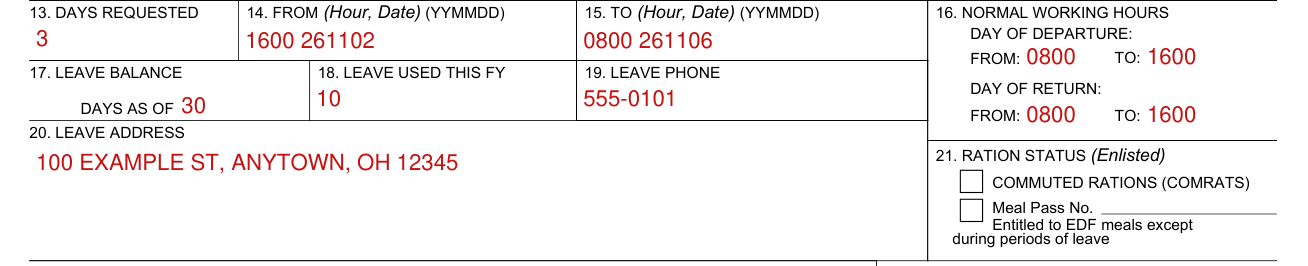
Enter the 19. LEAVE PHONE and the 20. LEAVE ADDRESS.
If the member does not request a specific period of leave and furnish his leave address, leave is not granted.
Ration status

21. RATION STATUS (Enlisted): COMMUTED RATIONS (COMRATS) and Meal Pass No. Entitled to EDF meals except during periods of leave.
Signature of applicant

I CERTIFY THAT I HAVE SUFFICIENT FUNDS TO COVER THE COST OF ROUND TRIP TRAVEL. I UNDERSTAND THAT SHOULD ANY PORTION OF THIS LEAVE, IF APPROVED, RESULT IN MY TAKING MORE LEAVE THAN I CAN EARN ON MY CURRENT UNEXTENDED ENLISTMENT OR CURRENT ACTIVE DUTY OBLIGATION, MY PAY WILL BE CHECKED FOR SUCH EXCESS LEAVE.
Sign the 22. SIGNATURE OF APPLICANT.
More rules for NAVCOMPT Form 3065
Leave is granted subject to immediate recall, therefore maintain communication with your leave address. In the event of a general recall, individual orders may not be issued.
Keep this leave authorization in your possession at all times. Inform your commanding officer of permanent change of leave address.
You are advised that you must immediately return your original leave authorization to the appropriate office designated by your command upon return from leave.
If necessary to request an extension of leave, communicate with your commanding officer by telegram. Since you need positive approval for remaining absent beyond the time originally authorized, if no replay is received you must consider your request not approved.
Before you go
Print or type the appropriate data in blocks 1 and 3 through 21, and leave block 2 blank.
Complete the form in ballpoint or typewriter, in triplicate.
Sources
[1] NAVCOMPT Form 3065 (Rev. 01/2007), Leave Request/Authorization (the Official source link on this page).
