
Ncui 604 Form PDF Details

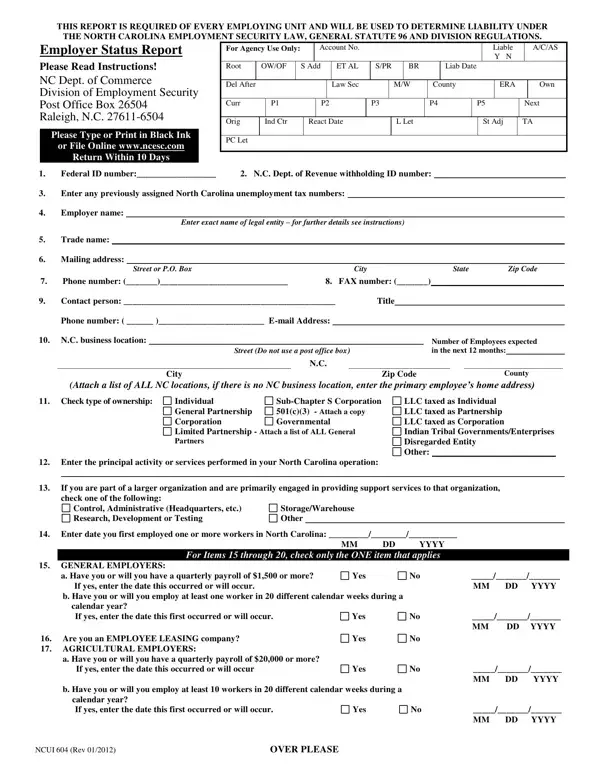
The NCUI 604 form plays a crucial role for businesses operating within North Carolina, serving as a bridge to compliance with the state's Employment Security Law and applicable Division Regulations. Recognized formally as the Employer Status Report, it must be submitted by every employing entity to the North Carolina Department of Commerce's Division of Employment Security. This document's purpose is multifold: it establishes whether an entity meets the criteria for unemployment tax liability, guides through the categorization process of businesses based on their workforce and payroll sizes, and collects essential data on the employer, including federal and state ID numbers, contact information, the type of business ownership, and detailed descriptions of business activities in North Carolina. Additionally, it addresses situations like changes in business ownership, mergers, or asset transfers, ensuring that employment security records accurately reflect the current structure and status of businesses. Critical for maintaining accurate employer records and determining liability, this form acts as a foundational document for businesses to align with state legal requirements, and with a mandate to return it within 10 days of receipt, timeliness in its completion is equally paramount.

QuestionAnswer
Form NameNcui 604 Form
Form Length2 pages
Fillable?No
Fillable fields0
Avg. time to fill out30 sec
Other namesncui 604 online, ncui604, amazon, form ncui 604

How to Edit Ncui 604 Form Online for Free

When using the online PDF tool by FormsPal, you can easily fill out or modify ncui604 here. Our team is focused on providing you the ideal experience with our editor by constantly adding new functions and upgrades. Our editor is now a lot more intuitive as the result of the latest updates! Currently, editing documents is simpler and faster than ever. If you're looking to begin, here is what it's going to take:

Step 1: Click the "Get Form" button above on this page to get into our PDF tool.

Step 2: With this state-of-the-art PDF tool, it is possible to accomplish more than merely complete blank fields. Try all the functions and make your forms look perfect with customized textual content incorporated, or modify the original input to perfection - all that accompanied by the capability to insert any graphics and sign it off.

It's an easy task to fill out the form with our practical tutorial! Here is what you have to do:

1. Begin filling out the ncui604 with a selection of major blank fields. Collect all the information you need and be sure not a single thing omitted!

Completing part 1 of ncui 604 online

2. Your next step is to submit these blanks: Check type of ownership, County Attach a list of ALL NC, Individual General Partnership, SubChapter S Corporation c Attach, LLC taxed as Individual LLC taxed, Enter the principal activity or, If you are part of a larger, Control Administrative, Enter date you first employed one, StorageWarehouse Other, YYYY For Items through check, GENERAL EMPLOYERS, a Have you or will you have a, If yes enter the date this, and Yes.

Part number 2 for filling out ncui 604 online

3. The next part is going to be straightforward - fill in all of the empty fields in calendar year If yes enter the, Yes, MM DD YYYY, NCUI Rev, and OVER PLEASE to complete this process.

How to complete ncui 604 online portion 3

4. It's time to complete the next section! In this case you will have these DOMESTIC EMPLOYERS, Have you or will you pay or more, Yes, MM DD YYYY, NONPROFIT ORGANIZATIONS Attach a, Revenue Code Have you or will you, Yes, MM DD YYYY, GOVERNMENTAL ENTITY check one, Federal, State, Other, If you are not otherwise subject, Have you ever paid Federal, and If yes for what years blanks to complete.

Filling out segment 4 of ncui 604 online

5. And finally, the following last subsection is what you need to wrap up before using the form. The blank fields in question include the following: e Did you acquire all or a portion, f Was the business in operation at, Yes, No Date Closed, g Was the business in bankruptcy, Yes, All, Portion Specify, MM DD YYYY, h Does the former owner continue, Yes, Do you have workers who perform, independent contractors If yes see, Yes, and List owners parent corporation.

Guidelines on how to fill in ncui 604 online portion 5

Be very attentive when filling in independent contractors If yes see and All, since this is the section where most people make errors.

Step 3: Confirm that the information is right and press "Done" to finish the process. Sign up with FormsPal today and instantly get access to ncui604, prepared for downloading. All alterations made by you are preserved , helping you to customize the file further when required. We do not sell or share the details that you use while filling out documents at FormsPal.