
Nexus Questionnaire Form PDF Details

The Nexus Questionnaire form, issued by the New Jersey Department of the Treasury Division of Taxation, is an extensive document designed to determine a business's tax obligations to the state by examining the nature and extent of its activities within New Jersey. This five-page questionnaire requires detailed information including but not limited to the legal and trade names of the business, Federal Employer ID Number (FEIN), New Jersey State Corporation Number, fiscal year end, office address, and various types of contact information. It delves into the business type, ownership details, affiliations, and the specific nature of operations conducted within the state. Additionally, it asks businesses to disclose information regarding income derived from New Jersey sources, employee activities within the state, property owned or leased, and any goods or services provided to New Jersey residents. The form also inquires about any contractual relationships in New Jersey that could impact tax liabilities, aiming to capture a comprehensive understanding of the business's presence and activities in the state to accurately assess its nexus and subsequent tax responsibilities. Through detailed yes or no questions, businesses are guided to reveal the depth of their engagement in New Jersey's economic landscape, ensuring compliance with state tax regulations.

QuestionAnswer
Form NameNexus Questionnaire Form
Form Length5 pages
Fillable?No
Fillable fields0
Avg. time to fill out1 min 15 sec
Other namesnexus state of new jersey department of human services division of medical assistance and human services bulletins, new jersey real estate commission questionnaire, nj petit juror questionnaire, new jersey department of treasury division of taxation nexus questionnaire

How to Edit Nexus Questionnaire Form Online for Free

By using the online tool for PDF editing by FormsPal, you'll be able to fill in or alter new jersey nexus questionnaire right here and now. We at FormsPal are aimed at giving you the best possible experience with our editor by consistently adding new functions and enhancements. Our tool has become much more user-friendly thanks to the newest updates! So now, filling out documents is easier and faster than before. To begin your journey, go through these easy steps:

Step 1: Click the orange "Get Form" button above. It is going to open up our pdf editor so you could begin filling out your form.

Step 2: The tool provides you with the capability to work with PDF files in many different ways. Improve it by including personalized text, correct existing content, and include a signature - all at your convenience!

When it comes to fields of this specific document, here's what you should consider:

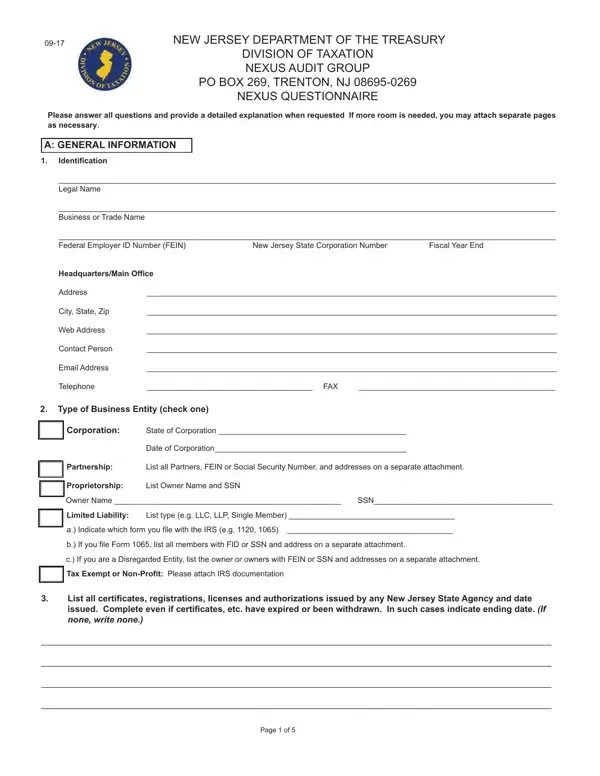
1. To begin with, while filling out the new jersey nexus questionnaire, beging with the page that features the next blanks:

new jersey department of treasury division of taxation nexus questionnaire conclusion process shown (step 1)

2. Immediately after the first section is filled out, proceed to enter the relevant information in all these: Type of Business Entity check one, Corporation, State of Corporation, Date of Corporation, Partnership, List all Partners FEIN or Social, Proprietorship, List Owner Name and SSN, Owner Name, SSN, Limited Liability, List type eg LLC LLP Single Member, a Indicate which form you file, b If you file Form list all, and c If you are a Disregarded Entity.

How to prepare new jersey department of treasury division of taxation nexus questionnaire part 2

3. Completing Name, FEIN, Did your business currently or at, YES Please state the names and, worked on your behalf in New, Provide the address where the, Street, City State and Zip, Contact Person and Phone Number, If the books and records are, Provide the address where the, Street, City State Zip, Contact Person and Phone Number, and If located in New Jersey please is essential for the next step, make sure to fill them out in their entirety. Don't miss any details!

new jersey department of treasury division of taxation nexus questionnaire completion process outlined (step 3)

4. You're ready to complete this next portion! Here you will get these YES Please provide the complete, conducted in New Jersey Also if, scribe in detail any intercompany, Is this entity a partner in a, YES Please provide the name and, indicate the date that this entity, deriving income from New Jersey, Status of Business, Active, Dormant Inactive, Dissolved Attach Certificate of, Non Survivor of Merger Please, surviving entity, Other Please provide details on, and Total gross revenue for past fields to fill in.

Writing section 4 in new jersey department of treasury division of taxation nexus questionnaire

Regarding deriving income from New Jersey and Dormant Inactive, make sure that you double-check them here. Both of these are the most important ones in this page.

5. The pdf has to be finalized by filling out this area. Here there's a comprehensive listing of fields that require specific details for your document usage to be faultless: Tax Year Gross Revenue Tax Year, Tax Year Gross Revenue Tax Year, Total gross revenue from New, Tax Year NJ Revenue Tax Year NJ, Tax Year NJ Revenue Tax Year NJ, and Page of.

How you can complete new jersey department of treasury division of taxation nexus questionnaire part 5

Step 3: Make certain the details are correct and then click on "Done" to finish the process. Sign up with FormsPal today and easily get access to new jersey nexus questionnaire, all set for download. All adjustments you make are preserved , making it possible to modify the file later if needed. At FormsPal.com, we endeavor to be sure that all of your information is maintained secure.