
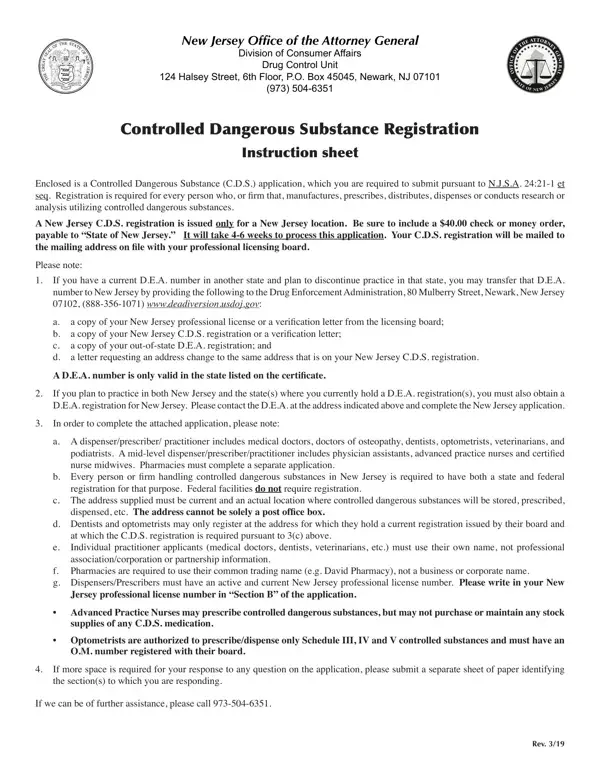
Within the framework of regulatory compliance, particularly concerning controlled dangerous substances (C.D.S.), New Jersey mandates rigorous registration protocols as outlined by the New Jersey Office of the Attorney General Division of Consumer Affairs Drug Control Unit. This comprehensive requirement, detailed in an extensive instruction sheet, encapsulates the procedural essence for individuals and firms engaged in the manufacture, prescription, distribution, dispensing, and research or analysis of controlled substances within the state. Notably, the registration, which necessitates a $40 fee, is exclusive to New Jersey locales, emphasizing a clear stance on geographical specificity. Moreover, an intriguing aspect of the process is the provision for practitioners with a current D.E.A. number from another state, outlining a methodical transfer process contingent upon discontinuation of practice in said state and including perspectives on dual-state practice. Registration intricacies further elaborate on the categories of professionals involved, requirements for personal versus business or corporate names, and the criticality of an active New Jersey professional license. The form also nuances the expectation for additional information submission, should space constraints arise, hinting at the meticulous nature of the information required for a successful registration. The essence of this registration process, from its foundational legal basis to the procedural specifics and associated contingencies, underscores a comprehensive approach towards regulated control of dangerous substances within New Jersey, serving as a pivotal resource for professionals navigating this regulatory landscape.
| Question | Answer |
|---|---|
| Form Name | Nj Application Registration Form |
| Form Length | 3 pages |
| Fillable? | Yes |
| Fillable fields | 41 |
| Avg. time to fill out | 30 sec |
| Other names | nj initial application, new jersey initial, nj application registration, registration prescriber |
Nj Application Registration Form isn’t the one you’re looking for?