
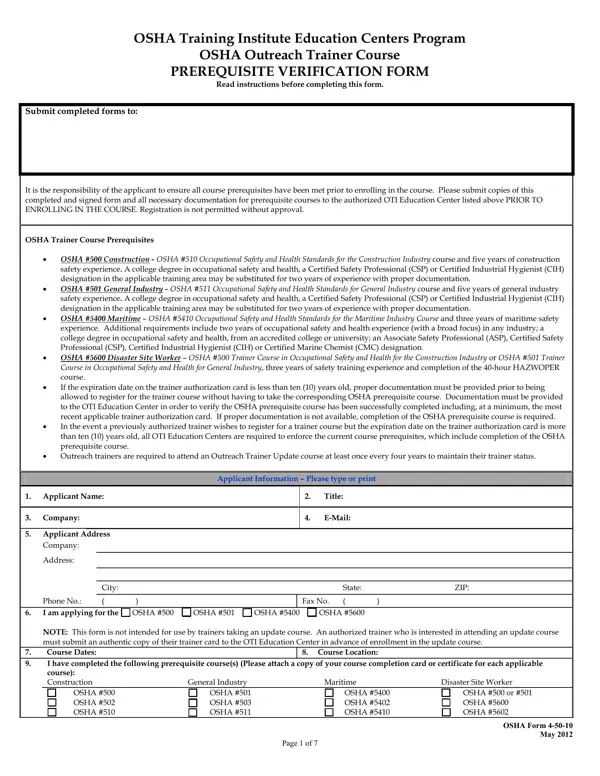
Osha Form 4 50 10 PDF Details

In the realm of occupational safety and health training, the OSHA Form 4-50-10 plays a pivotal role in ensuring that trainers are adequately prepared to impart knowledge and skills to workers across various industries. This comprehensive Prerequisite Verification Form is a crucial step for individuals seeking to enroll in the OSHA Outreach Trainer Course, provided through the OSHA Training Institute Education Centers Program. The form serves as a detailed check to verify that applicants meet all necessary prerequisites before enrollment, thus maintaining the integrity and effectiveness of the training delivered. It outlines specific prerequisites for different sectors, such as construction, general industry, maritime, and disaster site work, including requirements like having a certain number of years in safety experience or holding relevant educational degrees or professional certifications. Additionally, the form collects detailed information about the applicant's background, including previous work experience, safety-related duties, and any relevant qualifications beyond work experience that can substitute for the standard requirements. Prospective trainers must submit evidence of their qualifications, such as course completion cards or certificates and professional certifications, to be considered for registration. This process ensures that only qualified individuals are authorized to conduct these essential training sessions, thereby fostering a safer work environment across multiple industries.

QuestionAnswer
Form NameOsha Form 4 50 10
Form Length7 pages
Fillable?No
Fillable fields0
Avg. time to fill out1 min 45 sec
Other namesosha prerequisite verification form, osha tool tethering requirements, osha fillable form no 4 50 1, osha pdf form 4 50 1

How to Edit Osha Form 4 50 10 Online for Free

Through the online PDF tool by FormsPal, it is possible to fill in or change osha form 4 50 1 here. Our tool is constantly evolving to provide the very best user experience attainable, and that's because of our resolve for constant development and listening closely to customer feedback. Here's what you would have to do to get going:

Step 1: Firstly, access the editor by pressing the "Get Form Button" above on this page.

Step 2: The editor will give you the opportunity to customize PDF files in many different ways. Modify it by writing your own text, adjust existing content, and place in a signature - all when it's needed!

This document will need some specific details; in order to ensure accuracy, please take into account the following guidelines:

1. Fill out your osha form 4 50 1 with a selection of essential fields. Gather all of the required information and make sure nothing is omitted!

Part no. 1 for submitting osha prerequisite verification form

2. Soon after finishing the previous part, go on to the subsequent part and complete the necessary particulars in all these fields - Applicant Name, Company, Applicant Information Please type, Title, EMail, State, ZIP, Applicant Address, Company, Address, City, Phone No I am applying for the, OSHA, OSHA, and OSHA.

Company, Company, and City of osha prerequisite verification form

3. In this stage, have a look at List Work Experience with Most, Employer Name, Contact Person, Contact Persons Phone Number, Contact Persons Email Address, Employer Address, Company, Address, City, State, ZIP, Start Date of Employment, End Date of Employment, Overall Job Duties in this, and Describe Safety Activities in. All these need to be taken care of with utmost precision.

Step no. 3 in completing osha prerequisite verification form

4. To move ahead, the next part requires filling out several empty form fields. These include Employer Name, Contact Person, Contact Persons Phone Number, Contact Persons Email Address, Employer Address, Company, Address, City, State, ZIP, Start Date of Employment, End Date of Employment, Overall Job Duties in this, Describe Safety Activities in, and What Percentage of This Position, which you'll find essential to going forward with this particular form.

Filling out segment 4 of osha prerequisite verification form

When it comes to Employer Address and ZIP, be certain you get them right in this current part. The two of these are surely the key fields in the page.

5. To finish your form, this final area features a couple of additional blanks. Typing in List Work Experience with Next, Employer Name, Contact Person, Contact Persons Phone Number, Contact Persons Email Address, Employer Address, Company, Address, City, State, ZIP, Start Date of Employment, End Date of Employment, Overall Job Duties in this, and Describe Safety Activities in will certainly finalize the process and you're going to be done quickly!

Step no. 5 for submitting osha prerequisite verification form

Step 3: Before finalizing the file, it's a good idea to ensure that all blanks were filled out the proper way. As soon as you confirm that it is correct, click “Done." Join FormsPal now and instantly obtain osha form 4 50 1, ready for download. Every modification you make is conveniently preserved , allowing you to customize the file later on as needed. With FormsPal, you can certainly complete forms without stressing about personal data incidents or records getting distributed. Our protected system helps to ensure that your personal details are stored safely.