
Oshas Form 300 PDF Details

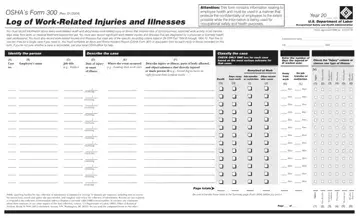
In the realm of occupational safety, meticulous record-keeping not only ensures compliance with regulatory bodies but also serves as a pivotal tool for safeguarding employee well-being. At the core of this documentation is OSHA’s Form 300, a meticulously structured log implemented by the U.S. Department of Labor’s Occupational Safety and Health Administration. This form acts as a comprehensive record of work-related injuries and illnesses, capturing every incident that results in outcomes such as death, loss of consciousness, days away from work, restricted work activity, job transfer, or any medical treatment extending beyond first aid. In addition to cataloging significant injuries and illnesses diagnosed by a physician or licensed health care professional, its scope further encompasses the recording of work-related injuries and illnesses fitting specific criteria outlined in 29 CFR Part 1904.8 through 1904.12. Integral to the process is the completion of an Injury and Illness Incident Report (OSHA Form 301) for each recorded case, underscoring the importance of accuracy and confidentiality in handling employee health information. With a duty to not only document but also classify the gravity of each incident and maintain these records for analysis and inspection, the forms embody a crucial element of occupational health management, ensuring that workplaces remain vigilant and responsive to the ever-present goal of minimizing harm.

QuestionAnswer
Form NameOshas Form 300
Form Length1 pages
Fillable?No
Fillable fields0
Avg. time to fill out15 sec
Other namesosha 300a, osha 300 logs, osha log form, osha form 300

How to Edit Oshas Form 300 Online for Free

Once you open the online PDF tool by FormsPal, you're able to fill in or modify osha gov 300a right here. We at FormsPal are committed to making sure you have the perfect experience with our editor by constantly adding new functions and enhancements. With all of these updates, using our tool gets better than ever! For anyone who is seeking to begin, here is what it will take:

Step 1: Hit the "Get Form" button above. It is going to open our editor so you could start filling in your form.

Step 2: With the help of our advanced PDF tool, you may accomplish more than merely fill in blanks. Edit away and make your docs look sublime with custom text added, or optimize the original input to excellence - all that comes with the capability to add any pictures and sign the document off.

It is actually straightforward to fill out the pdf with our practical tutorial! This is what you want to do:

1. The osha gov 300a necessitates particular information to be entered. Make sure the next blanks are completed:

osha form log completion process clarified (stage 1)

2. Once this section is finished, you'll want to put in the necessary specifics in monthday, monthday, monthday, monthday, monthday, monthday, monthday, monthday, monthday, monthday, monthday, monthday, days, days, and days allowing you to go to the next step.

Filling in segment 2 of osha form log

Always be really attentive while filling in monthday and monthday, since this is where most people make mistakes.

3. This part is generally simple - complete every one of the empty fields in r e d r o s i d n i k S, y r o t a r i p s e R, Page of, s s o l g n i r a e H, and s e s s e n l l I in order to complete this process.

Completing section 3 of osha form log

Step 3: When you have looked over the details in the document, simply click "Done" to finalize your FormsPal process. Create a 7-day free trial option at FormsPal and get instant access to osha gov 300a - readily available from your personal account. When you work with FormsPal, you can easily complete forms without having to get worried about personal information breaches or data entries being shared. Our protected software makes sure that your private information is maintained safe.
