
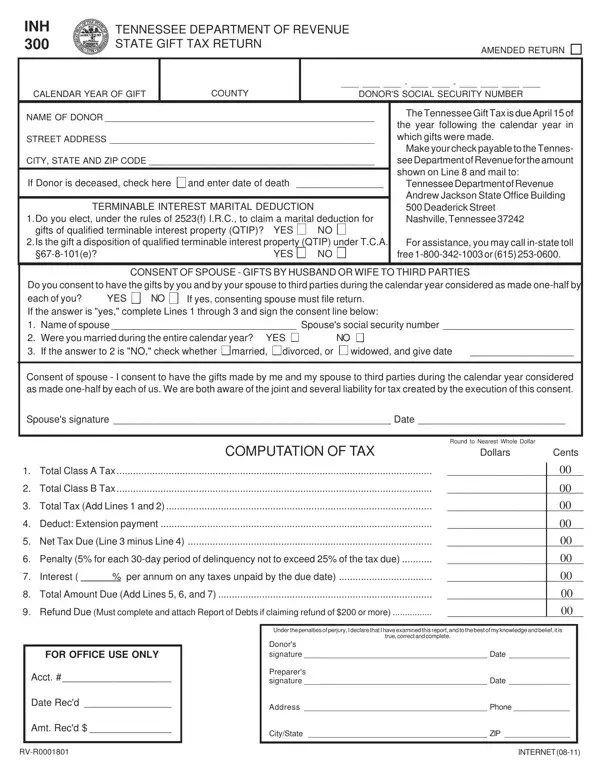
For many people, the idea of gift-giving is associated with celebrations, special occasions, and the act of showing appreciation. However, in the state of Tennessee, if you've given a gift of substantial value, it might also involve filling out the Tennessee Inh 300 form. Known officially as the Tennessee Department of Revenue State Gift Tax Return, this form plays a crucial role for individuals who have made significant gifts within a calendar year. It requires the donor's detailed information, including their Social Security number and address, as well as specific details about the gift such as its value, description, and the donee's information. The deadline for filing is April 15 of the year following the gift's transfer, emphasizing the state's timely accounting for such transactions. One of the form's interesting aspects is its provision for marital deductions, acknowledging gifts made between spouses under certain conditions, and the potential for spouses to consent to consider gifts to third parties as jointly made. This form also delineates the classification of donees into Class A and Class B, each with different implications for taxation and exemptions, underscoring the importance of understanding the relationship between the donor and the recipient. With penalties for late filing and specific instructions on calculating taxes owed or refunds due, the Tennessee Inh 300 form encapsulates the intersection of personal generosity and state tax regulations, making it an important document for both residents and non-residents of Tennessee engaging in the practice of gift-giving.
| Question | Answer |
|---|---|
| Form Name | Tennessee Form Inh 300 |
| Form Length | 4 pages |
| Fillable? | No |
| Fillable fields | 0 |
| Avg. time to fill out | 1 min |
| Other names | inh300 tn form inh 300 |