
Pa 003 Form PDF Details

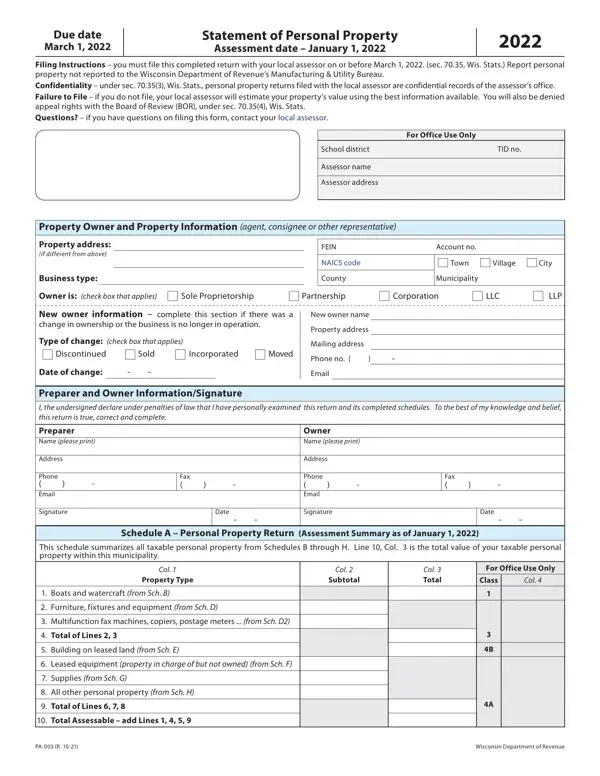
The PA-003 form serves as a critical document for businesses in Wisconsin, outlining the process for reporting personal property for assessment purposes. Its importance lies in its role in ensuring businesses accurately declare their personal property to local assessors, based on the status of the property as of January 1, 2022, with a due filing date of March 1, 2022. This comprehensive form requires detailed information about property ownership—ranging from equipment to leased assets—and its proper assessment can greatly impact a business's local tax responsibilities. Furthermore, it highlights the importance of confidentiality in personal property returns, stipulates penalties for failure to file, and outlines the rights and limitations of businesses in the appeals process. Through instructions for filling and filing, coupled with sections dedicated to various types of personal property, the PA-003 form is designed to facilitate thorough and accurate reporting, thereby enabling fair assessment and taxation. Questions regarding the form and its components direct users to contact their local assessor, emphasizing a collaborative approach to property tax assessment.

QuestionAnswer
Form NamePa 003 Form
Form Length3 pages
Fillable?No
Fillable fields0
Avg. time to fill out45 sec
Other names www.revenue.wi.govdorformspa-003Due date Statement of Personal Property 2022

How to Edit Pa 003 Form Online for Free

It is possible to prepare Pa 003 Form instantly with the help of our PDFinity® online tool. We at FormsPal are dedicated to providing you with the absolute best experience with our editor by consistently presenting new functions and improvements. With all of these updates, working with our editor gets better than ever before! To begin your journey, go through these basic steps:

Step 1: Press the "Get Form" button above. It's going to open our pdf tool so you can begin completing your form.

Step 2: After you access the tool, you will get the document made ready to be filled in. Besides filling in various blanks, you can also do several other actions with the file, including putting on any words, editing the initial textual content, adding images, putting your signature on the PDF, and a lot more.

It will be simple to finish the form adhering to our helpful tutorial! Here is what you must do:

1. The Pa 003 Form needs particular details to be inserted. Make sure the following fields are filled out:

Part no. 1 in filling in Pa 003 Form

2. Once your current task is complete, take the next step – fill out all of these fields - Preparer Name please print, Owner Name please print, Address, Phone Email, Signature, Fax, Date, Address, Phone Email, Signature, Fax, Date, Schedule A Personal Property, This schedule summarizes all, and Col with their corresponding information. Make sure to double check that everything has been entered correctly before continuing!

Preparer Name please print, Schedule A  Personal Property, and Signature inside Pa 003 Form

3. This next part is all about All other personal property from, Total of Lines, Total Assessable add Lines, PA R, and Wisconsin Department of Revenue - type in every one of these blank fields.

Pa 003 Form completion process explained (part 3)

4. The next paragraph will require your involvement in the following areas: Description of Boats and Watercraft, Acquisition, Year, Original, Cost, Conversion, Declared Value, Factor, January, For Office Use Only, Total Declared Value, Note Attach additional sheets if, Enter Col Total on Sch A Line, Report All furniture fixtures and, and Schedule D Furniture Fixtures and. It is important to enter all required information to move onward.

Pa 003 Form conclusion process described (step 4)

Be extremely attentive while completing Acquisition and Factor, as this is where most users make mistakes.

5. The last point to conclude this form is crucial. Make sure that you fill in the appropriate form fields, such as All prior years, Total, Schedule D Multifunction Faxes, Report All multifunction faxes, Col, Col, Acquisition, Year, Total Original Cost as of Jan, Col, Col, Col, Col, Additions Disposals Transfers, and Net Total Original Cost, before finalizing. Failing to do it might generate a flawed and possibly nonvalid paper!

Filling out segment 5 in Pa 003 Form

Step 3: Be certain that the information is right and press "Done" to conclude the task. After starting afree trial account here, you will be able to download Pa 003 Form or email it without delay. The form will also be easily accessible in your personal account with all your adjustments. FormsPal is invested in the confidentiality of all our users; we make certain that all personal information put into our system is confidential.