
Pag Ibig Mdf Update Form PDF Details

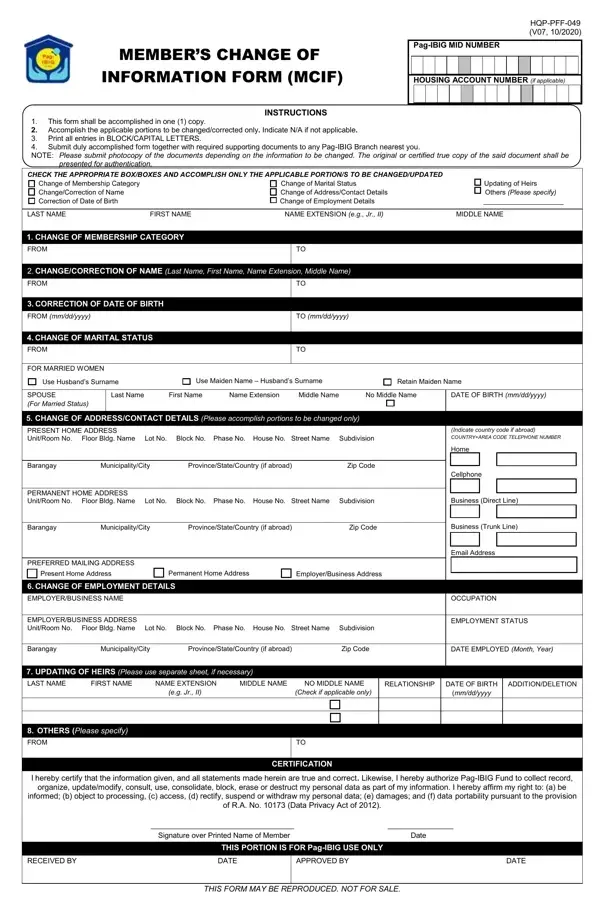
Navigating through the process of updating personal information with Pag-IBIG Fund has been made straightforward with the Member’s Change of Information Form (MCIF). As a one-page document designed to consolidate various types of updates or corrections a member might need to make—from changing their membership category, marital status, contact details, to updating heirs and employment details—it serves as a comprehensive tool to ensure one's records are current. It emphasizes clarity by requiring all changes to be printed in block or capital letters. The importance of submitting the necessary supporting documents alongside this form is highlighted, providing a reminder to bring both photocopies for submission and original documents for verification. With checkboxes for distinct updates, including the space to specify other types of changes not listed, the form is meticulously structured to cover a wide range of member needs. It ends with a certification to be signed by the member, affirming the truthfulness of the information provided and acknowledging the Pag-IBIG Fund’s authority to manage their personal data in accordance with the Data Privacy Act of 2012. Completing the MCIF is a crucial step for members to ensure their information is accurate and up-to-date, facilitating smoother transactions and interactions with the Pag-IBIG Fund.

QuestionAnswer
Form NamePag Ibig Mdf Update Form
Form Length2 pages
Fillable?No
Fillable fields0
Avg. time to fill out30 sec
Other namespff 049 hqp, pag ibig change of information form, pag ibig mcif form, view pag ibig registration information

How to Edit Pag Ibig Mdf Update Form Online for Free

Dealing with PDF documents online is definitely quite easy using our PDF tool. You can fill in hqp pff 049 pag ibig form here effortlessly. To maintain our tool on the leading edge of efficiency, we work to implement user-driven capabilities and enhancements regularly. We're routinely looking for suggestions - help us with revolutionizing the way you work with PDF forms. In case you are seeking to begin, here's what it requires:

Step 1: Access the PDF inside our editor by clicking on the "Get Form Button" above on this webpage.

Step 2: With this advanced PDF tool, it is easy to do more than simply complete blank fields. Try all of the functions and make your documents appear professional with custom textual content put in, or adjust the file's original content to perfection - all that accompanied by an ability to incorporate any pictures and sign the document off.

So as to fill out this PDF document, be certain to provide the necessary information in every single blank:

1. While filling out the hqp pff 049 pag ibig form, make certain to include all necessary blanks within its relevant form section. It will help expedite the process, enabling your information to be processed quickly and properly.

The best ways to prepare mcif form portion 1

2. Now that this segment is done, it's time to insert the needed particulars in CORRECTION OF DATE OF BIRTH FROM, CHANGE OF MARITAL STATUS FROM FOR, Use Husbands Surname, TO mmddyyyy, Use Maiden Name Husbands Surname, Retain Maiden Name, SPOUSE For Married Status, Last Name First Name Name, DATE OF BIRTH mmddyyyy, CHANGE OF ADDRESSCONTACT DETAILS, PRESENT HOME ADDRESS UnitRoom No, Barangay MunicipalityCity, PERMANENT HOME ADDRESS UnitRoom No, Barangay MunicipalityCity, and PREFERRED MAILING ADDRESS in order to progress further.

CORRECTION OF DATE OF BIRTH FROM, CHANGE OF MARITAL STATUS FROM FOR, and SPOUSE For Married Status of mcif form

Always be extremely attentive while completing CORRECTION OF DATE OF BIRTH FROM and CHANGE OF MARITAL STATUS FROM FOR, as this is the part in which a lot of people make a few mistakes.

3. In this specific step, examine EMPLOYERBUSINESS NAME, DATE EMPLOYED Month Year, LAST NAME FIRST NAME NAME, RELATIONSHIP, DATE OF BIRTH, ADDITIONDELETION, mmddyyyy, OTHERS Please specify FROM, CERTIFICATION, I hereby certify that the, organize updatemodify consult use, informed b object to processing c, of RA No Data Privacy Act of, Signature over Printed Name of, and THIS PORTION IS FOR PagIBIG USE. Each of these have to be completed with utmost accuracy.

Completing part 3 of mcif form

Step 3: Before submitting the form, make sure that blank fields are filled in the proper way. Once you are satisfied with it, press “Done." Make a 7-day free trial option at FormsPal and gain immediate access to hqp pff 049 pag ibig form - accessible in your personal cabinet. FormsPal guarantees your information confidentiality by using a secure method that in no way saves or shares any personal data provided. Be assured knowing your paperwork are kept safe each time you work with our editor!