
Physical Examination Format Pdf Form PDF Details

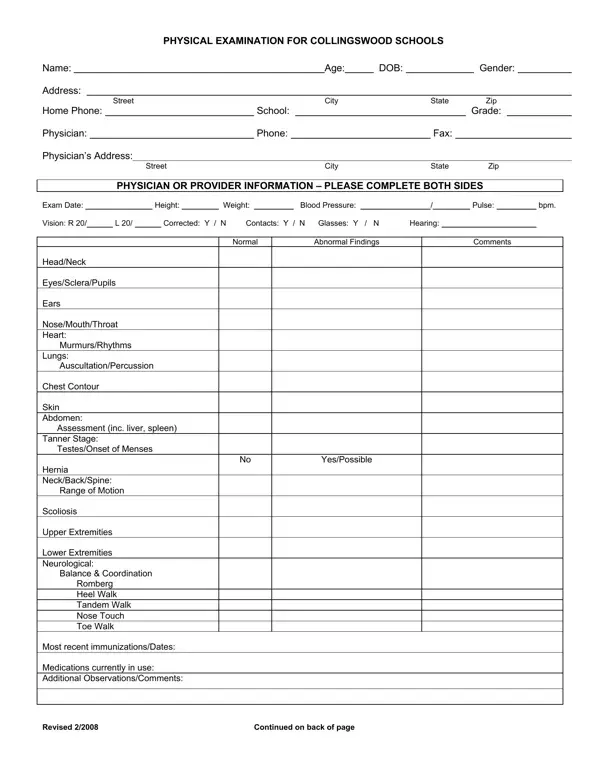
The Physical Examination Format PDF form serves as a comprehensive document designed for assessing the health status of students at Collingswood Schools. This crucial form captures a wide array of health-related information that includes personal details such as name, age, date of birth, gender, contact information, school grade, and the examining physician's contact details. The heart of the form lies in its detailed assessment sections that meticulously record the student's physical metrics like height, weight, blood pressure, and pulse, alongside visual and auditory health indicators. Key observations from a physical examination covering various physiological areas such as head, neck, cardiovascular system, lungs, skin, abdomen, and neurological health are systematically recorded. The form extends into a more specialized review, noting recent immunizations, current medications, and any remarkable health history that might impact the student's educational experience. Additionally, it offers an essential segment on clearance for physical education, specifying the conditions under which a student may or may not participate in physical activities based on their health evaluation. Revised in February 2008, this intricately designed form ensures a thorough medical assessment, providing a reliable basis for safeguarding student health and ensuring a conducive learning environment.

QuestionAnswer
Form NamePhysical Examination Format Pdf Form
Form Length2 pages
Fillable?No
Fillable fields0
Avg. time to fill out30 sec
Other namesPneumococcal, INH, sample physical assessment pdf, 2008

How to Edit Physical Examination Format Pdf Form Online for Free

Making use of the online PDF tool by FormsPal, you are able to fill in or edit foot physical exam right here and now. Our editor is constantly developing to grant the best user experience attainable, and that's because of our resolve for constant development and listening closely to customer feedback. It merely requires several simple steps:

Step 1: Hit the "Get Form" button above. It'll open our tool so you can begin completing your form.

Step 2: The tool allows you to customize PDF documents in various ways. Transform it with any text, adjust original content, and put in a signature - all possible within a few minutes!

When it comes to blanks of this particular document, here's what you should know:

1. When completing the foot physical exam, ensure to complete all necessary blanks within its relevant part. This will help hasten the work, allowing for your details to be handled promptly and accurately.

2008 conclusion process outlined (step 1)

2. Once your current task is complete, take the next step – fill out all of these fields - Exam Date Vision R HeadNeck, and YesPossible with their corresponding information. Make sure to double check that everything has been entered correctly before continuing!

Part number 2 for filling out 2008

3. In this part, take a look at Exam Date Vision R HeadNeck, Revised, and Continued on back of page. Every one of these have to be completed with greatest focus on detail.

Continued on back of page, Exam Date Vision R  HeadNeck, and Revised of 2008

4. To move forward, the next stage involves completing several blank fields. These include HISTORY Please check all areas, AllergiesAnaphylaxis, EczemaSkin Endocrine, HospitalizationsSurgery, A Student may participate in, Contact Moderate, NonContact NonStrenuous, Only this certificate is to be, VACCINE, TOTAL DOSES, DATE, DATE, DATE, DATE, and DATE, which you'll find crucial to going forward with this particular PDF.

2008 conclusion process explained (step 4)

5. And finally, this final part is what you need to complete prior to using the document. The blanks here include the following: OPV, IPV, MMR, Measles, Mumps, Rubella, Hepatitis B, HIB or Prohibit, Varicella, Pneumococcal PCV, Meningococcal, RSV, and Influenza.

Step # 5 for filling out 2008

Be really careful when filling out Influenza and Pneumococcal PCV, since this is where a lot of people make some mistakes.

Step 3: Make sure that your details are right and just click "Done" to conclude the project. Try a free trial subscription at FormsPal and acquire immediate access to foot physical exam - with all adjustments preserved and accessible from your FormsPal account page. FormsPal provides secure document completion devoid of personal data recording or any type of sharing. Rest assured that your details are secure with us!