Please rate Probate 13101

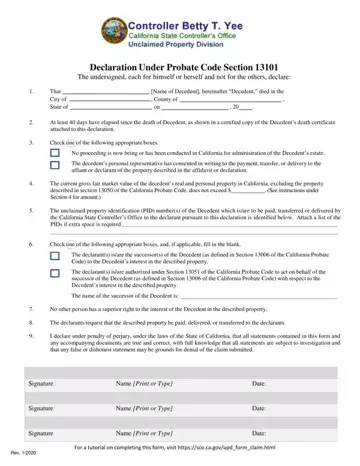
When dealing with the aftermath of a loved one's passing, managing their unclaimed property can become an essential task. The Probate 13101 form, formally known as the "Declaration Under Probate Code Section 13101," serves as a crucial document in this process within the state of California. This form facilitates the transfer, payment, or delivery of the decedent's property without the need for formal administration or probate of the will, under certain conditions. It requires the declarant to provide detailed information about the decedent, including their name, the date and location of their death, and a statement affirming that at least 40 days have passed since the death. Furthermore, it necessitates the disclosure of the gross fair market value of the decedent's real and personal property in California, while also specifying which parties are entitled to receive the property, among other stipulations. This declaration not only streamlines the process of claiming unclaimed property but also underlines the importance of honesty and accuracy in reporting, as it requires a statement under penalty of perjury regarding the truthfulness of the provided information. Through a combination of checkboxes and narrative sections, the form guides the declarant in asserting their rightful claim or authority to act on behalf of the successor to the decedent's estate, thereby making the daunting task of managing unclaimed property a bit more manageable.
| Question | Answer |
|---|---|
| Form Name | Probate 13101 |
| Form Length | 2 pages |
| Fillable? | No |
| Fillable fields | 0 |
| Avg. time to fill out | 30 sec |
| Other names | 13101, declaration probate, form 13101, california sco declaration section online |
Probate 13101 isn’t the one you’re looking for?
Please rate Probate 13101
