


ProForma Invoice US CUSTOMS at a glance
What it is: ProForma Invoice and its Proforma Invoice - Continuation Sheet.
Who signs: Sign on Shipper Signature and enter the Date.
A filled-in ProForma Invoice US CUSTOMS example: Maria Sample ships one item
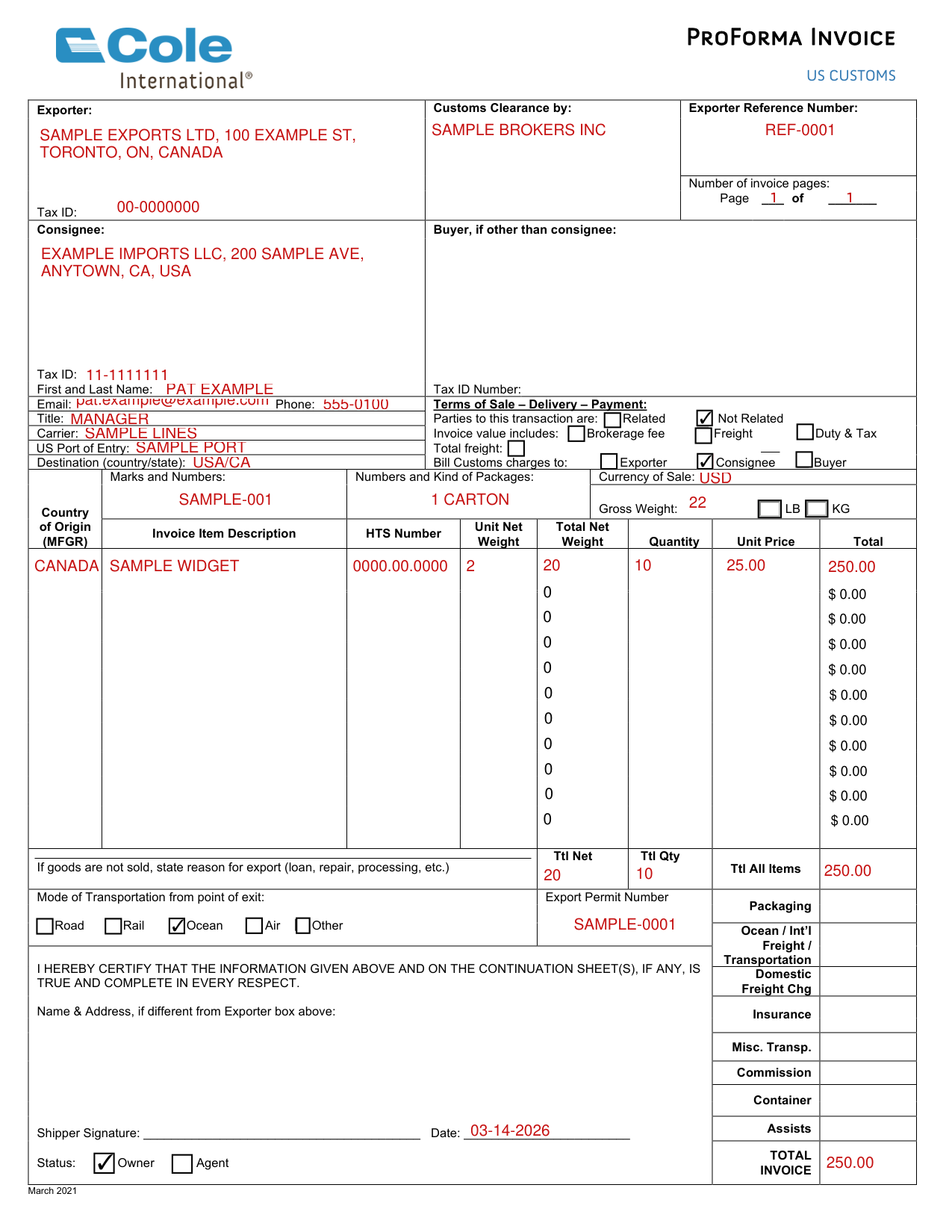
How to fill out ProForma Invoice US CUSTOMS, box by box
Exporter, Customs Clearance by and Exporter Reference Number
Enter the Exporter, Customs Clearance by, Exporter Reference Number and Tax ID.
Number of invoice pages
Enter Page ____ of _______ under Number of invoice pages.
Consignee
Enter the Consignee, with Tax ID, First and Last Name, Email, Phone Number and Title.
Buyer, if other than consignee
Enter Buyer, if other than consignee, with Tax ID Number.
Carrier, US Port of Entry and Destination (country/state)
Enter Carrier, Port of Entry and Destination (country/state).
Parties to this transaction are
Parties to this transaction are Related or Not Related.
Invoice value includes
The Invoice value includes boxes are Brokerage fee, Freight and Duty & Tax.
Bill Customs charges to
Bill Customs charges to Exporter, Consignee or Buyer.
Marks and Numbers, Numbers and Kind of Packages, Currency of Sale and Gross Weight
Enter Marks and Numbers, Numbers and Kind of Packages and Currency of Sale.
Enter Gross Weight in LB or KG.
Country of Origin (MFGR), Invoice Item Description, HTS Number and Unit Net Weight
For each item, enter Country of Origin (MFGR), Invoice Item Description, HTS Number, Unit Net Weight, Total Net Weight, Quantity, Unit Price and Total.
Ttl Net and Ttl Qty
Enter Ttl Net and Ttl Qty.
Ttl All Items, Packaging and TOTAL INVOICE
Enter Ttl All Items, Packaging, Ocean / Int'l Freight / Transportation, Domestic Freight Chg, Insurance, Misc. Transp., Commission, Container, Assists and TOTAL INVOICE.
If goods are not sold, state reason for export
If goods are not sold, state reason for export (loan, repair, processing, etc.)
Mode of Transportation from point of exit and Export Permit Number
Under Mode of Transportation from point of exit, the boxes are Road, Rail, Ocean, Air and Other.
Enter Export Permit Number.
Shipper Signature, Date and Status
Certify that the information given on the Proforma Invoice and its Continuation Sheet(s), if any, is true and complete in every respect.
Sign on Shipper Signature and enter the Date.
Status: Owner or Agent.
Name & Address, if different from Exporter box above
Enter Name & Address, if different from the Exporter box.
Proforma Invoice - Continuation Sheet
On the Proforma Invoice - Continuation Sheet, enter Page of.
Enter Page 2 TTL.
Sources
[1] ProForma Invoice US CUSTOMS (March 2021), Cole International (the Official source link on this page).