
Project Mobilization Schedule Form PDF Details

The Project Mobilization Schedule form, an essential tool within the 2009 Version - Mobilization Plan, has been meticulously crafted to streamline the process of mobilization for various incidents by employing an Excel format for user convenience. Designed with attention to detail, it features color-coded boxes—light tan for user input, light red for automatic calculations, and light blue specifically for EMD or WSP use—facilitating an intuitive experience for completing the form. Beyond these color codes, it incorporates check boxes for further inputs. Included within this document are various tabs, each color-coded to easily distinguish between the type of form, ranging from Mobilization Request Forms, Incident Complexity Analysis, Agency Reimbursement Forms, and several other resource and incident management forms. Each form serves a distinct purpose, such as requesting mobilization, analyzing incident complexity, claiming expenses, and reporting injuries, among others. Instructions are comprehensively laid out for saving, deleting, adding, and printing pages, ensuring the forms are tailored to the specific needs of each mobilization incident. Additionally, guidelines for form submission underscore the importance of following up on emailed or faxed documents to confirm their receipt. Support contacts and a channel for feedback suggest a system in place for assistance and continuous improvement. This versatile tool not only assists in efficient mobilization planning but also in the meticulous documentation and management of resources, personnel, and incidents, reflecting an effort to make the process as smooth as possible for all agencies involved.

QuestionAnswer
Form NameProject Mobilization Schedule Form
Form Length43 pages
Fillable?No
Fillable fields0
Avg. time to fill out10 min 45 sec
Other namesmobilization plan sample pdf, construction mobilization plan sample, mobilization plan, mobilization schedule for road construction

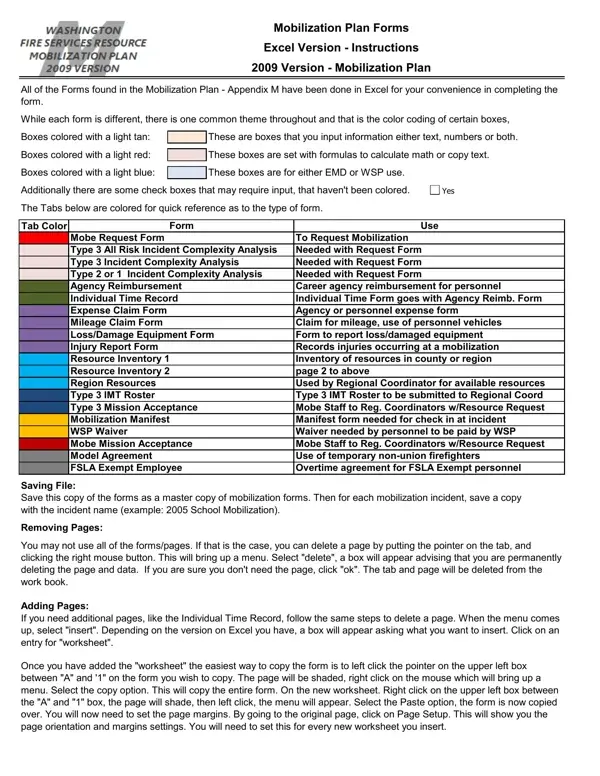
Form Preview Example

Mobilization Plan Forms

Excel Version - Instructions

2009 Version - Mobilization Plan

All of the Forms found in the Mobilization Plan - Appendix M have been done in Excel for your convenience in completing the form.

While each form is different, there is one common theme throughout and that is the color coding of certain boxes,

Boxes colored with a light tan:


These are boxes that you input information either text, numbers or both.

Boxes colored with a light red:


These boxes are set with formulas to calculate math or copy text.


Boxes colored with a light blue:


These boxes are for either EMD or WSP use.


Additionally there are some check boxes that may require input, that haven't been colored.

Yes

The Tabs below are colored for quick reference as to the type of form.


Tab Color


Form

Use


Mobe Request Form


To Request Mobilization


Type 3 All Risk Incident Complexity Analysis

Needed with Request Form


Type 3 Incident Complexity Analysis

Needed with Request Form


Type 2 or 1 Incident Complexity Analysis

Needed with Request Form


Agency Reimbursement

Career agency reimbursement for personnel


Individual Time Record

Individual Time Form goes with Agency Reimb. Form


Expense Claim Form


Agency or personnel expense form


Mileage Claim Form


Claim for mileage, use of personnel vehicles


Loss/Damage Equipment Form

Form to report loss/damaged equipment


Injury Report Form


Records injuries occurring at a mobilization


Resource Inventory 1

Inventory of resources in county or region


Resource Inventory 2

page 2 to above


Region Resources


Used by Regional Coordinator for available resources


Type 3 IMT Roster


Type 3 IMT Roster to be submitted to Regional Coord


Type 3 Mission Acceptance

Mobe Staff to Reg. Coordinators w/Resource Request


Mobilization Manifest

Manifest form needed for check in at incident


WSP Waiver


Waiver needed by personnel to be paid by WSP


Mobe Mission Acceptance

Mobe Staff to Reg. Coordinators w/Resource Request


Model Agreement


Use of temporary non-union firefighters


FSLA Exempt Employee

Overtime agreement for FSLA Exempt personnel

Saving File:

Save this copy of the forms as a master copy of mobilization forms. Then for each mobilization incident, save a copy with the incident name (example: 2005 School Mobilization).

Removing Pages:

You may not use all of the forms/pages. If that is the case, you can delete a page by putting the pointer on the tab, and clicking the right mouse button. This will bring up a menu. Select "delete", a box will appear advising that you are permanently deleting the page and data. If you are sure you don't need the page, click "ok". The tab and page will be deleted from the work book.

Adding Pages:

If you need additional pages, like the Individual Time Record, follow the same steps to delete a page. When the menu comes up, select "insert". Depending on the version on Excel you have, a box will appear asking what you want to insert. Click on an entry for "worksheet".

Once you have added the "worksheet" the easiest way to copy the form is to left click the pointer on the upper left box between "A" and '1" on the form you wish to copy. The page will be shaded, right click on the mouse which will bring up a menu. Select the copy option. This will copy the entire form. On the new worksheet. Right click on the upper left box between the "A" and "1" box, the page will shade, then left click, the menu will appear. Select the Paste option, the form is now copied over. You will now need to set the page margins. By going to the original page, click on Page Setup. This will show you the page orientation and margins settings. You will need to set this for every new worksheet you insert.

Mobilization Plan Forms

Excel Version - Instructions

2009 Version - Mobilization Plan

Printing Pages:

Once you have a form completed and want to print it. Click on the upper left box between the "A" and "1" on the form. Left click the mouse and the form will shade. Select the button that looks like the paint can tipping over. This is the color menu. Click on the paint can, on the color menu select "No Color". This will allow you to print the form out in black and white, rather than color.

Submitting the Forms:

Form such as the Mobilization Request and Incident Complexity Analysis will be printed out and faxed in. If you can, please remove the pages not used, save the document with a name (example: School Fire Mobilization Request) and e-mail the document to the intended recipient. Depending on the form, such as the Mobilization Request Form, we'd ask that you follow up any e-mail or fax submission with a phone call to ensure that it is received.

If submitting claims, then we would ask that you save the file named in the following manner:

Richland FD - School Fire - Sept 2005

If you have a lot of personnel and want to submit personnel reimbursement in more than one file, name the file as:

Thurston # 9 - School Fire - 2101 2103 2105 2108 - Sept 05

By submitting the file electronically, we won't need a copy of the time card as we have the white copy and Crew Time Reports at the office. Using descriptive names on the files will help us when getting the paperwork necessary to process the claim.

Need Assistance:

If you need help with these forms, call:

Dan Johnson at 360-596-3924, or

Sue Carr 360-596-3925, or

Esther Hernandez 360-596-3926

Comments/Suggestions:

If you have suggestions, improvements or comments, please e-mail them to: FPBMobe@wsp.wa.gov

Please provide feedback on these forms and let us know any issues that may arise. We understand that not every agency participates in Mobilization on a regular basis and that some may be new to the Mobilization process. Our goal is to streamline the paperwork and make the process as easy as possible.

Mobilization Request

Form

2009 Version - Mobilization Plan

WSP/EMD Use Only

Date/Time Received:

Date/Time Approved:

Mobilization #: WA-WFS-

Mobilization Authorization

Date of Request:


4/1/2009


Time:


14:00


Requesting Agency:


Thurston County # 25


Phone:

360-596-3935


Fire Chief or Designee:


John Smith


Phone:

360-596-3937


On Scene I/C:


John Smith


Phone:


Regional Coordinator:


Tedd Hendershot


Phone:

360-866-1100


Has the Regional Coordinator been contacted?


Yes


No

Who:

Tedd


Has an Incident Complexity Analysis been completed?


Yes


No

If yes, Incident Type: 1

2

3


Incident Location


Type of Incident:


Incident Name:

Rock Candy Mnt Fire


Size (acres, blocks miles):

100 + acres


Is the size growing or contained:

Growing


Weather: Temperature:

75+

Wind Speed

12


Wind

N-NW

Relative


23%


(MPH):


Direction:

Humidity:


Location of Incident:

10 miles west of Olympia, SR 8 and Rock Candy Mountain Road


(Describe location relative to


roads/landmarks)


County:

Thurston


Nearest Town/City:


Olympia


Fuels Involved:

Logging slash, timber, heavy brush


12 Medium Logging Slash


Is the Incident in your fire jurisdiction?

Yes

No

Is your jurisdiction imminently threatened?


Yes

No


Have local resource been exhausted?

Yes

No

Has mutual aid been expended?


Yes

No


Does the event jeopardize the ability of the local jurisdiction to protect lives and property?


Yes

No


What is at risk? (number of lives/homes/crops)


20 Homes, powerlines. If crosses SR8 - 100 more homes


Evacuations?

Yes

No

Probable


Evacuation Level:

1

2


3


Estimated number to evacuate?

40


Shelter Location:

Unknown


What land is it on? (Check all that apply)

Private


Federal


State


Unprotected


Resources Needed


What specific resources are needed?

5 ST of Wildland Engines (Type 3-6), 2 ST of Tenders (Type 2-3); 3 - 20 person handcrews; 1 Type 2 Helicopter with bucket.


Reporting Area

Command Post: (location/address)

Summit Lake Rest Area, SR8 MP 12; Staging is the Boy Scout Camp on


Summit Lake Road.


Contact Person:

Steve North


Phone:

360-866-1100


The requesting jurisdiction agrees to comply with all provisions of the Mobilization Plan.

Yes

No

FAX this document to the Washington EMD’s State Emergency Operations Duty Officer at (253) 512-7203.

or

E-mail this document to: dutyofficer@emd.wa.gov

Call 1-800-258-5990 for the State Emergency Operations Officer

Verify they have received the Mobilization Request Form

Use Township, Range, Section; Drainage, Road, or common descriptive area names

Delegation of Authority

Form

2009 Version - Mobilization Plan

To:

Mark Green


SW Thurston County IMT


Incident Commander


Representing

From:

John Smith


Thurston # 25


Agency Administrators Name


Representing

From:


Agency Administrators Name


Representing

From:


Agency Administrators Name


Representing

From:


Agency Administrators Name


Representing

As the Agency Administrators for the agencies having jurisdiction (AHJ) over the Incident described below, you are hereby delegated the authority necessary to manage this incident. I/we understand that the AHJ still retains legal obligation for the incident, however the Incident Commander you will have the operational control.

Incident Number:

WA - WFS -

145


County:

Thurston


Incident Name:

Rock Candy Mountain Fire


Narrative: The fire began on:


at


4/1/2009


10:00

;


The cause has been determined as:


and


List Cause


is/was investigated by:


of


Investigators Name


Agency / Department Name

The cause has not been determined at this time.

The geographic location of the fire is: 10 Miles West of Olympia, Rock Candy Mountain and SR 8

The fire is currently estimated to be:

150


acres in size at time of the Delegation.


Size


Weather:

Current conditions are:


degrees;


75


23

% humidity and;


(temperature)


(percent)


the winds are


miles per hour, coming from the:


12


N-NW

.


(wind speed)


(direction)

Command Structure:


The current command structure at this time is:


Incident Commander:


John Smith


Thurston # 25


Name


Fire Jurisdiction

Operations Section Chief:

Roger Landers


Thurston # 25


Name

Fire Jurisdiction

Delegation of Authority

Form

2009 Version - Mobilization Plan

Incident Complexity Analysis:

An Incident Complexity Analysis (ICA) was completed when Mobilization was requested.

This has been reviewed and is still current to operate with a Type 3 Incident Management Team.

This has been reviewed and a new ICA has been completed as conditions have changed.

The incident will continue to be managed as a Type 3 Incident.

The ICA shows the incident has grown from a Type 3 Incident to a:

(Type 2) Incident.


(Type 1) Incident.


The Type

IMT has been ordered. The Type 3 IMT will continue to assume

Command from the local jurisdiction and prepare to turn over the incident on: 1/1/2000

Incident Priorities:

As the delegating authority, I have the following expectations:

The priority for protection ranked in order is as follows:

Personal safety of firefighters and the public;

Developed property;

Natural resources.

Require compliance with the “18 Watch Out Situations” and the “Ten Standard Firefighting Orders” by all incident personnel.

All personnel are to receive at a minimum 2 to 1 work to rest ratio. A twelve-hour rest for all personnel is preferred. Be mindful of the local crews when implementing this directive. As the Incident Commander, you will document and approve the Crew Time Reports for any deviation when the 2 to 1 work to rest ratio is not achieved or when a single shift exceeds 16 hours.

Immediately notify the assigned agency representative when the health or safety of incident personnel has been compromised.

Provide a written safety plan for the incident.

Prepare a plan to gain control of the incident that takes into account: fire behavior, weather conditions, fuel load, current resources and available resources.

How to Edit Project Mobilization Schedule Form Online for Free

project mobilisation plan template can be filled in with ease. Simply make use of FormsPal PDF editing tool to do the job promptly. The tool is consistently maintained by our team, acquiring useful functions and becoming greater. To get the process started, go through these simple steps:

Step 1: Just press the "Get Form Button" in the top section of this page to see our pdf file editing tool. There you will find all that is necessary to fill out your document.

Step 2: The editor helps you work with almost all PDF forms in a variety of ways. Transform it by including customized text, correct what's originally in the file, and put in a signature - all when you need it!

With regards to the blank fields of this particular document, here's what you need to know:

1. First, when filling in the project mobilisation plan template, start in the page that includes the following blank fields:

Filling in segment 1 of mobilization plan for construction project sample

Step 3: After you've reread the details provided, press "Done" to complete your form at FormsPal. Join FormsPal now and instantly get project mobilisation plan template, prepared for downloading. Every change you make is conveniently kept , meaning you can modify the file at a later stage as needed. Here at FormsPal, we do everything we can to ensure that all your details are stored private.