
Renewal Form Husky PDF Details

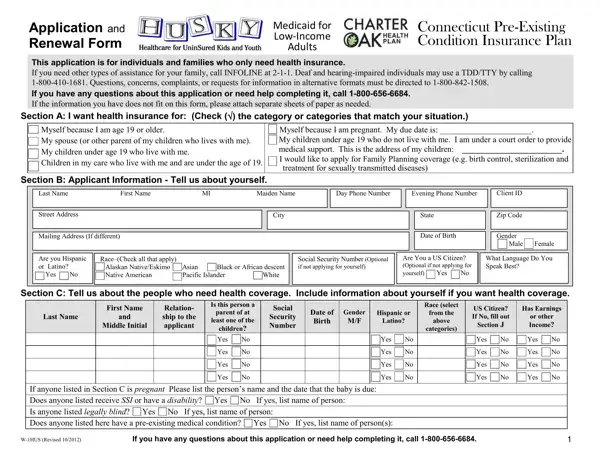
In Connecticut, ensuring that low-income adults and families have access to essential health insurance coverage is a high priority, which is addressed through the application and renewal process for Medicaid under the HUSKY Health Program. The comprehensive Renewal Husky Form is specifically designed for individuals seeking to renew their health coverage, catering principally to adults, pregnant individuals, children under 19, and anyone under a court order to provide medical support. This form underscores the commitment to accessibility by offering assistance through designated contact numbers for general inquiries, the deaf, and hearing-impaired individuals, along with a promise of support for those requiring information in alternative formats. It comprehensively gathers applicant information, including personal details, household composition, income, and other critical aspects like employment income, other household income, and daycare expenses, ensuring a complete understanding of the applicant's situation. Additionally, it accommodates immigration status and tribal membership, reflecting a meticulous approach to inclusivity and fairness. The form also emphasizes the importance of cooperation with child support enforcement for certain applicants, underscoring the state’s dual focus on child welfare and health coverage. Notably, the form includes guidance on addressing pre-existing conditions and stipulates the implications of providing false information, highlighting the state’s diligence in maintaining program integrity while ensuring the delivery of health benefits. By signing the form, applicants agree to a set of responsibilities and authorize the state to use their information for administering health programs, showcasing a balanced partnership between the state and beneficiaries aimed at fostering a healthier Connecticut.

QuestionAnswer
Form NameRenewal Form Husky
Form Length4 pages
Fillable?No
Fillable fields0
Avg. time to fill out1 min
Other namesHUSKY Application English renewal form huskypdffillercom 2012

How to Edit Renewal Form Husky Online for Free

You could work with Renewal Form Husky effectively in our PDFinity® editor. We are dedicated to making sure you have the best possible experience with our tool by consistently adding new functions and improvements. Our tool is now a lot more user-friendly thanks to the latest updates! So now, working with documents is a lot easier and faster than before. If you're looking to start, here is what it will take:

Step 1: Access the PDF inside our editor by clicking the "Get Form Button" at the top of this page.

Step 2: The tool allows you to change nearly all PDF forms in a range of ways. Change it by writing any text, adjust original content, and place in a signature - all within the reach of a few clicks!

It's straightforward to complete the pdf following our helpful guide! This is what you have to do:

1. The Renewal Form Husky necessitates specific details to be typed in. Ensure the following fields are complete:

Writing segment 1 of Renewal Form Husky

2. Now that this segment is finished, you'll want to put in the needed particulars in Middle Initial, If anyone listed in Section C is, Yes No Yes No Yes No Yes No, Yes No Yes No Yes No Yes No, Yes No Yes No Yes No Yes No, Yes No Yes No Yes No Yes No, WHUS Revised, and If you have any questions about allowing you to progress further.

Filling out segment 2 of Renewal Form Husky

3. This 3rd part should be rather easy, Number Optional, are related Example father of, Receives Earned Income, Yes No Yes No, Income, Yes No Yes No, Section E Parents Who Do Not Live, yourself you must agree to, Name of Parent, Name of Child, Parents Address, Name Address and Phone Number of, Section F Employment Income, parent of a child listed in, and Employer Name Address and Phone - these form fields will have to be filled in here.

Renewal Form Husky writing process described (part 3)

4. This next section requires some additional information. Ensure you complete all the necessary fields - Government Employee CityTown State, per, Section G Other Income Please, Name of Person, Type of Income, How Much, How Often, WHUS Revised, and If you have any questions about - to proceed further in your process!

Tips to complete Renewal Form Husky part 4

Lots of people frequently make errors when filling in Section G Other Income Please in this area. You need to go over whatever you enter right here.

5. This form should be finalized by going through this section. Further there is a full set of form fields that require accurate details for your form usage to be complete: Receives Care, By You, the State, How Often, And Phone Number, Section I Health Insurance Does, following, Names of Insured, Insurance Company Name Address and, Type Medical Vision Dental, Policy or Member, Number, Begin Date, Source, and EmployerSponsored State Employee.

Stage number 5 for filling out Renewal Form Husky

Step 3: Go through all the information you've typed into the form fields and then click the "Done" button. Make a free trial subscription with us and gain instant access to Renewal Form Husky - download or modify from your personal cabinet. When you use FormsPal, you can complete forms without needing to get worried about data leaks or entries being shared. Our protected platform ensures that your personal details are maintained safely.