
Renewal Form For Calfresh PDF Details

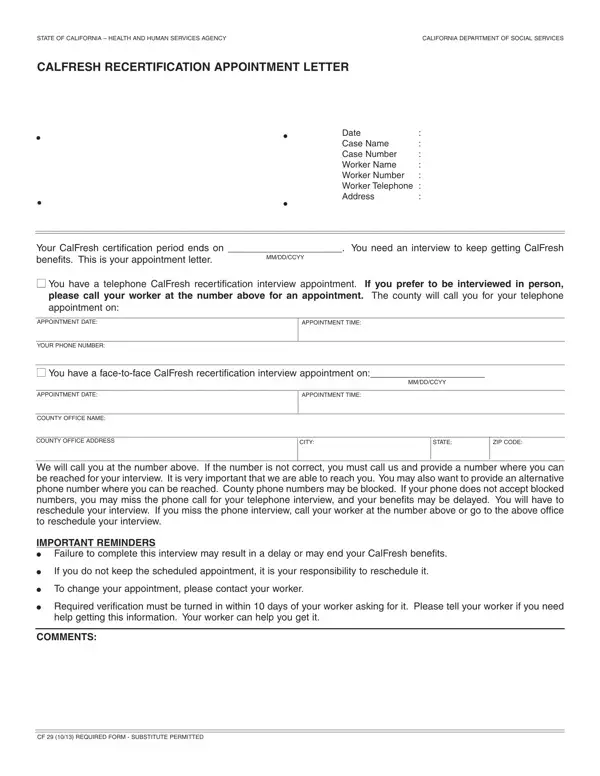
The Renewal for CalFresh Form serves as a critical step in ensuring that individuals and families in California continue to receive assistance from the CalFresh program, a vital resource for securing food. Managed by the California Department of Social Services, this document initiates the recertification process, a mandatory procedure that beneficiaries must complete to extend their benefits beyond the initial certification period. Notably, the form notifies recipients of their upcoming certification expiry and schedules them for either a face-to-face or telephone recertification interview. Essential details provided include the date, case number, worker's contact information, and the address of the county office, facilitating a streamlined communication channel between the beneficiaries and their assigned workers. The emphasis on maintaining updated contact information accentuates the importance of a seamless process to prevent any delays or termination of benefits. Additionally, the form outlines the consequences of missing the scheduled appointment and underscores the obligation of beneficiaries to reschedule if necessary. It further reminds recipients about the requisite verification documents and deadlines, reinforcing the program's commitment to aid while adhering to regulatory compliance. Overall, the Renewal for CalFresh Form epitomizes the intersection of governmental assistance and individual responsibility, ensuring that those in need have continued access to food resources through structured and timely processes.

QuestionAnswer
Form NameRenewal Form For Calfresh
Form Length1 pages
Fillable?No
Fillable fields0
Avg. time to fill out15 sec
Other namescalfresh recertification application online, calworks recertification online, renew calfresh online, recertification calfresh

How to Edit Renewal Form For Calfresh Online for Free

Working with PDF files online is actually super easy using our PDF tool. You can fill in calfresh renewal application here in a matter of minutes. Our tool is constantly developing to give the best user experience attainable, and that's because of our dedication to constant development and listening closely to customer opinions. Here's what you'll have to do to start:

Step 1: Click the "Get Form" button above. It will open up our pdf editor so you can start completing your form.

Step 2: With the help of our state-of-the-art PDF editor, you may do more than merely fill in blank fields. Express yourself and make your forms appear great with customized text added, or modify the file's original content to excellence - all comes with the capability to insert your personal photos and sign it off.

As a way to complete this PDF document, ensure you type in the right information in every field:

1. While filling out the calfresh renewal application, make certain to complete all essential blank fields in the corresponding area. It will help to speed up the work, which allows your information to be handled swiftly and correctly.

Filling in section 1 in renew calfresh online

2. After the previous section is done, it's time to include the required particulars in APPOINTMENT DATE, COUNTY OFFICE NAME, COUNTY OFFICE ADDRESS, APPOINTMENT TIME, MMDDCCYY, CITY, STATE, ZIP CODE, We will call you at the number, IMPORTANT REMINDERS, Failure to complete this interview, If you do not keep the scheduled, To change your appointment please, Required verification must be, and help getting this information Your so you can go to the 3rd part.

CITY, MMDDCCYY, and We will call you at the number inside renew calfresh online

Regarding CITY and MMDDCCYY, make sure you take another look here. Both these could be the key fields in the file.

Step 3: Always make sure that your information is correct and then click on "Done" to proceed further. Join us today and instantly obtain calfresh renewal application, ready for download. All changes you make are preserved , helping you to change the document further if required. FormsPal is invested in the privacy of our users; we make sure that all personal information put into our system continues to be confidential.