
Rto Renewal Form PDF Details

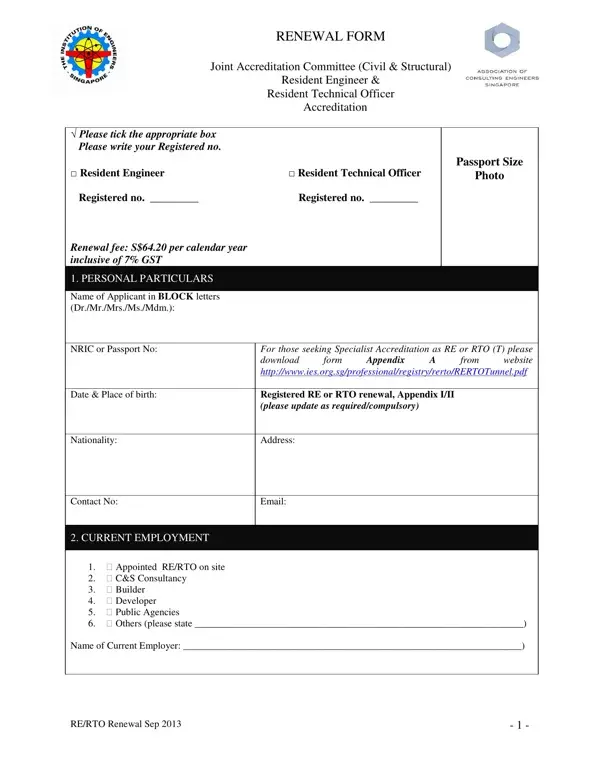
Navigating the process of renewing accreditation as a Resident Engineer (RE) or Resident Technical Officer (RTO) requires a detailed understanding of the Renewal Form provided by the Joint Accreditation Committee (Civil & Structural). This form is a crucial document designed to ensure that professionals in the field maintain the standards set forth for their positions. With a renewal fee of S$64.20 per calendar year, inclusive of 7% GST, the form encompasses several sections that applicants must meticulously fill out. These sections include personal particulars, current employment details, and a declaration by the applicant affirming the accuracy and completeness of the information provided. Additionally, appendices detail academic qualifications, memberships of professional bodies, and records of past employment or practical experience. For those seeking Specialist Accreditation, specific supplementary forms are required. The form also includes a section for Supervision Training Units (STU), which must be attained within the past 12 months, indicating ongoing professional development. The disclaimer at the end of the form underscores the importance of honesty in the submission and clarifies the accreditation's scope, emphasising that it does not serve as an endorsement of the individual's performance. Completing this form accurately is a step toward maintaining the high standards expected of REs and RTOs, reflecting their commitment to excellence in civil and structural engineering projects.

QuestionAnswer
Form NameRto Renewal Form
Form Length6 pages
Fillable?No
Fillable fields0
Avg. time to fill out1 min 30 sec
Other namesrto application form, rto ies, ies rto renewal, ies rto renewal form

How to Edit Rto Renewal Form Online for Free

It is possible to prepare rto renewal online without difficulty with our PDFinity® online tool. We at FormsPal are committed to providing you the absolute best experience with our tool by consistently introducing new functions and improvements. With these updates, working with our tool becomes easier than ever before! Here's what you would want to do to begin:

Step 1: Simply hit the "Get Form Button" at the top of this webpage to get into our form editing tool. This way, you'll find all that is needed to fill out your file.

Step 2: The tool enables you to modify most PDF forms in a variety of ways. Improve it by writing customized text, adjust original content, and add a signature - all manageable in no time!

As for the blanks of this specific PDF, this is what you need to know:

1. It is advisable to complete the rto renewal online accurately, so pay close attention while filling in the segments that contain all these blanks:

Step # 1 in submitting how to renew passport form

2. Once your current task is complete, take the next step – fill out all of these fields - Contact No, CURRENT EMPLOYMENT, For those seeking Specialist, cid Appointed RERTO on site cid, Name of Current Employer, and RERTO Renewal Sep with their corresponding information. Make sure to double check that everything has been entered correctly before continuing!

RERTO Renewal Sep, For those seeking Specialist, and cid Appointed RERTO on site  cid inside how to renew passport form

It is possible to make an error while filling in the RERTO Renewal Sep, so be sure to go through it again before you decide to submit it.

3. Completing I hereby declare that the, FOR OFFICE USE ONLY, and Processing Officer Signature is essential for the next step, make sure to fill them out in their entirety. Don't miss any details!

How you can fill out how to renew passport form stage 3

4. It's time to fill in this fourth part! Here you have all these Degree Diploma Others, Name of University College, Country, Year of Award, MEMBERSHIP OF PROFESSIONAL BODIES, Name of Professional Body, Country, Grade of Membership, Membership obtained by Examination, Including designator letters, Exemption Honorary Award, and Year of Election empty form fields to fill out.

how to renew passport form writing process described (stage 4)

5. To finish your form, this particular part has some additional fields. Completing RERTO Renewal Sep should conclude everything and you'll be done in a tick!

Filling in segment 5 of how to renew passport form

Step 3: Just after taking another look at the fields you've filled out, press "Done" and you're all set! Create a free trial subscription at FormsPal and get direct access to rto renewal online - available inside your FormsPal account page. We don't share or sell any information you use when completing documents at our website.