
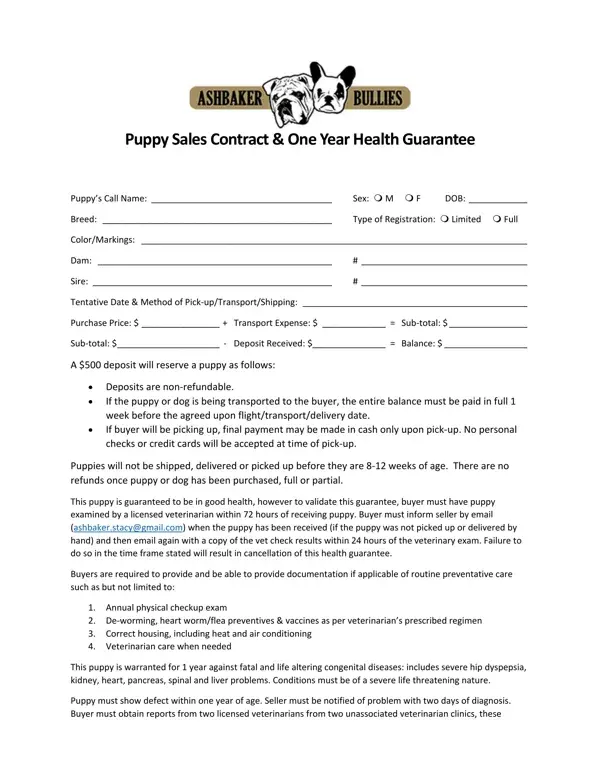
In the intricate landscape of puppy sales, the Puppy Sales Contract & One Year Health Guarantee stands as a comprehensive document designed to safeguard the interests of both the buyer and seller, while ensuring the well-being and genetic health of the puppy involved. This detailed document outlines the specifics of the puppy’s identification, including call name, sex, date of birth, breed, type of registration, color/markings, and the genetic lineage through the dam and sire information. Financial terms cover the purchase price, including any transport expenses, deposit requirements, and the balance due process, emphasizing the non-refundable nature of deposits and stipulating the methods and timing of final payments. A notable aspect of the contract is the rigorous health guarantee which mandates a veterinary examination within 72 hours of receipt to validate the guarantee, alongside prerequisites for maintaining the guarantee such as routine preventative care and conditions not covered by the contract. The seller provides assurances against congenital diseases for a year, with specific conditions for claiming this guarantee, which involves diagnoses by two independent veterinaries and potential replacement of the puppy. Furthermore, the contract addresses the procedural steps in the unfortunate event of the puppy’s death under the warranty period, alongside exclusions for common breed-specific conditions and other non-genetic health issues. Importantly, it delineates the legal jurisdiction, non-transferability of the contract, and financial responsibilities concerning disputes, laying a well-structured foundation for a transparent and fair transaction between the buyer and the seller.
| Question | Answer |
|---|---|
| Form Name | Puppy Sales Guarantee Form |
| Form Length | 3 pages |
| Fillable? | No |
| Fillable fields | 0 |
| Avg. time to fill out | 45 sec |
| Other names | printable puppy health guarantee template, written health guarantee puppy, ashbaker contract, ashbaker puppy contract health |
Puppy Sales Guarantee Form isn’t the one you’re looking for?