
Sd Form Id 01 PDF Details

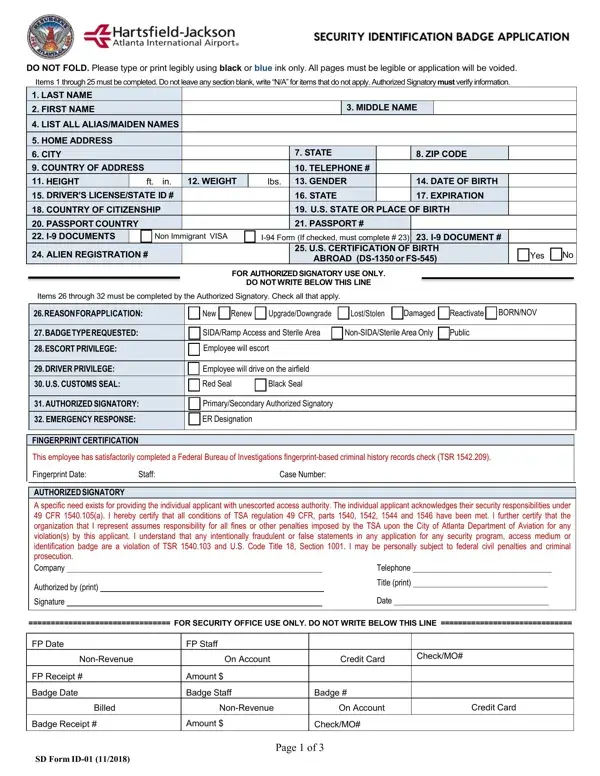
In the realm of transportation and security, precision and thoroughness are indispensable, especially when it comes to the paperwork required for obtaining airport access privileges. The SD ID-01 form serves as a prime example of this, as it is a comprehensive document designed for individuals seeking access authorization to secure and non-secure areas within an airport environment. The instructions at the beginning of the form emphasize the importance of legibility and completeness, urging applicants to use black or blue ink and not to leave any section blank—if a particular item is not applicable, "N/A" is the recommended notation. The form is segmented into various sections, starting with personal information—ranging from name and address to height, weight, and gender—and extends to include details about driver's licenses, passports, and immigration status, clearly underlining the level of detail required. An authorized signatory must verify the information provided, indicating an added layer of scrutiny. In addition to personal and identification details, the form delves into specifics regarding the type of access required, badge type, any driving or escorting privileges on the airfield, and security seals, further illustrating the complexity and the security measures inherent in the process. The latter sections of the form emphasize the legal and security commitments of the applicant, including obligations to maintain security awareness and to adhere to airport security rules, underscoring the serious nature of the responsibilities attached to the access that is being requested. This document not only ensures compliance with Transportation Security Administration (TSA) regulations but also serves as a testament to the rigorous security standards expected from individuals operating within airport boundaries.

QuestionAnswer
Form NameSd Form Id 01
Form Length3 pages
Fillable?No
Fillable fields0
Avg. time to fill out45 sec
Other namesatlanta airport sida badge office, airport badge renewal, atl hartsfield jackson sd id, atl sida badge

How to Edit Sd Form Id 01 Online for Free

Any time you would like to fill out atlanta airport badge renewal, it's not necessary to download any software - simply make use of our PDF editor. The tool is constantly improved by our team, getting new awesome functions and becoming more versatile. To get the ball rolling, consider these basic steps:

Step 1: First of all, open the editor by clicking the "Get Form Button" at the top of this page.

Step 2: When you open the tool, you will find the document made ready to be filled in. Besides filling in different blanks, it's also possible to do many other actions with the form, such as writing custom words, editing the initial text, adding images, placing your signature to the PDF, and a lot more.

In order to complete this document, ensure that you type in the right information in each field:

1. The atlanta airport badge renewal usually requires specific information to be inserted. Be sure that the next blanks are complete:

atl security identification badge application completion process explained (step 1)

2. The third step is usually to fill in these blanks: DRIVER PRIVILEGE, US CUSTOMS SEAL, Employee will drive on the airfield, Red Seal, Black Seal, AUTHORIZED SIGNATORY, PrimarySecondary Authorized, EMERGENCY RESPONSE, ER Designation, FINGERPRINT CERTIFICATION, This employee has satisfactorily, Case Number, Staff, AUTHORIZED SIGNATORY A specific, and Telephone.

Filling out segment 2 in atl security identification badge application

3. In this step, look at This employee has satisfactorily, Date Completed, Staff, Company, AIRPORT DRIVER SAFETY TRAINING, Contact Airport Operations for, Any employee required to operate a, SAFETY MANAGEMENT SYSTEM SMS, This employee has successfully, Date Completed, Staff, Company, NONSIDA EMPLOYEECUSTOMER SERVICE, This employee has successfully, and Date Completed. All of these need to be taken care of with greatest awareness of detail.

Filling in segment 3 of atl security identification badge application

4. The form's fourth part arrives with these particular form blanks to focus on: All employees traveling as, Employee Signature, SD Form ID, and Page of.

Stage # 4 for filling out atl security identification badge application

5. The very last notch to conclude this document is critical. Ensure you fill out the displayed blanks, including Employee Signature, Employee Full Name print, SD Form ID, Date of Birth, SSN, and Page of, prior to submitting. Neglecting to do so can generate an unfinished and possibly unacceptable document!

How you can fill in atl security identification badge application stage 5

People who use this PDF generally make errors while completing Employee Full Name print in this section. Remember to revise whatever you type in right here.

Step 3: Once you have looked over the information you given, simply click "Done" to conclude your FormsPal process. Find your atlanta airport badge renewal after you register online for a 7-day free trial. Easily gain access to the pdf document from your personal account page, together with any modifications and adjustments automatically kept! Here at FormsPal, we do our utmost to make certain that your details are maintained secure.