
Sec Form D PDF Details

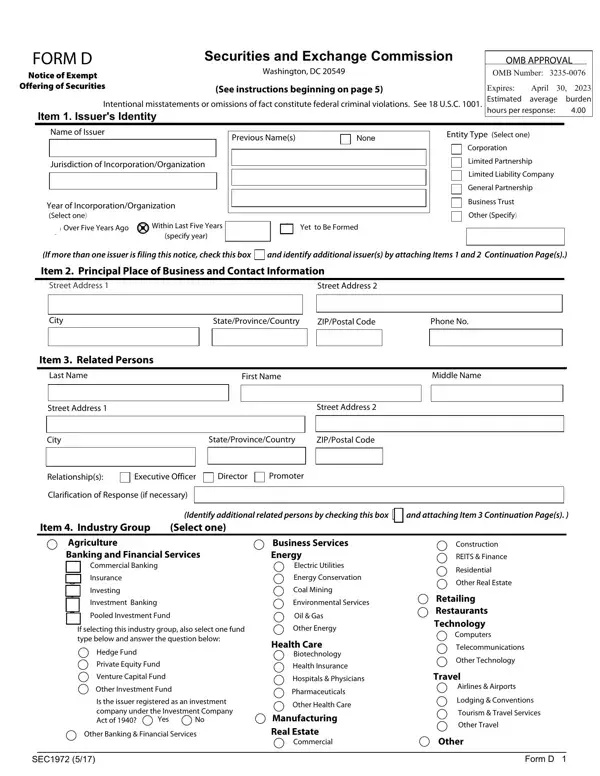
At the heart of navigating the complexities of raising capital through securities lies the critical, yet often underappreciated, Form D. This form, mandatorily filed with the Securities and Exchange Commission (SEC), serves as a notice of an exempt offering of securities, a common avenue for companies seeking funding without the rigors of a full SEC registration. Companies must tread carefully, noting the form’s expiration date—currently set at April 30, 2023—and the thoroughness required in its completion to avoid the severe repercussions associated with intentional misstatements or omissions. With an estimated average burden of 4 hours per response, the form demands details about the issuer, including entity type and principal business information, specifics of the offering, the type of filing, and data on related persons, to name just a few. Such filings not only fulfill a legal requirement but also serve as a public declaration of the offering, crucial for transparency and compliance in the entrepreneurial ecosystem. Beyond the surface, Form D is tightly interwoven with various exemptions under laws like the Securities Act of 1933 and the Investment Company Act of 1940, each carrying its own set of conditions and implications. This intricate interplay underscores the importance of due diligence and the potential need for professional guidance in navigating these regulatory waters—a testament to the form’s critical role in the domain of securities law.

QuestionAnswer
Form NameSec Form D
Form Length11 pages
Fillable?No
Fillable fields0
Avg. time to fill out2 min 45 sec
Other namesnotice form d, form d, d form sec, sec d form

How to Edit Sec Form D Online for Free

Handling PDF files online is always super easy with this PDF editor. You can fill out notice form d here effortlessly. The tool is continually updated by us, getting additional functions and becoming a lot more versatile. With some simple steps, you are able to begin your PDF editing:

Step 1: Simply hit the "Get Form Button" in the top section of this site to see our pdf file editor. Here you will find everything that is required to fill out your document.

Step 2: With the help of this online PDF editor, you can accomplish more than simply complete blanks. Express yourself and make your documents look faultless with custom textual content added, or optimize the file's original input to excellence - all that comes with an ability to incorporate your own pictures and sign it off.

This PDF doc will require some specific details; to ensure consistency, you need to heed the next tips:

1. It is very important complete the notice form d correctly, therefore be careful when filling in the sections containing these blank fields:

form d printable conclusion process clarified (portion 1)

2. Once your current task is complete, take the next step – fill out all of these fields - Street Address, Street Address, City, StateProvinceCountry, ZIPPostal Code, Relationships, Executive Officer, Director, Promoter, Clarification of Response if, Identify additional related, and attaching Item Continuation, Item Industry Group, Select one, and Agriculture Banking and Financial with their corresponding information. Make sure to double check that everything has been entered correctly before continuing!

Tips to fill in form d printable part 2

3. Completing Revenue Range for issuer not, No Revenues, Over, Decline to Disclose, Not Applicable, Aggregate Net Asset Value Range, No Aggregate Net Asset Value, Over, Decline to Disclose, Not Applicable, Item Federal Exemptions and, Select all that apply, Investment Company Act Section c, Rule b not i ii or iii, and Rule bi is essential for the next step, make sure to fill them out in their entirety. Don't miss any details!

No Revenues, Item  Federal Exemptions and, and Over of form d printable

In terms of No Revenues and Item Federal Exemptions and, be certain that you double-check them in this current part. Both these could be the most significant fields in the document.

4. This subsection comes with these empty form fields to type in your particulars in: Date of First Sale in this Offering, First Sale Yet to Occur, Item Duration of Offering, Does the issuer intend this, Yes, Item Types of Securities Offered, Select all that apply, Equity, Debt, Option Warrant or Other Right to, Security to be Acquired Upon, Pooled Investment Fund Interests, TenantinCommon Securities, Mineral Property Securities Other, and Item Business Combination.

Writing section 4 of form d printable

5. To finish your document, the final area includes a number of extra fields. Completing Is this offering being made in, and Form D will finalize everything and you can be done in the blink of an eye!

Form D, Is this offering being made in, and Form D of form d printable

Step 3: Immediately after rereading the filled out blanks, hit "Done" and you're all set! Download the notice form d as soon as you join for a free trial. Conveniently use the form from your personal account, along with any modifications and changes being all kept! FormsPal guarantees your information confidentiality with a secure method that in no way records or shares any kind of sensitive information provided. Be confident knowing your docs are kept safe every time you work with our editor!