
Standard Form 2819 PDF Details

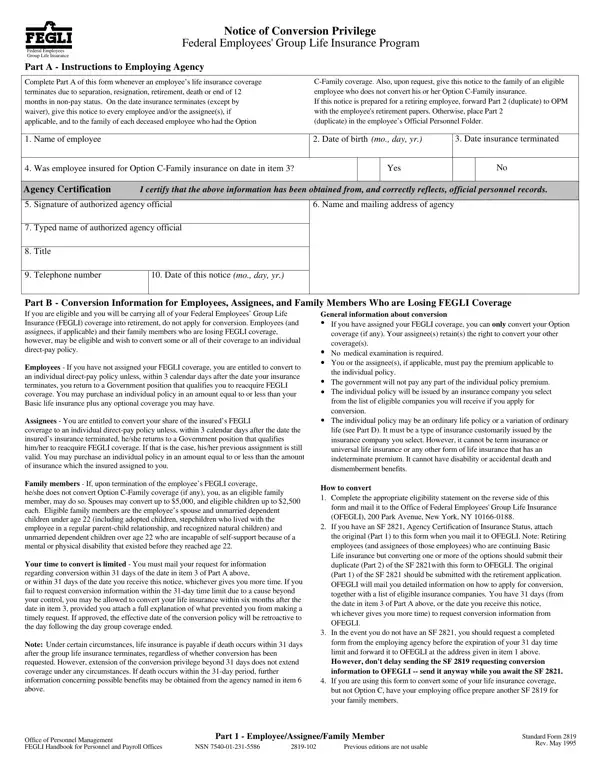
Navigating changes in employment status can be challenging, especially when it comes to ensuring the continued protection of life insurance coverage. The Standard Form 2819, a critical document within the Federal Employees' Group Life Insurance (FEGLI) Program, serves as a lifeline for those facing loss of coverage due to several reasons including separation, resignation, retirement, or death. This form offers eligible individuals the opportunity to convert their group life insurance to an individual direct-pay policy without the need for a medical examination. Specifically designed to guide not only employees but also their assignees and family members through the conversion process, the form details how to maintain life insurance protection seamlessly. It encapsulates directions for employing agencies on how to fill out the form, explains the conversion rights available to employees, assignees, and family members, and outlines the types of individual policies available. Furthermore, it discusses the eligibility for conversion, the requisite steps to initiate conversion, and the deadlines for application, aiming to ensure that individuals do not find themselves without life insurance coverage during transitions in their employment status.

QuestionAnswer
Form NameStandard Form 2819
Form Length3 pages
Fillable?No
Fillable fields0
Avg. time to fill out45 sec
Other namesichever, assignee, standard form 2819, sf2819 form

How to Edit Standard Form 2819 Online for Free

Should you would like to fill out sf 2819, you won't have to download and install any software - just try our online tool. Our tool is constantly evolving to give the very best user experience achievable, and that's due to our resolve for continuous improvement and listening closely to customer opinions. With just several basic steps, you can begin your PDF editing:

Step 1: Access the PDF file inside our tool by hitting the "Get Form Button" above on this webpage.

Step 2: With the help of our online PDF file editor, it is easy to accomplish more than simply complete blanks. Edit away and make your docs appear great with customized text put in, or fine-tune the original input to excellence - all that comes along with the capability to incorporate just about any graphics and sign it off.

This document requires specific details to be typed in, hence be sure to take some time to enter what is requested:

1. It is crucial to complete the sf 2819 correctly, thus be attentive while working with the segments containing these particular blank fields:

Part number 1 of filling out assignee

2. Immediately after the last section is done, proceed to enter the applicable details in these: Part C Eligibility Statement, I have read Part B on page and am, I have read Part B on page The, Basic, Option AStandard, Option BAdditional, Signature of person completing, Date mo day yr, Full name and address of person, statement including ZIP code, Was the FEGLI coverage assigned, Yes, If Yes are you the assignee of the, Yes, and Check one.

Part C  Eligibility Statement, Signature of person completing, and Date mo day yr in assignee

3. The following section will be about Part D Information About, An Ordinary Life policy also known, Life policy provides lifetime, A variation of Ordinary Life, Assignment If you have assigned, the cash if heshe stops paying, Cost of Individual Policy Life, Premiums for participating, For nonparticipating policies, The following are approximate, Sample Annual Premium Rates per, Participating Insurance any, Age of insured, Ordinary, and Life - type in all these blank fields.

How to fill out assignee portion 3

4. This next section requires some additional information. Ensure you complete all the necessary fields - Name of employee, Date of birth mo day yr, Date insurance terminated, Was employee insured for Option, Yes, Agency Certification, I certify that the above, Signature of authorized agency, Name and mailing address of agency, Typed name of authorized agency, Title, Telephone number, Date of this notice mo day yr, Part B Conversion Information for, and If you have assigned your FEGLI - to proceed further in your process!

How you can fill in assignee stage 4

Be very careful while filling out Name of employee and Date insurance terminated, as this is where many people make some mistakes.

Step 3: Reread the information you have typed into the blank fields and then press the "Done" button. Join FormsPal now and easily gain access to sf 2819, all set for download. All changes you make are preserved , which means you can customize the document later if required. Here at FormsPal, we strive to ensure that your details are stored private.