
Standard Form 2821 PDF Details

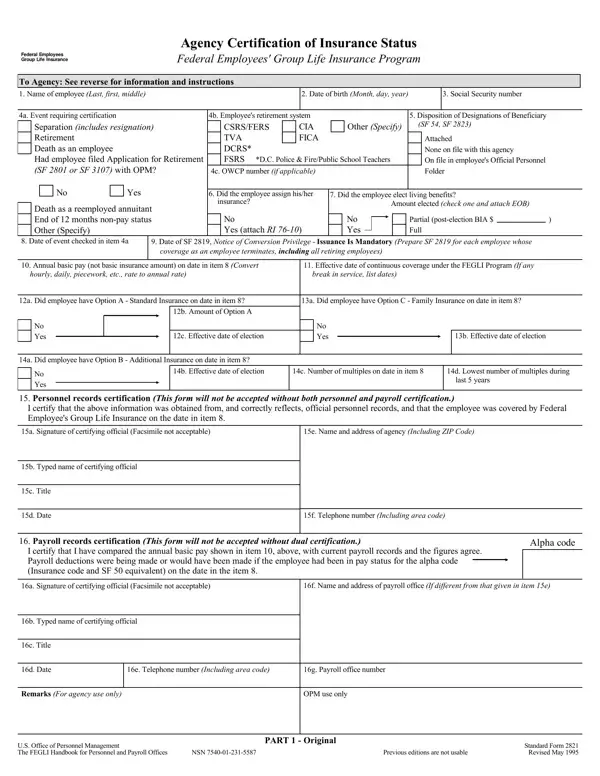
The seamless operation of federal benefits, particularly life insurance within the context of public sector employment, is underpinned by meticulous documentation and procedural adherence, exemplified by the Standard Form 2821. This form serves as a critical instrument in the administration of the Federal Employees' Group Life Insurance (FEGLI) Program, enabling agencies to certify an employee's insurance status in various circumstances such as separation, retirement, or death. It requires detailed information regarding an employee's identity, employment, and insurance selections, including any assignments of insurance or elections of living benefits. Furthermore, it mandates certifications from both personnel and payroll records to verify the accuracy of the employment and insurance information provided. The form also contemplates different insurance options available to the employee, asking for specific details about standard, family, and additional insurance coverages at the time of the event requiring certification. The comprehensive nature of the Standard Form 2821 underscores its importance not just as a bureaucratic necessity but as a facilitator of continuity and assurance for federal employees and their beneficiaries navigating through significant life events.

QuestionAnswer
Form NameStandard Form 2821
Form Length3 pages
Fillable?No
Fillable fields0
Avg. time to fill out45 sec
Other namessf2821 fegli form 2823 march 2011

How to Edit Standard Form 2821 Online for Free

In case you want to fill out Standard Form 2821, it's not necessary to download and install any software - just use our PDF editor. In order to make our tool better and simpler to work with, we constantly come up with new features, bearing in mind suggestions from our users. Getting underway is simple! Everything you need to do is take these simple steps below:

Step 1: Just press the "Get Form Button" above on this webpage to launch our pdf file editor. There you will find all that is necessary to work with your document.

Step 2: With the help of this advanced PDF editor, it's possible to do more than merely complete blanks. Try all of the features and make your docs seem faultless with customized textual content put in, or optimize the original input to perfection - all comes along with the capability to incorporate almost any graphics and sign the document off.

This document requires some specific information; to ensure consistency, you need to consider the next guidelines:

1. When filling out the Standard Form 2821, make certain to incorporate all of the necessary fields in the relevant area. It will help to speed up the work, allowing for your details to be handled swiftly and appropriately.

Step # 1 of filling out Standard Form 2821

2. Just after performing the previous part, go to the next step and fill out the essential particulars in all these blanks - a Signature of certifying official, e Name and address of agency, b Typed name of certifying official, c Title, d Date, f Telephone number Including area, Payroll records certification, I certify that I have compared the, Alpha code, a Signature of certifying official, f Name and address of payroll, b Typed name of certifying official, c Title, d Date, and e Telephone number Including area.

The best ways to complete Standard Form 2821 portion 2

3. This subsequent step is usually quite uncomplicated, Remarks For agency use only, OPM use only, US Office of Personnel Management, NSN, PART Original, Previous editions are not usable, and Standard Form Revised May - all these fields is required to be completed here.

Filling out part 3 in Standard Form 2821

4. The fourth subsection arrives with these fields to fill out: To Agency See reverse for, Name of employee Last first middle, Date of birth Month day year, Social Security number, a Event requiring certification, Separation includes resignation, b Employees retirement system CIA, CSRSFERS TVA DCRS FSRS, DC Police FirePublic School, c OWCP number if applicable, Disposition of Designations of, Other Specify, SF SF, Attached None on file with this, and Yes.

Stage # 4 in completing Standard Form 2821

5. The very last section to complete this form is integral. Make sure you fill in the required blanks, like a Did employee have Option B, No Yes, b Effective date of election, c Number of multiples on date in, d Lowest number of multiples during, last years, Personnel records certification, I certify that the above, a Signature of certifying official, e Name and address of agency, b Typed name of certifying official, c Title, d Date, f Telephone number Including area, and Payroll records certification, before finalizing. Otherwise, it might produce an unfinished and potentially nonvalid form!

c Number of multiples on date in, last  years, and a Did employee have Option B of Standard Form 2821

Always be very careful while filling in c Number of multiples on date in and last years, as this is where a lot of people make some mistakes.

Step 3: Ensure that the details are correct and then press "Done" to continue further. Join FormsPal right now and easily access Standard Form 2821, all set for downloading. Each edit you make is handily kept , enabling you to change the document later when necessary. We do not share or sell the information that you use when filling out documents at our website.