
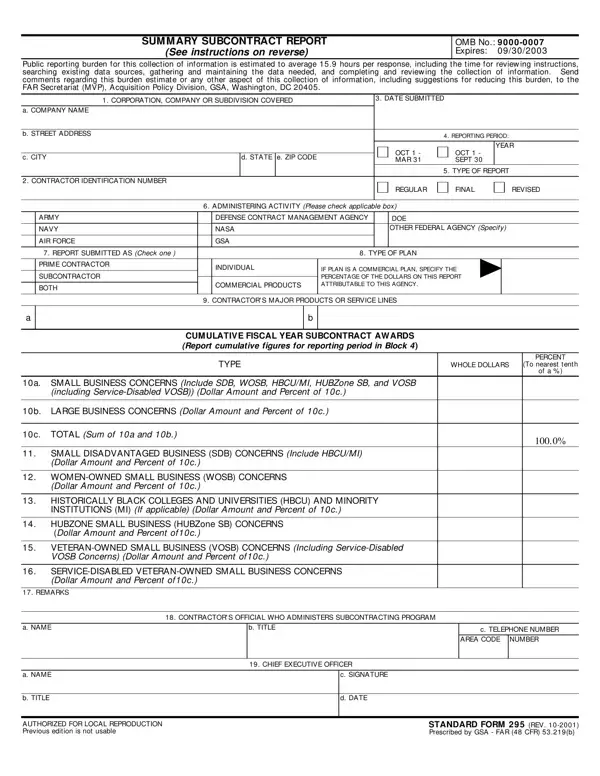
In the world of government contracting and subcontracting, the Standard Form 295 plays a crucial role in ensuring small and disadvantaged businesses have fair opportunities to participate in federal projects. This comprehensive report, mandatory for certain contractors and subcontractors, serves as a semi-annual or annual submission to various federal agencies, detailing subcontract awards. It captures data across several classifications, including small businesses, women-owned small businesses (WOSBs), small disadvantaged businesses (SDBs), service-disabled veteran-owned small businesses (SDVOSBs), HUBZone small businesses, as well as awards to historically black colleges and universities (HBCUs) and minority institutions (MIs) where applicable. The form requires detailed information on the corporation, company, or subdivision covered, the type of report, the administering activity, and specifics about the contractor's major products or service lines, alongside a breakdown of subcontract award figures. This reporting mechanism not only aids in monitoring and promoting diversity in federal contracting but also imposes a significant administrative task on contractors, demanding accuracy and transparency in declaring awards to these specified groups. With an estimated completion time of nearly 16 hours, it underscores the comprehensive nature of the data collection and the importance placed on equitable subcontracting practices within the governmental framework.
| Question | Answer |
|---|---|
| Form Name | Standard Form 295 |
| Form Length | 2 pages |
| Fillable? | No |
| Fillable fields | 0 |
| Avg. time to fill out | 30 sec |
| Other names | standard forms 295, summary subcontracting report sf 295, form, standard form 295 |