
Form VTR-141 at a glance
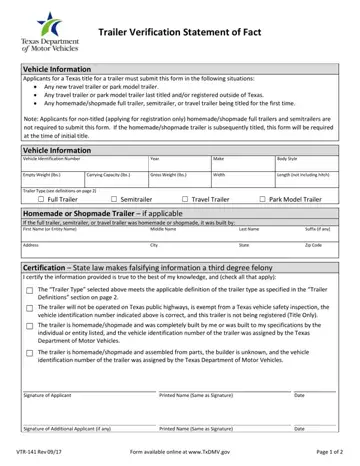
What it is: Form VTR-141, the Trailer Verification Statement of Fact, is for applicants for a Texas title for a trailer in the situations shown next.
Who signs: Sign on the Signature of Applicant line, and enter the Printed Name (Same as Signature) and the Date.
Applicants for a Texas title for a trailer must submit this form in the following situations:
Any new travel trailer or park model trailer.
Any travel trailer or park model trailer last titled and/or registered outside of Texas.
Any homemade/shopmade full trailer, semitrailer, or travel trailer being titled for the first time.
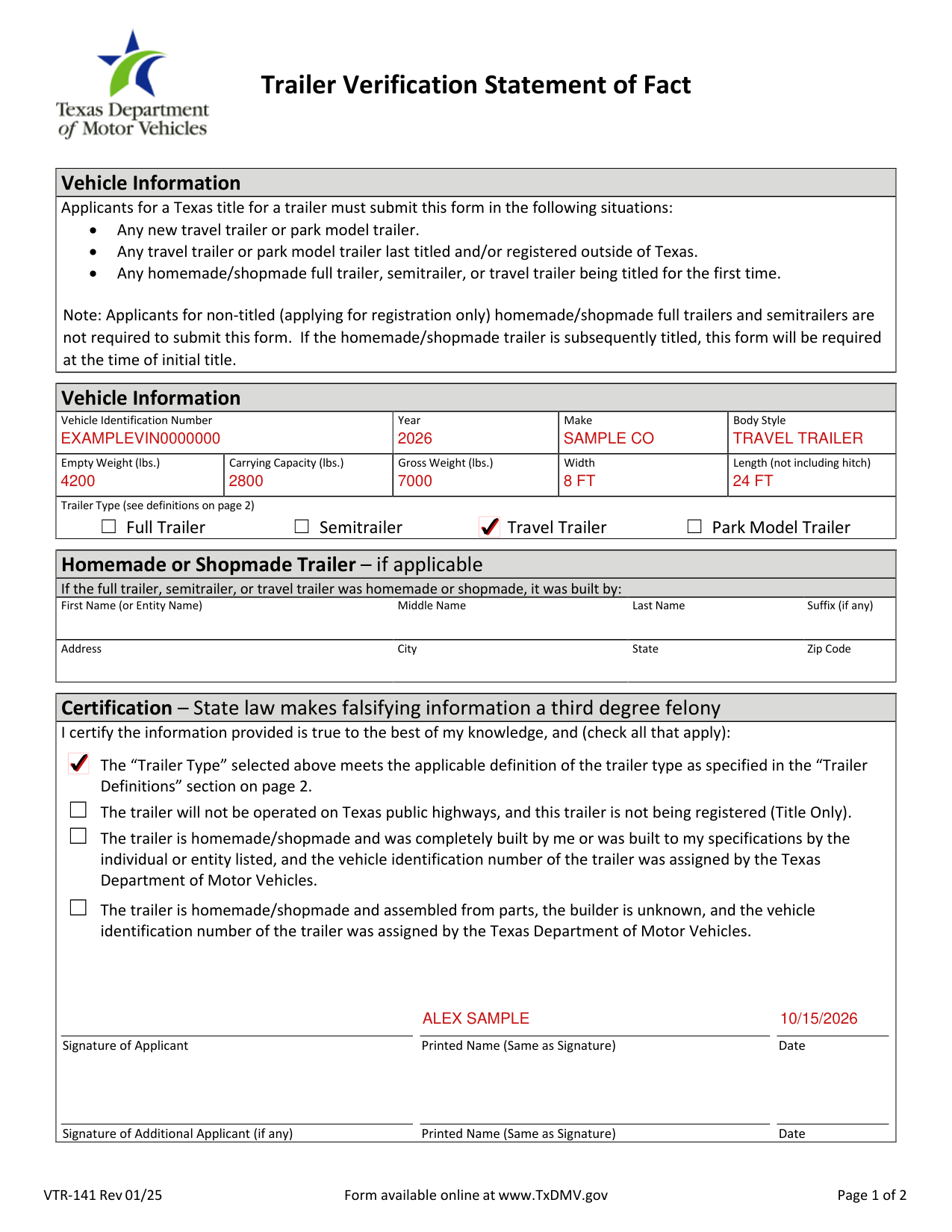
A filled-in Form VTR-141 example: a new travel trailer
How to fill out Form VTR-141, box by box
Vehicle Information

Enter the Vehicle Identification Number, Year, Make and Body Style.
Enter the Empty Weight (lbs.), Carrying Capacity (lbs.), Gross Weight (lbs.), Width and Length (not including hitch).
For a new or out of state trailer, the empty weight or shipping weight reflected on the evidence of ownership (i.e., manufacturer's certificate of origin or out of state title) is considered the empty weight.
For a new or out of state trailer, a weight certificate is required if the required weight information is not located on the manufacturer's certificate of origin or out of state title.
Trailer Type

Under Trailer Type, check the box for a Full Trailer, Semitrailer, Travel Trailer or Park Model Trailer.
A Full Trailer is designed or used to carry its load wholly on its own structure and is drawn or designed to be drawn by a motor vehicle.
A Semitrailer is designed or used with a motor vehicle, so part of the weight of the semitrailer and its load rests on or is carried by the motor vehicle drawing the semitrailer.
A Travel Trailer is not designed or used primarily as a permanent dwelling, but as temporary living quarters for recreational, camping, travel, or seasonal use; is built on a single chassis; and must be less than eight (8) feet, six (6) inches in width or less than forty-five (45) feet in length (not including the hitch).
A Park Model Trailer is not designed for use or primarily used as a permanent dwelling, but as temporary living quarters for recreational, camping, travel, or seasonal use; is built on a single chassis; is permanently towable by a light duty truck; and is eight (8) feet, six (6) inches or greater in width and forty-five (45) feet or greater in length, but 400 square feet or less when measured at the largest horizontal projections.
Manufactured homes designed as a permanent dwelling may not be titled and registered as a travel trailer or park model trailer.
Custom trailers with living quarters primarily used for commercial purposes must be titled and registered as a full trailer or semitrailer (including those with farm registration).
Homemade or Shopmade Trailer

If the full trailer, semitrailer, or travel trailer was homemade or shopmade, enter who built it: the First Name (or Entity Name), Middle Name, Last Name and Suffix (if any), and the Address, City, State and Zip Code.
Certification
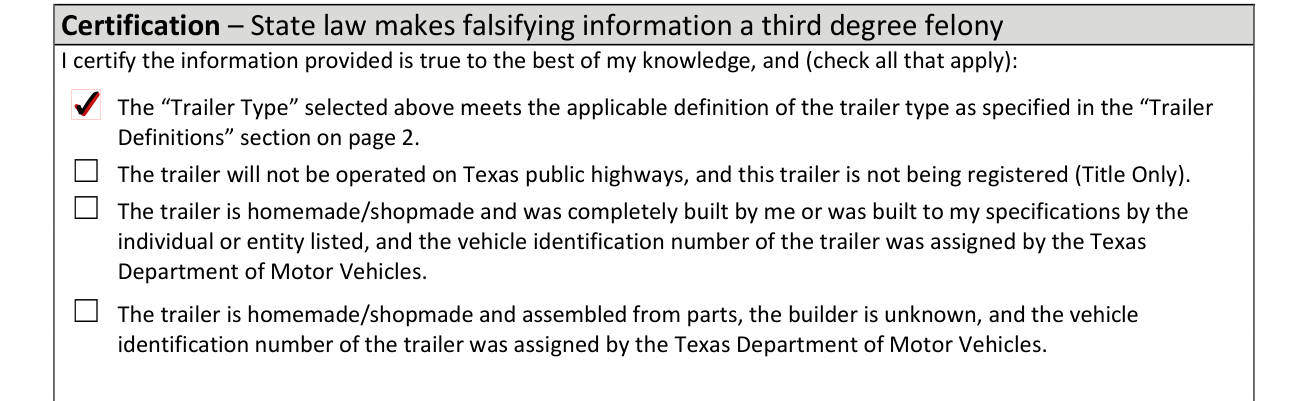
State law makes falsifying information a third degree felony. Under the certification, you certify the information provided is true to the best of your knowledge, and check all that apply.
Check the box if the Trailer Type you selected meets the applicable definition of the trailer type as specified in the Trailer Definitions section on page 2.
Check the box if the trailer will not be operated on Texas public highways, and this trailer is not being registered (Title Only).
Check the box if the trailer is homemade/shopmade and was completely built by you or was built to your specifications by the individual or entity listed, and the vehicle identification number of the trailer was assigned by the Texas Department of Motor Vehicles.
Check the box if the trailer is homemade/shopmade and assembled from parts, the builder is unknown, and the vehicle identification number of the trailer was assigned by the Texas Department of Motor Vehicles.
Signature of Applicant and Additional Applicant
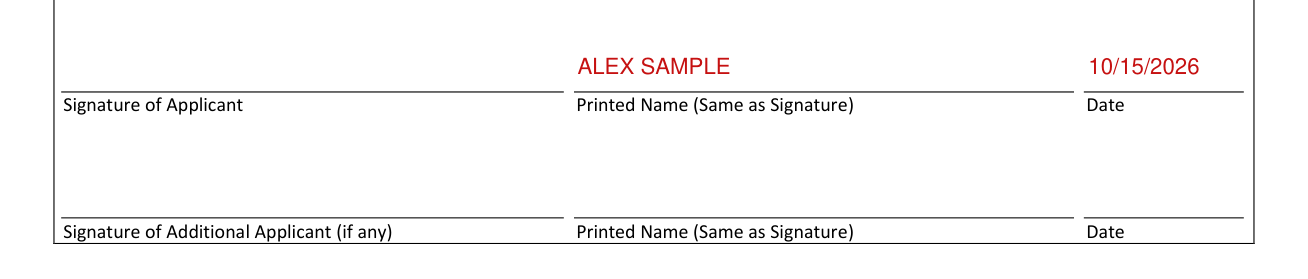
Sign on the Signature of Applicant line, and enter the Printed Name (Same as Signature) and the Date.
The additional applicant (if any) signs on the Signature of Additional Applicant (if any) line, and enters the Printed Name (Same as Signature) and the Date.
If your situation is different
Last Titled and Registered Out of State
If the vehicle was last titled and registered out of state, applicants are required to physically inspect the vehicle to verify the correct vehicle identification number (VIN) and self-certify the VIN on the Application for Texas Title and/or Registration (Form 130-U).
Permit Required to Move on Public Highways
Any trailer in excess of eight (8) feet, six (6) inches in width or fourteen (14) feet in height is required to be issued an oversize/overweight permit in addition to regular registration to legally move the trailer on a Texas public highway.
Additionally, a semitrailer exceeding fifty-nine (59) feet, a park model exceeding forty-five (45) feet, and most combinations of a pulling unit and trailer exceeding sixty-five (65) feet in length are required to be issued an oversize/overweight permit (in addition to regular registration) to legally move the trailer on a Texas public highway.
To obtain an oversize/overweight permit, contact the Texas Department of Motor Vehicles' Motor Carrier Division at 1-800-299-1700 or visit http://www.txdmv.gov/motor-carriers.
Common questions about Form VTR-141
When is this form not the right one?
Applicants for non-titled (applying for registration only) homemade/shopmade full trailers and semitrailers are not required to submit this form. If the homemade/shopmade trailer is subsequently titled, this form will be required at the time of initial title.
Sources
[1] Form VTR-141 (Rev 01/25), Trailer Verification Statement of Fact, Texas Department of Motor Vehicles (the Official source link on this page).
