Please rate Vtr 136 Form

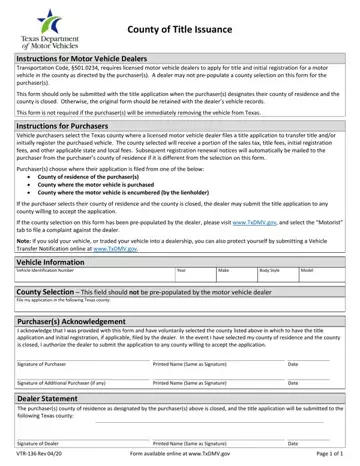
In the complex landscape of vehicle transactions, the VTR-136 form serves as a critical document for both motor vehicle dealers and purchasers in Texas. As mandated by the Transportation Code, Section 501.0234, this form plays a central role in ensuring that the title and initial registration of a motor vehicle are correctly applied for within the purchaser's county of choice. This necessity arises in scenarios where a designated county is unavailable to process the application, thereby requiring dealers to hold onto the form or submit it to an accepting county, based on the purchaser's directive. Highlighting the importance of purchaser agency, the form prohibits dealers from predetermining the county selection, safeguarding the purchaser's right to choose from their county of residence, the county of purchase, or the county where the vehicle is encumbered. Furthermore, it underscores the process's impact on local economies, as the selected county benefits from receiving portions of sales tax, title fees, and registration fees. The completion and submission of the VTR-136 form, accompanied by the acknowledgment of both dealer and purchaser, are pivotal in ensuring that vehicle transactions are not only compliant with Texas law but also reflective of purchaser preferences and local fiscal health.
| Question | Answer |
|---|---|
| Form Name | Vtr 136 Form |
| Form Length | 1 pages |
| Fillable? | No |
| Fillable fields | 0 |
| Avg. time to fill out | 15 sec |
| Other names | county of issuance, gopj 136, texas county of issuance, vtr 136 |
VTR-136 Form isn’t the one you’re looking for?
Please rate Vtr 136 Form
