
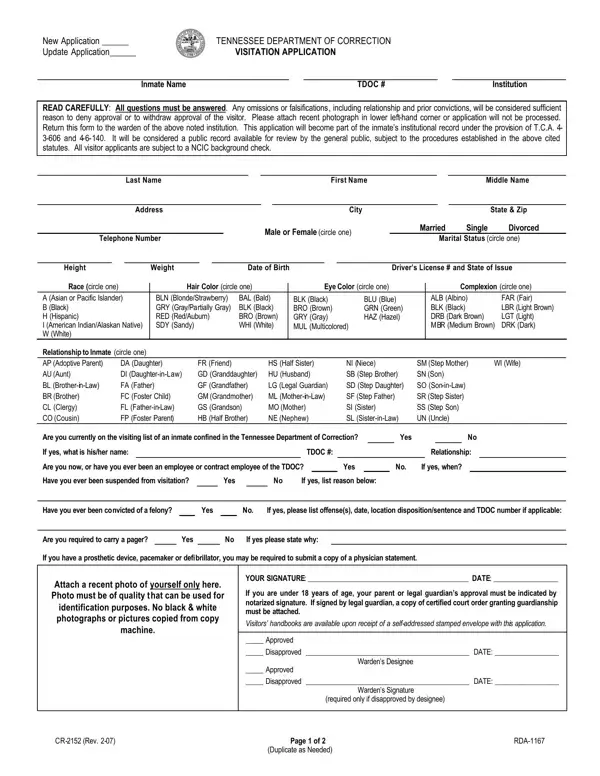

CR-2152 at a glance
What it is: CR-2152 is the Tennessee Department of Correction Visitation Application.
Where and when to file: Return this form to the warden of the institution noted in the Institution box at the top of the page.
If you are under 18 years of age, your parent or legal guardian's approval must be indicated by notarized signature.
The Parental Consent/Release for Minor's Visitation must be completed by the custodial parent/legal guardian and properly notarized for minor children (under 18 years of age) to visit an inmate when the custodial parent/legal guardian is unable, or unwilling to visit and accompany the minor child.
A filled-in CR-2152 example: a friend files a new visitation application
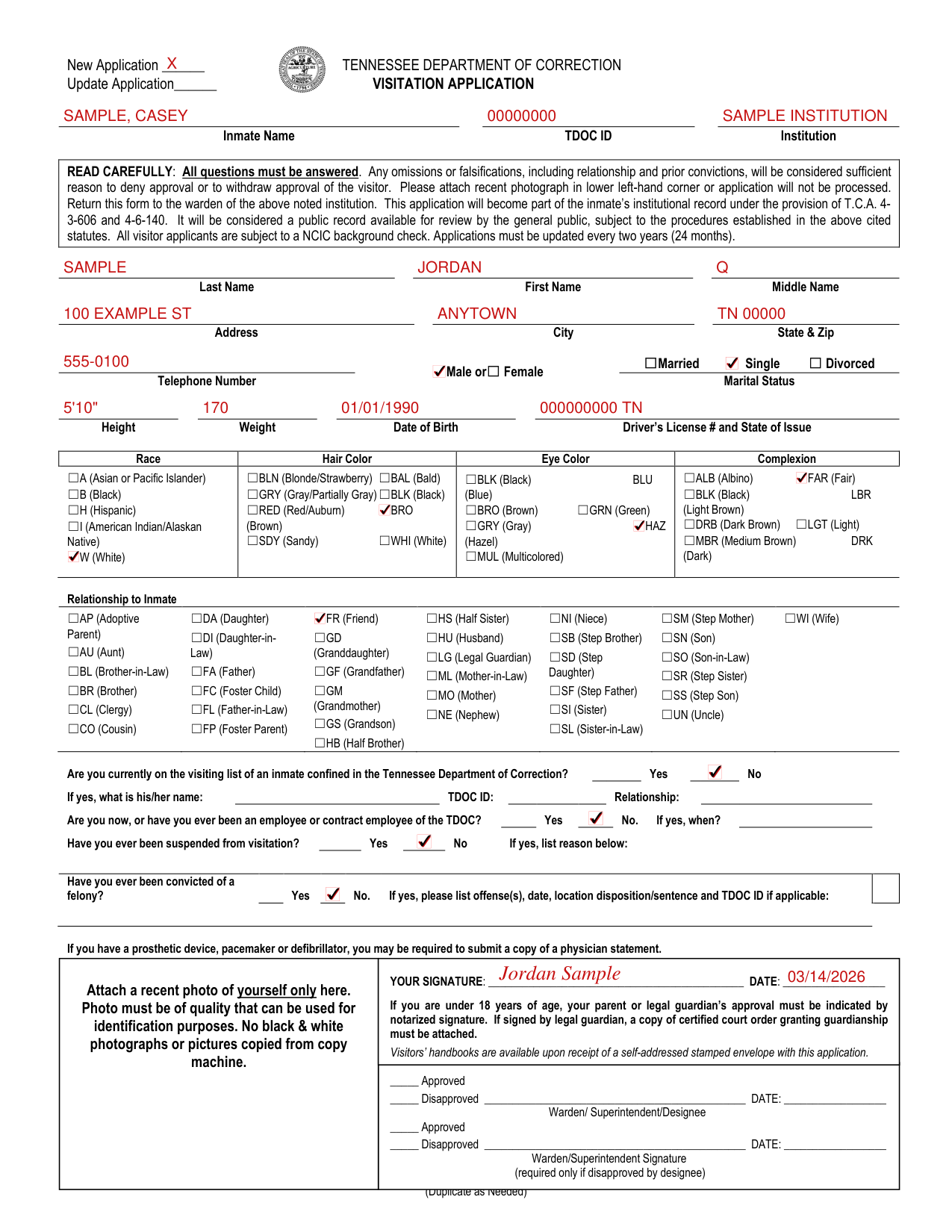
How to fill out CR-2152, box by box
New Application, Update Application, Inmate Name, TDOC ID and Institution

Enter New Application or Update Application.
Enter the Inmate Name, TDOC ID and Institution.
Last Name, First Name, Middle Name, Address, City and State & Zip

Enter your Last Name, First Name and Middle Name.
Enter your Address, City and State & Zip.
Male or Female, Married, Single or Divorced, Telephone Number

Enter Male or Female, Married Single Divorced under Marital Status, and your Telephone Number.
Height, Weight, Date of Birth and Driver's License # and State of Issue

Enter your Height, Weight, Date of Birth and Driver's License # and State of Issue.
Race, Hair Color, Eye Color, Complexion

Under Race, enter A (Asian or Pacific Islander), B (Black), H (Hispanic), I (American Indian/Alaskan Native) or W (White).
Under Hair Color, enter BLN (Blonde/Strawberry), BAL (Bald), GRY (Gray/Partially Gray), BLK (Black), RED (Red/Auburn), BRO (Brown), SDY (Sandy) or WHI (White).
Under Eye Color, enter BLK (Black), BLU (Blue), BRO (Brown), GRN (Green), GRY (Gray), HAZ (Hazel) or MUL (Multicolored).
Under Complexion, enter ALB (Albino), FAR (Fair), BLK (Black), LBR (Light Brown), DRB (Dark Brown), LGT (Light), MBR (Medium Brown) or DRK (Dark).
Relationship to Inmate
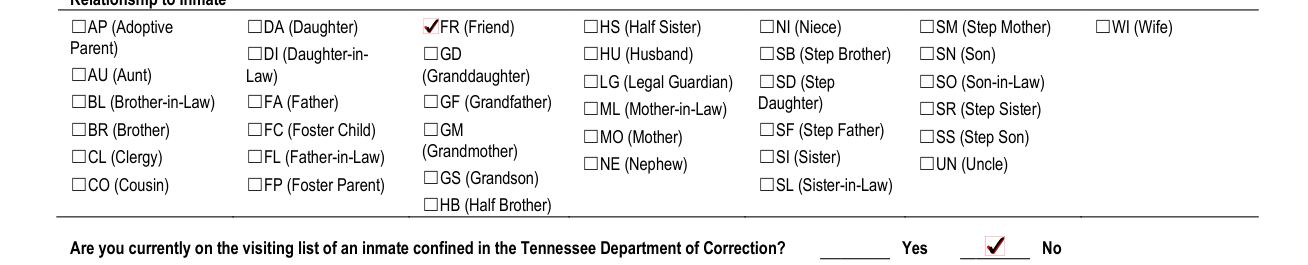
Under Relationship to Inmate, enter ☐AP (Adoptive Parent) ☐AU (Aunt) ☐DA (Daughter) ☐FR (Friend) ☐HS (Half Sister) ☐NI (Niece) ☐SM (Step Mother) ☐WI (Wife) ☐DI (Daughter-in- Law) ☐FA (Father) ☐GD (Granddaughter) ☐GF (Grandfather) ☐HU (Husband) ☐SB (Step Brother) ☐SN (Son) ☐LG (Legal Guardian) ☐SD (Step Daughter) ☐SF (Step Father) ☐SO (Son-in-Law) ☐BL (Brother-in-Law) ☐ML (Mother-in-Law) ☐SR (Step Sister) ☐BR (Brother) ☐FC (Foster Child) ☐GM (Grandmother) ☐GS (Grandson) ☐MO (Mother) ☐SS (Step Son) ☐CL (Clergy) ☐FL (Father-in-Law) ☐NE (Nephew) ☐SI (Sister) ☐UN (Uncle) ☐CO (Cousin) ☐FP (Foster Parent) ☐SL (Sister-in-Law) ☐HB (Half Brother).
On the visiting list of an inmate confined in the Tennessee Department of Correction

Are you currently on the visiting list of an inmate confined in the Tennessee Department of Correction? Enter Yes or No.
If yes, enter his/her name, TDOC ID and Relationship.
Employee or contract employee of the TDOC

Are you now, or have you ever been an employee or contract employee of the TDOC? Enter Yes or No. If yes, enter when.
Suspended from visitation

Have you ever been suspended from visitation? Enter Yes or No. If yes, list reason.
Convicted of a felony

Have you ever been convicted of a felony? Enter Yes or No. If yes, please list offense(s), date, location disposition/sentence and TDOC ID if applicable.
YOUR SIGNATURE and DATE

Enter YOUR SIGNATURE and DATE.
PARENTAL CONSENT/RELEASE FOR MINOR'S VISITATION
For children under 18 years of age, please fill out completely, have notarized by a notary public, lawyer, or local postal official.
Minor's Name, Date of Birth, Relationship of Child to Inmate
Enter Minor's Name, Date of Birth and Relationship of Child to Inmate.
Approved Escort/Guardian and Guardian's Date of Birth
Enter Approved Escort/Guardian and Guardian's Date of Birth. The child may visit only with the authorized person named, who is over 18 years of age and who must also be on the approved visitation list of the inmate they wish to visit.
Signature of Custodial Parent/Legal Guardian and Date
Enter Signature of Custodial Parent/Legal Guardian and Date.
STATEMENT OF NOTARY PUBLIC
Notary Public: Subscribed to, and sworn before me on this day of 20, and My commission expires on.
More rules for CR-2152
All questions must be answered.
Any omissions or falsifications, including relationship and prior convictions, will be considered sufficient reason to deny approval or to withdraw approval of the visitor.
Applications must be updated every two years (24 months).
This application will become part of the inmate's institutional record under the provision of T.C.A. 4- 3-606 and 4-6-140.
Permission is granted for the child to be searched.
Before you go
Please attach recent photograph in lower left-hand corner or application will not be processed.
Attach a recent photo of yourself only. Photo must be of quality that can be used for identification purposes. No black & white photographs or pictures copied from copy machine.
If you have a prosthetic device, pacemaker or defibrillator, you may be required to submit a copy of a physician statement.
If signed by legal guardian, a copy of certified court order granting guardianship must be attached.
Visitors' handbooks are available upon receipt of a self-addressed stamped envelope with this application.
All visitor applicants are subject to a NCIC background check.
Common questions about CR-2152
Where do I file it?
Return this form to the warden of the institution noted in the Institution box at the top of the page.
Sources
[1] CR-2152 (Rev. 11-19), Visitation Application, Tennessee Department of Correction (the Official source link on this page).