
Transfer Information Sheet Form PDF Details

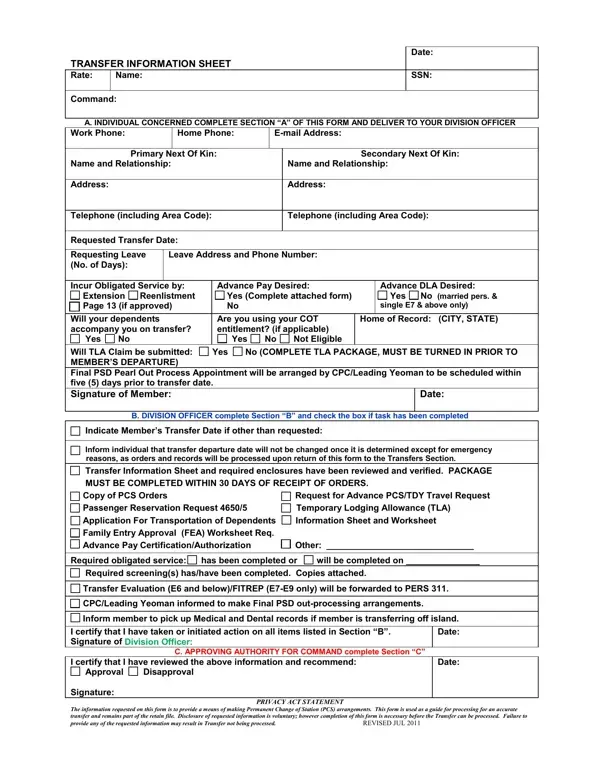
Managing the myriad details involved in a Permanent Change of Station (PCS) can be a daunting task for military personnel and their families. This process is aided by various forms and procedures designed to ensure a smooth transition. Among these, the Transfer Information Sheet form plays a critical role, serving as a comprehensive document that gathers essential information from the individual concerned about their upcoming move. Revised in July 2011, this form covers several key areas: personal contact information, leave requests, dependent details, financial arrangements such as advance pay, and the necessary steps for processing the PCS. It is meticulously structured into sections for the individual, division officer, and approving authority, ensuring a systematic approach to preparing for the transfer. Additionally, it touches upon travel arrangements and pet shipment, highlighting the attention to detail required in planning a PCS. Completing this form is crucial for military members as it facilitates the coordination of their transfer, addresses their specific needs, and helps manage the financial aspects of relocating. In essence, the Transfer Information Sheet form is an indispensable tool in the PCS process, requiring careful attention to ensure all needs are met and documented before the move.

QuestionAnswer
Form NameTransfer Information Sheet Form
Form Length12 pages
Fillable?No
Fillable fields0
Avg. time to fill out3 min
Other namesnavy transfer package, navy tis form, nppsc 1300 1 navy, navy transfer information sheet

How to Edit Transfer Information Sheet Form Online for Free

Using PDF forms online can be very simple with our PDF editor. You can fill in transfer information sheet navy here painlessly. To keep our editor on the forefront of convenience, we work to put into operation user-oriented capabilities and improvements on a regular basis. We are routinely happy to receive suggestions - play a vital role in reshaping PDF editing. It just takes several basic steps:

Step 1: Click on the orange "Get Form" button above. It will open up our pdf editor so you can begin filling out your form.

Step 2: With our advanced PDF tool, it is possible to do more than just fill out blank form fields. Try each of the features and make your docs appear professional with customized textual content put in, or tweak the original input to perfection - all that comes with the capability to incorporate any images and sign the document off.

This PDF form will require specific info to be typed in, therefore be sure you take your time to type in what is expected:

1. Whenever completing the transfer information sheet navy, be certain to incorporate all of the needed blank fields in their associated section. It will help to expedite the process, making it possible for your information to be handled quickly and appropriately.

Find out how to prepare navy tis form step 1

2. Now that the previous part is finished, you're ready put in the necessary details in Name and Relationship Address, Advance Pay Desired Yes Complete, Advance DLA Desired Yes No married, Will your dependents accompany you, Are you using your COT entitlement, Home of Record CITY STATE, Will TLA Claim be submitted Yes No, Date, B DIVISION OFFICER complete, Indicate Members Transfer Date if, Inform individual that transfer, Transfer Information Sheet and, Copy of PCS Orders Request for, and Application For Transportation of so you're able to progress to the 3rd step.

Completing section 2 of navy tis form

3. This next part will be hassle-free - fill out all of the fields in Application For Transportation of, Required obligated service has, Transfer Evaluation E and, CPCLeading Yeoman informed to make, Inform member to pick up Medical, I certify that I have taken or, C APPROVING AUTHORITY FOR COMMAND, I certify that I have reviewed the, PRIVACY ACT STATEMENT, Date, Date, and The information requested on this to finish this part.

Stage no. 3 for submitting navy tis form

4. Filling in PASSENGER RESERVATION REQUEST PCS, INITIAL, CHANGE, THIS FORM MUST BE TYPED, MEMBERS NAME LAST FIRST MI NAME, RANKRATE AGENDER, SSN A DOB, COMMAND DETACH DATE, MEMBERS LOCAL PHONE EMAIL, MEMBERS TRAVEL INCLUDING LEAVE, TRAVELING WITH SPONSOR OR, and TYPE SEAT REQUESTED FLIGHT TIME is paramount in the next step - be certain to be patient and take a close look at each and every field!

navy tis form conclusion process shown (part 4)

As to COMMAND DETACH DATE and RANKRATE AGENDER, ensure that you review things in this section. The two of these are thought to be the most significant fields in this PDF.

5. And finally, this last portion is precisely what you will have to finish before finalizing the document. The blanks at issue include the next: YES, CAT CAT, DOGBREEDAGE CAGE SIZE L W H PET WT, NOT SHIPPING A POV ADDRESS, and TYPE SEAT REQUESTED FLIGHT TIME.

The best ways to complete navy tis form stage 5

Step 3: Right after looking through the filled in blanks, hit "Done" and you're done and dusted! After creating a7-day free trial account at FormsPal, it will be possible to download transfer information sheet navy or send it via email without delay. The PDF document will also be accessible through your personal account menu with all of your adjustments. With FormsPal, it is simple to fill out documents without having to worry about personal data breaches or entries being distributed. Our secure platform ensures that your personal details are stored safe.