
Equity Bank Loan Application Form PDF Details

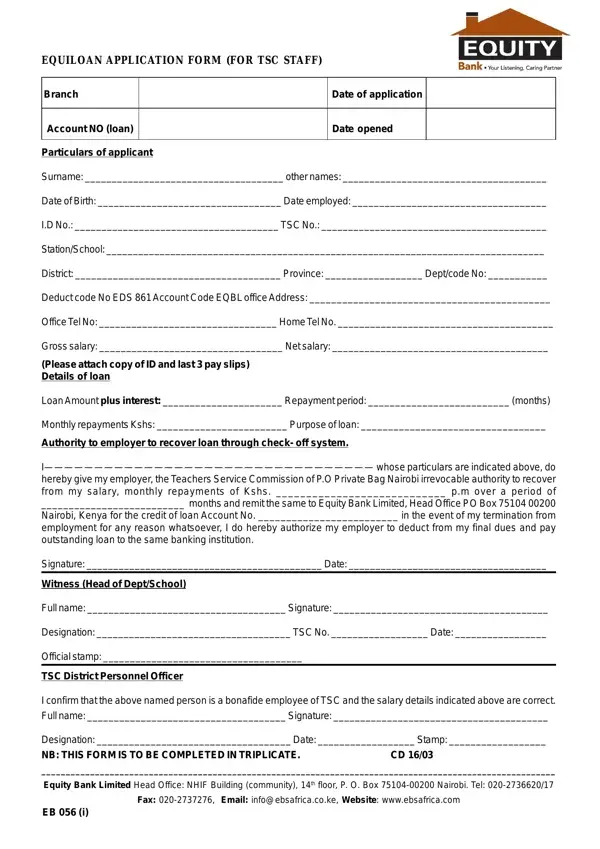
Applying for a loan through Equity Bank, specifically tailored for Teachers Service Commission (TSC) staff, entails completing the detailed "EquiLoan Application Form." This meticulous document captures essential personal and employment details of the applicant, including surname, other names, date of birth, employment date, identification number, and TSC number, among others. Additionally, it requires information regarding the applicant's station or school, district, province, and relevant codes for departmental and deduction purposes. The form not only facilitates the request for a certain loan amount and outlines the terms for repayment, including the loan interest, repayment period, and monthly repayment amounts, but it also specifies the purpose of the loan. A crucial component of the application is the authorization given to the employer, allowing the Teachers Service Commission, to deduct monthly repayments directly from the salary via a check-off system, ensuring a seamless transaction directly to Equity Bank. To reinforce the commitment, it demands the endorsement of the application by a witness, preferably the head of the department or school, and the TSC District Personnel Officer, who confirms the applicant's employment status and salary details. This formal process, requiring the form to be completed in triplicate and supported by personal identification and recent pay slips, epitomizes a structured approach towards obtaining a loan, reflecting the bank's and the educational sector's collaborative efforts to facilitate financial empowerment among educators.

QuestionAnswer
Form NameEquity Bank Loan Application Form
Form Length1 pages
Fillable?Yes
Fillable fields41
Avg. time to fill out8 min 27 sec
Other namesTSC Application Form, Equiloan Application Form (for TSC Staff)

How to Edit Equity Bank Loan Application Form Online for Free

By using the online PDF tool by FormsPal, you'll be able to complete or modify TSC Application Form here and now. The editor is continually upgraded by our team, acquiring cool features and turning out to be even more convenient. By taking a few easy steps, you'll be able to begin your PDF journey:

Step 1: Firstly, open the pdf tool by pressing the "Get Form Button" at the top of this webpage.

Step 2: With our online PDF tool, you may accomplish more than merely fill in blank form fields. Edit away and make your documents look great with customized text incorporated, or fine-tune the file's original input to excellence - all that comes with the capability to incorporate any graphics and sign the document off.

When it comes to blanks of this specific form, here's what you should know:

1. Firstly, once filling in the TSC Application Form, start with the section that features the following fields:

Part # 1 in filling out Equity Bank Loan Application Form

2. The next stage would be to complete these fields: Office Tel No Home Tel No, Gross salary Net salary, Please attach copy of ID and last, Loan Amount plus interest, Monthly repayments Kshs Purpose, Authority to employer to recover, I whose particulars are indicated, Signature Date, and Witness Head of DeptSchool.

Writing part 2 of Equity Bank Loan Application Form

When it comes to Signature Date and Loan Amount plus interest, be sure that you review things here. Both of these are definitely the most important ones in the document.

3. Completing Witness Head of DeptSchool, Full name Signature, Designation TSC No Date, Official stamp, TSC District Personnel Officer, I confirm that the above named, Designation Date Stamp NB THIS, Fax Email infoebsafricacoke, and EB i is essential for the next step, make sure to fill them out in their entirety. Don't miss any details!

Step number 3 for filling in Equity Bank Loan Application Form

Step 3: Revise all the information you've entered into the blank fields and click on the "Done" button. Download the TSC Application Form as soon as you register online for a 7-day free trial. Instantly view the form within your FormsPal cabinet, with any modifications and changes being all kept! FormsPal is dedicated to the privacy of our users; we make certain that all personal data entered into our tool stays protected.