
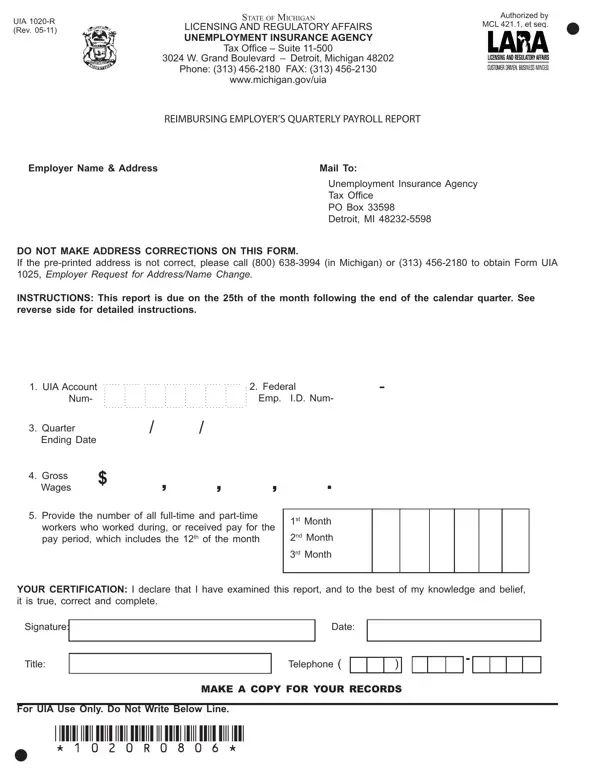
Uia 1020 R Form PDF Details

The UIA 1020-R form, a critical document for reimbursing employers in Michigan, serves a pivotal role in the regulatory landscape of unemployment insurance reporting. Under the authorization of the Michigan Employment Security (MES) Act, particularly Section 13, and the oversight of the Unemployment Insurance Agency (UIA), this form is designed to streamline the process of quarterly payroll reporting for employers who opt for reimbursing the UIA instead of paying traditional unemployment taxes. It requires detailed payroll information for each calendar quarter, including total wages paid and the count of both full-time and part-time workers who were employed or paid during certain periods. Each quarter's report is due by the 25th of the month following the quarter's end, emphasizing the importance of timely and accurate submissions to avoid penalties. Furthermore, this document briefly outlines the procedural mandates for new reimbursing employers, including registration requirements with the Michigan Department of Treasury and UIA, and the necessity of filing even in the absence of payroll in the reported quarter. Detailed instructions on the form ensure that employers provide precise information on their account number, federal identification number, wages paid, and employee counts, underscoring the strict compliance measures in place. Additionally, guidance on how to correct previously filed reports or update employer information illustrates the comprehensive nature of this document, intended to facilitate employer compliance and maintain the integrity of unemployment insurance funding in Michigan.

QuestionAnswer
Form NameUia 1020 R Form
Form Length2 pages
Fillable?No
Fillable fields0
Avg. time to fill out30 sec
Other namesuia 1020 form michigan, error uia 1020, mesc 1020, uia michigan 1020 mailing address

How to Edit Uia 1020 R Form Online for Free

Using PDF documents online is definitely very easy with this PDF editor. You can fill in uia r here painlessly. We at FormsPal are aimed at providing you with the ideal experience with our tool by regularly presenting new functions and upgrades. With all of these improvements, using our editor becomes easier than ever! To begin your journey, take these basic steps:

Step 1: Firstly, access the pdf editor by clicking the "Get Form Button" at the top of this site.

Step 2: With this state-of-the-art PDF editing tool, you could accomplish more than just fill out blanks. Express yourself and make your docs look high-quality with custom text incorporated, or optimize the original content to excellence - all that backed up by an ability to insert your personal photos and sign it off.

If you want to complete this form, ensure that you type in the right details in every blank:

1. You will need to complete the uia r properly, thus be attentive while filling out the segments comprising these blanks:

uia 1020 completion process described (stage 1)

2. Soon after completing this part, head on to the subsequent step and complete all required details in these blanks - Gross Wages, Provide the number of all, workers who worked during or, st Month, nd Month, rd Month, YOUR CERTIFICATION I declare that, Signature, Date, Title, Telephone, For UIA Use Only Do Not Write, and MAKE A COPY FOR YOUR RECORDS.

Stage number 2 in filling out uia 1020

Concerning Provide the number of all and Date, make sure you get them right here. Those two could be the key ones in this form.

Step 3: Make sure your information is accurate and click on "Done" to complete the project. Get hold of your uia r after you sign up for a 7-day free trial. Quickly get access to the pdf file inside your FormsPal account, with any modifications and adjustments being conveniently kept! FormsPal is focused on the personal privacy of all our users; we ensure that all information coming through our tool stays protected.