
Form St 13 PDF Details

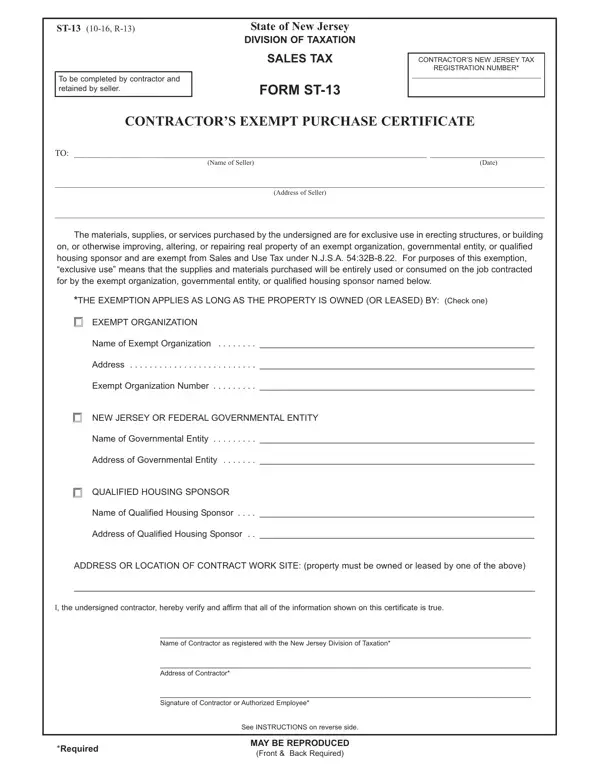
In the state of New Jersey, contractors engaged in projects for exempt organizations, governmental entities, or qualified housing sponsors can benefit from a specific tax exemption when purchasing materials, supplies, or services. This is where the Sales Tax Form ST-13, also known as the Contractor's Exempt Purchase Certificate, plays a crucial role. Designed to be completed by contractors and retained by sellers, this form enables purchases that are exclusively used in erecting structures, building on, or otherwise improving, altering, or repairing real property owned or leased by exempt entities to be made without the burden of sales and use tax, under the provision of N.J.S.A. 54:32B-8.22. The form requires detailed information, including the contractor's New Jersey Tax Registration Number, the nature of the exemption, and the identity of the exempt organization, government entity, or qualified housing sponsor benefiting from the work. By correctly completing and submitting this form, contractors can ensure compliance with state taxation laws, while sellers accepting these certificates within specified time frames are relieved from the responsibility of collecting sales tax on the transactions covered. Furthermore, this document outlines the importance of retaining certificates for a minimum of four years, the procedure in audit situations, and the provisions for additional purchases by the same purchaser, offering a comprehensive guide for both contractors and sellers in navigating the specifics of tax-exempt purchases in New Jersey.

QuestionAnswer
Form NameForm St 13
Form Length2 pages
Fillable?No
Fillable fields0
Avg. time to fill out30 sec
Other namesst 13 fill, new jersey form st 13, form st 13, new jersey st 13 blank

How to Edit Form St 13 Online for Free

st13 can be filled out easily. Just open FormsPal PDF editing tool to get the job done right away. The tool is constantly maintained by us, receiving cool functions and becoming better. Here is what you'd need to do to get going:

Step 1: Click on the "Get Form" button above. It will open our tool so you could start filling in your form.

Step 2: Once you access the PDF editor, you will find the document prepared to be completed. In addition to filling out different blank fields, you might also do many other actions with the PDF, including writing your own words, changing the original text, adding graphics, signing the form, and much more.

So as to complete this form, ensure that you enter the necessary details in each field:

1. Begin completing the st13 with a group of essential fields. Gather all of the information you need and ensure nothing is forgotten!

How to fill in form contractor exempt part 1

2. Right after the first part is filled out, go to type in the relevant information in these: Address, Exempt Organization Number, NEW JERSEY OR FEDERAL, Name of Governmental Entity, Address of Governmental Entity, QUALIFIED HOUSING SPONSOR, Name of Qualified Housing Sponsor, Address of Qualified Housing, ADDRESS OR LOCATION OF CONTRACT, I the undersigned contractor, and Name of Contractor as registered.

How you can fill out form contractor exempt step 2

3. This step is hassle-free - fill out all the form fields in Name of Contractor as registered, Address of Contractor, Signature of Contractor or, Required, See INSTRUCTIONS on reverse side, MAY BE REPRODUCED, and Front Back Required to complete this process.

See INSTRUCTIONS on reverse side, Address of Contractor, and Front  Back Required in form contractor exempt

Lots of people often make some mistakes when filling in See INSTRUCTIONS on reverse side in this section. You need to double-check what you enter here.

Step 3: Right after proofreading the form fields you've filled in, hit "Done" and you are all set! Join us now and instantly access st13, all set for download. All alterations made by you are kept , meaning you can customize the document later on anytime. At FormsPal.com, we do everything we can to make certain that all of your information is maintained secure.