
Va Form 0877 PDF Details

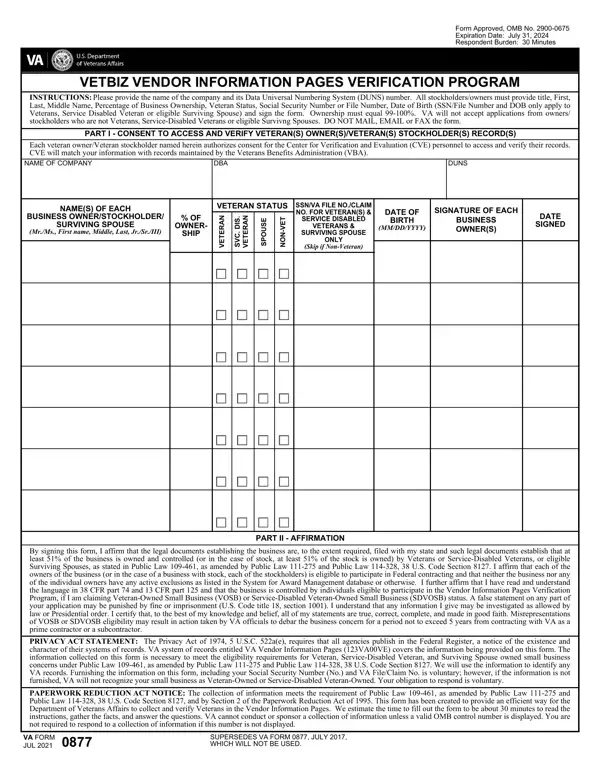
The VA 0877 form stands as a cornerstone for Veterans, Service-Disabled Veterans, and eligible Surviving Spouses aiming to have their businesses recognized and verified under specialized programs. This task is critical for those looking to engage in federal contracting opportunities that are exclusively available to these groups, as outlined by Public Law 109-461 and its subsequent amendments. By providing key details about the business, such as company name, DUNS number, and ownership percentages, alongside personal information including veteran status and Social Security or VA file numbers, applicants kickstart the process of validation. Notably, the form mandates the total ownership to lie between 99-100%, a criterion emphasizing the intent that these businesses be majority veteran-owned. Moreover, the form embodies a consent section allowing the Center for Verification and Evaluation (CVE) to access and verify the veteran owner's records, ensuring the information aligns with that maintained by the Veterans Benefits Administration (VBA). The affirmation part further solidifies the applicant's claim by requiring a declaration of the business's compliance with ownership and control conditions as set by relevant laws. Importantly, the VA 0877 form underscores the gravity of truthful disclosure, highlighting penalties for false statements and the importance of integrity in these declarations. As such, it is not just a form but a formal pledge by veteran business owners of their eligibility and compliance, striving to ensure that opportunities are rightfully allocated to those the laws aim to benefit.

QuestionAnswer
Form NameVa Form 0877
Form Length2 pages
Fillable?No
Fillable fields0
Avg. time to fill out30 sec
Other namesva form 0877 electronic, vendor information verification, va form 0877 e signature instructions, 0877

How to Edit Va Form 0877 Online for Free

You could fill out va form 0877 without difficulty in our PDFinity® PDF editor. The editor is consistently maintained by us, acquiring powerful features and growing to be more versatile. In case you are looking to start, this is what you will need to do:

Step 1: Click the "Get Form" button in the top part of this page to access our PDF tool.

Step 2: The editor provides you with the opportunity to modify nearly all PDF files in many different ways. Transform it by including customized text, correct original content, and put in a signature - all at your fingertips!

With regards to the fields of this particular form, here's what you need to do:

1. The va form 0877 will require certain details to be typed in. Make certain the following blank fields are finalized:

Completing part 1 in form 0877 va form

2. Just after this section is filled out, go to type in the applicable information in all these: PART II AFFIRMATION, By signing this form I affirm that, PRIVACY ACT STATEMENT The Privacy, The collection of information, VA FORM JUL, and SUPERSEDES VA FORM JULY WHICH.

The right way to prepare form 0877 va form portion 2

3. This next segment will be focused on SURVIVING SPOUSE, MrMs First name Middle Last JrSrIII, OWNER, SHIP, N A R E T E V, S D, C V S, N A R E T E V, E S U O P S, T E V N O N, VETERANS, SURVIVING SPOUSE, ONLY, Skip if NonVeteran, and MMDDYYYY - type in all of these blank fields.

Ways to complete form 0877 va form step 3

Regarding ONLY and SHIP, make sure you review things here. These are the most important fields in the document.

4. This next section requires some additional information. Ensure you complete all the necessary fields - - to proceed further in your process!

Completing segment 4 in form 0877 va form

5. Now, this final segment is what you should wrap up prior to closing the document. The blank fields at this point are the following: BACK OF VA FORM JUL, and SUPERSEDES VA FORM JULY WHICH.

BACK OF VA FORM  JUL, SUPERSEDES VA FORM  JULY  WHICH, and BACK OF VA FORM  JUL of form 0877 va form

Step 3: Check the details you've inserted in the form fields and click the "Done" button. Acquire your va form 0877 the instant you register online for a free trial. Easily gain access to the document inside your personal cabinet, with any modifications and adjustments all preserved! Whenever you work with FormsPal, you can certainly complete forms without having to get worried about personal information breaches or records being distributed. Our protected system helps to ensure that your personal information is stored safe.