
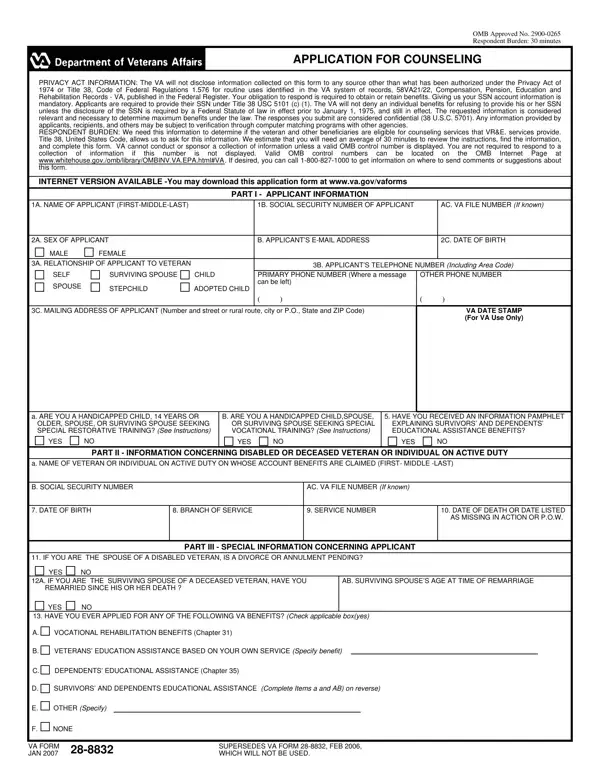
Va Form 28 8832 PDF Details

Embarking on a journey toward educational achievements or vocational milestones often involves a labyrinth of decisions and paperwork, especially for veterans and their dependents. Among the myriad forms and applications, the VA Form 28-8832 stands out as a beacon for those seeking educational or vocational counseling through the Veterans Affairs (VA) system. This form is not merely a piece of bureaucracy but a gateway to a range of counseling services designed to aid veterans and their families in making informed decisions about their educational and career paths. Completing this form triggers a process where applicants can gain insights into career opportunities, receive guidance on overcoming personal obstacles to success, and develop comprehensive plans for their education or vocational training. The form itself gathers essential information from applicants, such as their relationship to the veteran, personal contact details, and specifics about the veteran's service, to ensure they receive tailored advice. Furthermore, it outlines the confidentiality and privacy measures that protect the applicant's information, reassuring them that their personal details are handled with the utmost care. Responding to this form is a crucial step required to access these valuable counseling services, which are offered free of charge to eligible veterans and their dependents, promising a future where their educational and vocational goals are not just dreams but achievable realities.

QuestionAnswer
Form NameVa Form 28 8832
Form Length3 pages
Fillable?No
Fillable fields0
Avg. time to fill out45 sec
Other names19B, va 28 8832, va form 28 8832, form 28 8832

How to Edit Va Form 28 8832 Online for Free

When working in the online PDF editor by FormsPal, you may fill in or modify 14B right here and now. The editor is constantly updated by us, getting new features and turning out to be much more versatile. This is what you'll want to do to get started:

Step 1: Hit the "Get Form" button at the top of this webpage to open our tool.

Step 2: The editor gives you the ability to modify nearly all PDF forms in various ways. Enhance it by writing your own text, correct original content, and place in a signature - all within a few mouse clicks!

So as to fill out this PDF document, be sure you enter the necessary information in every blank:

1. First, when filling in the 14B, start in the area that includes the following fields:

htmlVA completion process detailed (step 1)

2. Your next stage is to fill out these fields: IF YOU ARE THE SPOUSE OF A, PART III SPECIAL INFORMATION, YES, A IF YOU ARE THE SURVIVING SPOUSE, B SURVIVING SPOUSES AGE AT TIME OF, YES, HAVE YOU EVER APPLIED FOR ANY OF, A VOCATIONAL REHABILITATION, B VETERANS EDUCATION ASSISTANCE, C DEPENDENTS EDUCATIONAL, D SURVIVORS AND DEPENDENTS, E OTHER Specify, F NONE, VA FORM DEC, and SUPERSEDES VA FORM JAN WHICH.

C DEPENDENTS EDUCATIONAL, B SURVIVING SPOUSES AGE AT TIME OF, and VA FORM DEC of htmlVA

People often make errors when filling in C DEPENDENTS EDUCATIONAL in this area. Be sure to read twice what you type in here.

3. This next portion is focused on A NAME OF VETERAN ON WHOSE ACCOUNT, B VETERANS FILE NUMBER OR SOCIAL, PART IV APPLICANTS MILITARY, HAVE YOU EVER SERVED ON ACTIVE, YES, Enter the following information, If you have already sent VA a DD, SERVICE INFORMATION, A DATE ENTERED, ACTIVE DUTY, B DATE SEPARATED FROM ACTIVE DUTY, C BRANCH OF SERVICE OR RESERVE, OR GUARD COMPONENT, D CHARACTER OF, and DISCHARGE - fill in all these blank fields.

htmlVA completion process outlined (stage 3)

4. Filling out REMARKS Use this space to provide, PART V CERTIFICATION AND, All Applicants Must Complete This, and I CERTIFY THAT all statements in is key in this fourth step - ensure to spend some time and be mindful with each empty field!

htmlVA writing process outlined (step 4)

5. Because you come near to the end of your form, you will find a couple more requirements that should be fulfilled. Particularly, A SIGNATURE OF APPLICANT Do NOT, B DATE SIGNED, SIGN HERE, IN INK, PART VI SIGNATURE OF PARENT, This section must be completed if, A NAME OF PARENT GUARDIAN OR, B TELEPHONE NUMBER AND MAIL, A SIGNATURE OF Check one DO NOT, PARENT, GUARDIAN, CUSTODIAN, SIGN HERE, IN INK, and B DATE SIGNED must be filled out.

SIGN HERE, CUSTODIAN, and B DATE SIGNED inside htmlVA

Step 3: Immediately after looking through the filled in blanks, click "Done" and you're good to go! Make a 7-day free trial option at FormsPal and acquire instant access to 14B - with all adjustments saved and accessible in your personal account page. FormsPal guarantees your data privacy via a protected system that in no way saves or distributes any sort of personal information provided. Rest assured knowing your paperwork are kept protected whenever you work with our tools!