
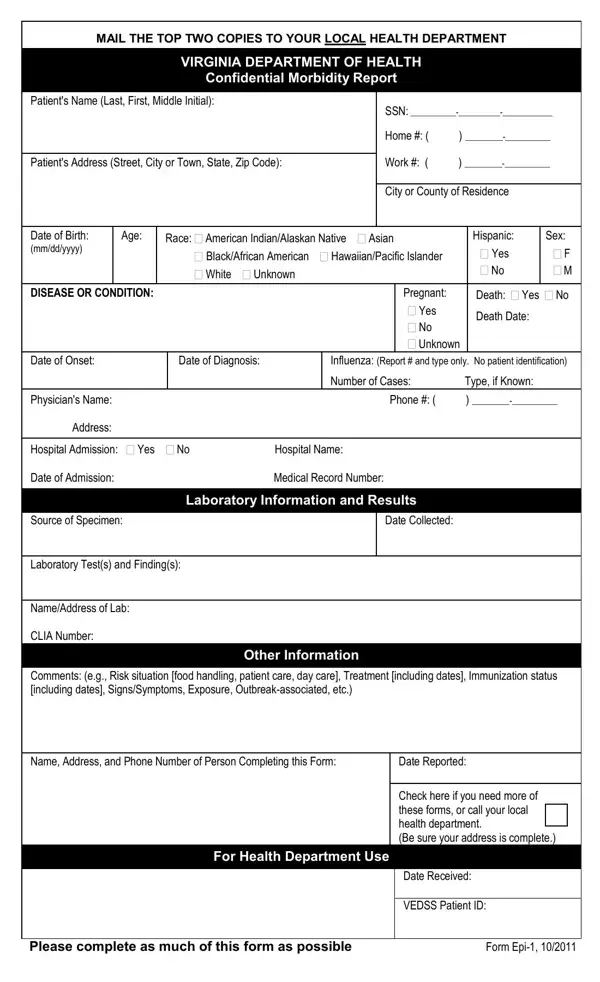
Keeping communities safe and healthy is a top priority, and part of that effort involves tracking various illnesses and conditions. This is where the Virginia Epi 1 form comes into play—a critical tool used by the Virginia Department of Health for this very purpose. Designed to facilitate the reporting of a wide array of diseases, from common flu to more severe conditions like tuberculosis or rabies, this form is a cornerstone of public health efforts in Virginia. Healthcare providers, including physicians and hospital personnel, as well as laboratory directors, are tasked with filling out and submitting this form to their local health department. The information requested covers everything from patient details, such as name and address, to specific data about the disease or condition, including symptoms, diagnosis dates, and any laboratory results. The goal is clear: by gathering detailed, confidential morbidity reports, the health department aims to monitor disease trends, control outbreaks, and ultimately protect the public's health. Reporting is not only a responsibility but a legal requirement for certain conditions, with specifics outlined in both the Code of Virginia and the Board of Health Regulations. Rapid reporting can be crucial for certain diseases, requiring immediate action to prevent further spread. Complementing these efforts, laboratories have a role in notifying health departments about positive test results and are encouraged to send initial samples to designated labs for further analysis. Such detailed and systematic reporting helps paint a clearer picture of public health trends across Virginia, guiding both preventive measures and responses to emerging health threats.
| Question | Answer |
|---|---|
| Form Name | Virginia Epi 1 Form |
| Form Length | 2 pages |
| Fillable? | No |
| Fillable fields | 0 |
| Avg. time to fill out | 30 sec |
| Other names | vdh epi, virginia health dept epi form, vdh form report, virginia epi |
Virginia Epi 1 Form isn’t the one you’re looking for?