
Form DL-104 at a glance
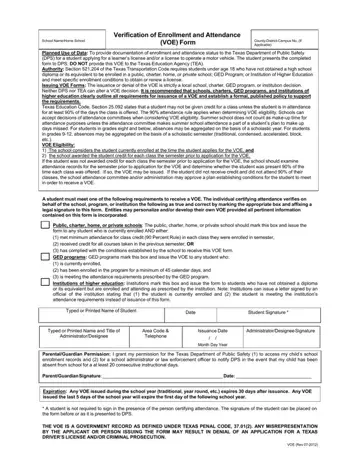
What it is: Form DL-104, the VOE, documents a student's enrollment and attendance for the Texas Department of Public Safety when applying for a learner's license and/or a license to operate a motor vehicle.
Where and when to file: The student presents the completed form to DPS. Do not provide this VOE to the Texas Education Agency (TEA).
Section 521.204 of the Texas Transportation Code requires students under age 18 who have not obtained a high school diploma or its equivalent to be enrolled in a public, charter, home, or private school; GED Program; or Institution of Higher Education and meet specific enrollment conditions to obtain or renew a license.
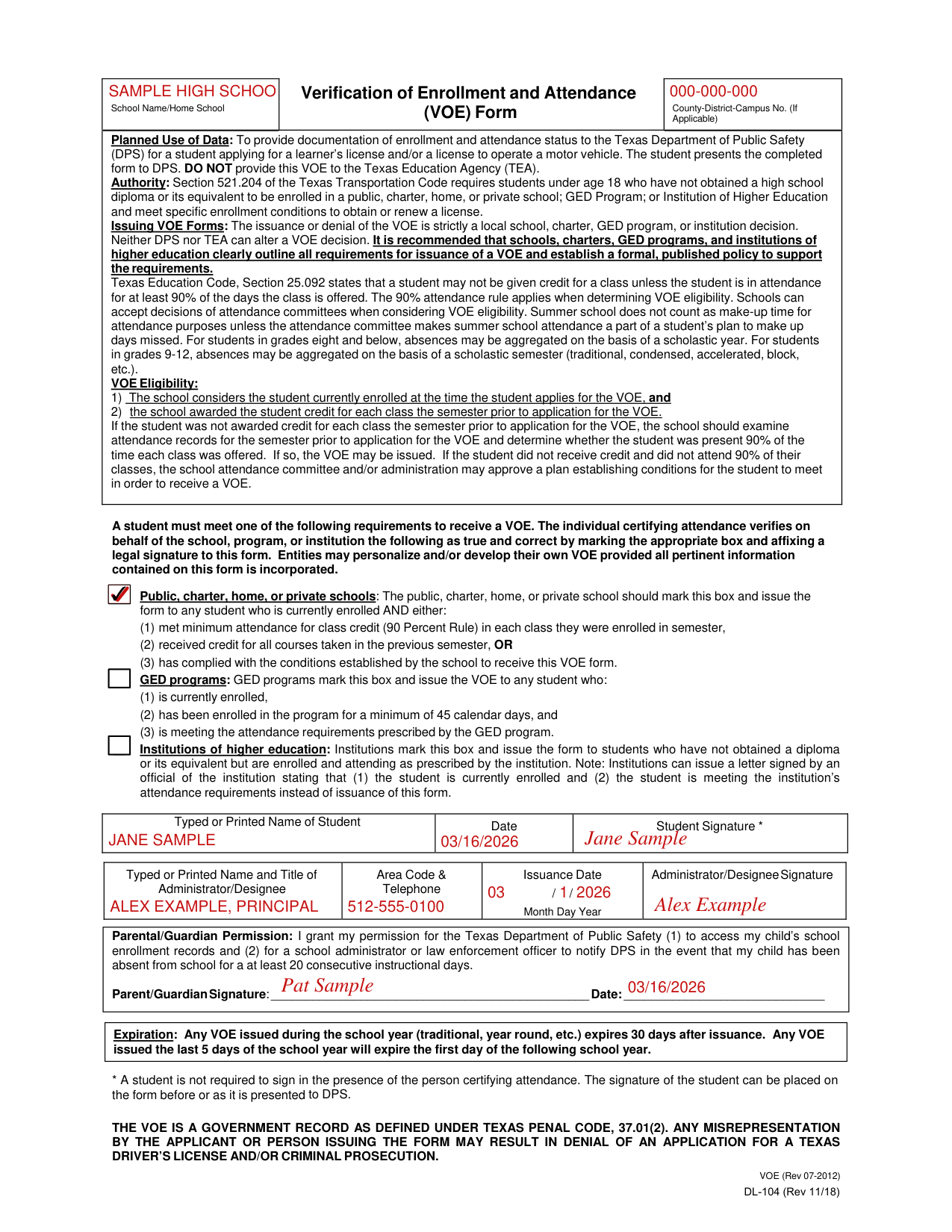
A filled-in Form DL-104 example: a public school issues a VOE
How to fill out Form DL-104, box by box
School Name and County-District-Campus No.

Enter the School Name/Home School and the County-District-Campus No. if applicable.
Public, charter, home, or private schools

A student must meet one of the following requirements to receive a VOE. The individual certifying attendance verifies on behalf of the school, program, or institution the following as true and correct by marking the appropriate box and affixing a legal signature to this form. Entities may personalize and/or develop their own VOE provided all pertinent information contained on this form is incorporated.
Public, charter, home, or private schools: The public, charter, home, or private school should mark this box and issue the form to any student who is currently enrolled AND either: (1) met minimum attendance for class credit (90 Percent Rule) in each class they were enrolled in semester, (2) received credit for all courses taken in the previous semester, OR (3) has complied with the conditions established by the school to receive this VOE form.
GED programs

GED programs: GED programs mark this box and issue the VOE to any student who: (1) is currently enrolled, (2) has been enrolled in the program for a minimum of 45 calendar days, and (3) is meeting the attendance requirements prescribed by the GED program.
Institutions of higher education

Institutions of higher education: Institutions mark this box and issue the form to students who have not obtained a diploma or its equivalent but are enrolled and attending as prescribed by the institution.
Note: Institutions can issue a letter signed by an official of the institution stating that (1) the student is currently enrolled and (2) the student is meeting the institution's attendance requirements instead of issuance of this form.
Typed or Printed Name of Student

Enter the Typed or Printed Name of Student, the Date and the Student Signature. A student is not required to sign in the presence of the person certifying attendance. The signature of the student can be placed on the form before or as it is presented to DPS.
Administrator/Designee

Enter the Typed or Printed Name and Title of Administrator/Designee, the Area Code & Telephone and the Issuance Date as Month Day Year, then sign on the Administrator/Designee Signature line.
Parental/Guardian Permission

Parental/Guardian Permission: I grant my permission for the Texas Department of Public Safety (1) to access my child's school enrollment records and (2) for a school administrator or law enforcement officer to notify DPS in the event that my child has been absent from school for at least 20 consecutive instructional days. Sign on the Parent/Guardian Signature line and enter the Date.
More rules for Form DL-104
The issuance or denial of the VOE is strictly a local school, charter, GED program, or institution decision. Neither DPS nor TEA can alter a VOE decision.
It is recommended that schools, charters, GED programs, and institutions of higher education clearly outline all requirements for issuance of a VOE and establish a formal, published policy to support the requirements.
Texas Education Code, Section 25.092 states that a student may not be given credit for a class unless the student is in attendance for at least 90% of the days the class is offered. The 90% attendance rule applies when determining VOE eligibility.
Schools can accept decisions of attendance committees when considering VOE eligibility.
Summer school does not count as make-up time for attendance purposes unless the attendance committee makes summer school attendance a part of a student's plan to make up days missed.
For students in grades eight and under, absences may be aggregated on the basis of a scholastic year. For students in grades 9-12, absences may be aggregated on the basis of a scholastic semester (traditional, condensed, accelerated, block, etc.).
VOE Eligibility: 1) The school considers the student currently enrolled at the time the student applies for the VOE, and 2) the school awarded the student credit for each class the semester prior to application for the VOE.
If the student was not awarded credit for each class the semester prior to application for the VOE, the school should examine attendance records for the semester prior to application for the VOE and determine whether the student was present 90% of the time each class was offered. If so, the VOE may be issued.
If the student did not receive credit and did not attend 90% of their classes, the school attendance committee and/or administration may approve a plan establishing conditions for the student to meet in order to receive a VOE.
Common questions about Form DL-104
Is there a deadline?
Any VOE issued during the school year expires 30 days after issuance. Any VOE issued the last 5 days of the school year will expire the first day of the next school year.
Is there a penalty?
Any misrepresentation by the applicant or person issuing the form may result in denial of an application for a Texas driver's license and/or criminal prosecution.
Sources
[1] Form DL-104 (Rev 11/18), School Name/Home School Verification of Enrollment and Attendance (VOE) Form, Texas Department of Public Safety (the Official source link on this page).
