
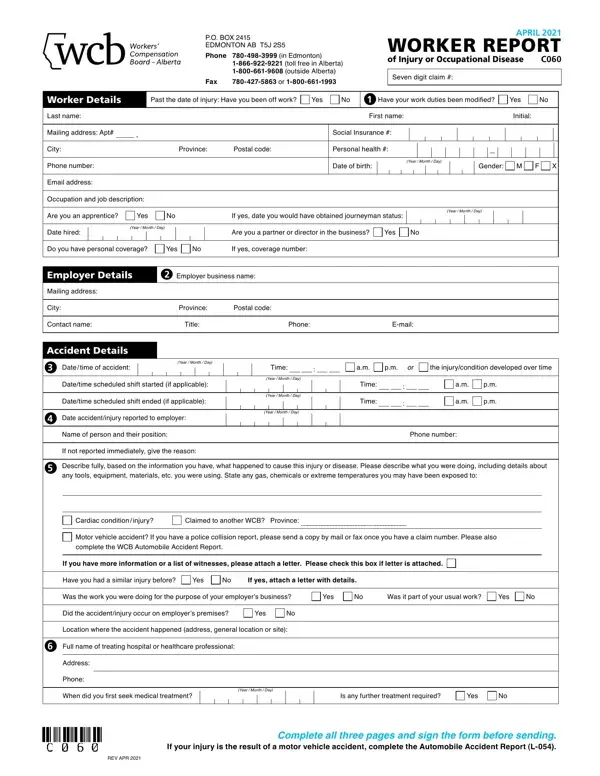
Wcb Form C060 PDF Details

The Workers' Compensation Board (WCB) C060 form, a critical document for employees who have suffered an injury or an occupational disease in Alberta, Canada, serves as the primary means by which workers can report their injury or condition to initiate a claim for compensation. This comprehensive form requires detailed information from the injured worker, including personal details, specifics of the injury or disease, employment information, and the circumstances surrounding the accident or condition development. Significantly, it also asks for an in-depth account of the accident, the initial medical treatment received, and the worker's employment status, such as whether they have been off work or if their duties have been modified post-incident. Moreover, it addresses the worker's understanding and obligations towards a safe and healthy return to work, a pivotal component of the rehabilitation process. It is pertinent for the worker completing this form to provide truthful and accurate information, as discrepancies might lead to penalties or affect the outcome of the claim. The form also touches upon the importance of the worker's cooperation in providing additional information if requested and indicates the legal and privacy considerations in processing the claim. The procedure outlined by the WCB aims to ensure that workers receive the support and compensation they deserve while maintaining transparency and integrity throughout the process.

QuestionAnswer
Form NameWcb Form C060
Form Length3 pages
Fillable?No
Fillable fields0
Avg. time to fill out45 sec
Other namesalberta workers report, wcb alberta workers, wcb workers, form wcb workers form

How to Edit Wcb Form C060 Online for Free

You can fill in wcb workers form effortlessly using our online PDF editor. To retain our editor on the forefront of efficiency, we work to integrate user-oriented capabilities and improvements on a regular basis. We are at all times thankful for any feedback - help us with reshaping how we work with PDF files. Should you be looking to get started, this is what it will take:

Step 1: Click the "Get Form" button above on this page to access our tool.

Step 2: This editor offers the opportunity to change almost all PDF documents in many different ways. Improve it with personalized text, adjust existing content, and add a signature - all at your fingertips!

This PDF requires specific data to be filled in, therefore make sure you take some time to type in what's expected:

1. To start with, when completing the wcb workers form, begin with the area that contains the following blank fields:

Step no. 1 of completing wcb worker report

2. Given that this array of fields is done, you need to put in the required specifics in Datetime scheduled shift ended if, Date accidentinjury reported to, Year Month Day, Year Month Day, Time, Name of person and their position, Phone number, If not reported immediately give, Describe fully based on the, Cardiac condition injury, Claimed to another WCB Province, Motor vehicle accident If you have, complete the WCB Automobile, If you have more information or a, and Have you had a similar injury so you can proceed to the third step.

If not reported immediately give, Have you had a similar injury, and If you have more information or a in wcb worker report

3. The next part is pretty simple, Address, Phone, When did you first seek medical, Year Month Day, Is any further treatment required, Yes, REV APR, and Complete all three pages and sign - each one of these fields has to be completed here.

Yes, When did you first seek medical, and REV APR of wcb worker report

4. This next section requires some additional information. Ensure you complete all the necessary fields - WORKER REPORT, Workers last name, Social Insurance, Workers first name, Initial, Date of birth, Year Month Day, Page of, Injury Details, What part of body was injured hand, Left side, Right side, What type of injury is this sprain, Return to Work Details, and Please complete all that apply - to proceed further in your process!

Filling in segment 4 of wcb worker report

5. The very last step to conclude this PDF form is integral. Be sure to fill out the required form fields, and this includes or B Nonpermanent position, Seasonal worker, Summer student, Temporary position, Had this injury not occurred your, Position start, Year Month Day, Position end, Year Month Day, Estimated or, Actual, How many months or days are, or C Special employment, Sub contractor, and Vehicle owneroperator, before using the pdf. Failing to do this might give you an unfinished and potentially unacceptable paper!

The right way to prepare wcb worker report step 5

Always be really careful while filling out or C Special employment and Year Month Day, because this is the section in which many people make mistakes.

Step 3: Check that your details are accurate and then press "Done" to conclude the project. Sign up with us right now and easily obtain wcb workers form, available for download. Every single change you make is handily kept , helping you to modify the file at a later stage if necessary. We do not share or sell any information you enter while filling out forms at our website.