
Wcb Form Ec 3 PDF Details

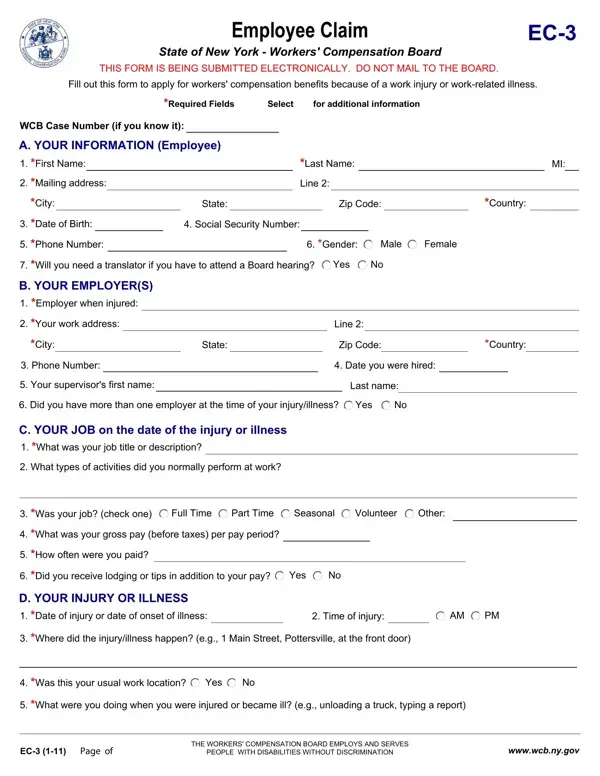
In the realm of workers' compensation in New York, the Employee Claim EC-3 form stands as a crucial document for individuals seeking benefits due to work-related injuries or illnesses. This electronic submission process simplifies the once daunting task of applying for assistance, ensuring that injured or ill workers can efficiently notify the Workers' Compensation Board of their situation without the need for mailing physical documents. The form covers extensive and necessary information, including personal details about the employee, such as their name, address, and social security number, as well as specific aspects of their employment at the time of injury or illness. It also seeks detailed descriptions of the job role, the incident that led to the injury or illness, the nature and extent of the injuries, and whether medical treatment was sought. Additionally, it addresses whether the injury has stopped the employee from working, if they have had similar injuries or illnesses before, and emphasizes the legal ramifications of submitting false information. The provision for those needing a translator at a board hearing showcases an understanding of the diverse workforce in New York. Finally, it includes instructions for submitting the form using specific operating systems, acknowledging the technological barriers that could otherwise impede the submission process. This form represents a significant step toward making the workers' compensation claims process more accessible and manageable for workers across New York.

QuestionAnswer
Form NameWcb Form Ec 3
Form Length2 pages
Fillable?No
Fillable fields0
Avg. time to fill out30 sec
Other namesform ec 60e sample, Pottersville, form ec 40h 1, ec forms

How to Edit Wcb Form Ec 3 Online for Free

It is possible to work with form ec 40h 1 without difficulty with our PDFinity® online tool. To maintain our tool on the cutting edge of practicality, we aim to integrate user-driven features and improvements on a regular basis. We're always grateful for any feedback - assist us with remolding PDF editing. With some simple steps, you'll be able to start your PDF editing:

Step 1: Hit the "Get Form" button above. It'll open up our editor so that you could start filling out your form.

Step 2: As soon as you access the file editor, you'll see the form prepared to be completed. In addition to filling out various blank fields, you could also perform other sorts of actions with the file, specifically adding your own text, modifying the original text, inserting images, putting your signature on the document, and more.

As for the fields of this specific form, here's what you want to do:

1. To get started, once completing the form ec 40h 1, beging with the area with the subsequent blanks:

Tips on how to fill out Pottersville stage 1

Step 3: Proofread what you've entered into the blank fields and click the "Done" button. Go for a free trial plan with us and obtain immediate access to form ec 40h 1 - which you'll be able to then work with as you would like inside your FormsPal account. FormsPal guarantees your information privacy via a protected system that never records or shares any personal data provided. Feel safe knowing your docs are kept safe when you work with our editor!