
Wisconsin Form 9-2009 PDF Details

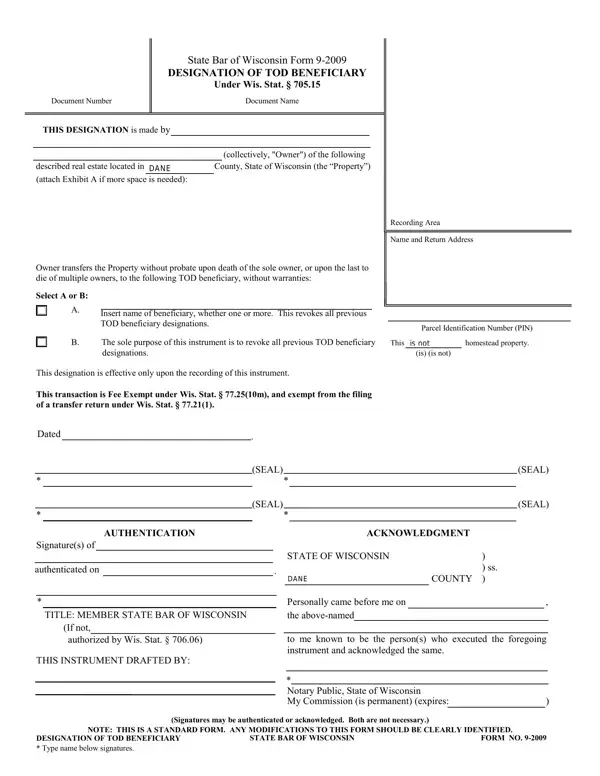
Understanding estate planning and the transfer of property upon death in Wisconsin can seem complex, but the State Bar of Wisconsin Form 9-2009, also known as the Designation of TOD (Transfer on Death) Beneficiary, provides a streamlined method for property owners to ensure their real estate bypasses probate and directly transfers to a named beneficiary. This legal document, crucial for simplifying the post-mortem transfer of property, allows the owner of real estate located within the State of Wisconsin to designate one or more beneficiaries who will inherit the property immediately upon the owner's death, or the last death among multiple owners, without the need for probate court proceedings. This designation not only enables a smooth transition of property ownership but also revokes all previous TOD beneficiary designations upon its recording. Importantly, the form is fee-exempt under specific Wisconsin Statutes, further alleviating the financial burden associated with transferring property rights. Additionally, for verification and legal acknowledgment, the form requires the signature of the property owner, which must be authenticated or acknowledged by a Notary Public, highlighting the importance of lawful execution. Through the comprehensive approach of the Wisconsin 9 form, property owners are afforded an efficient and legally sound method of planning for the future of their estate, ensuring their real estate is transferred according to their wishes with minimal complications.

QuestionAnswer
Form Name Wisconsin Form 9-2009
Form Length 1 pages
Fillable? No
Fillable fields 0
Avg. time to fill out 15 sec
Other names wisconsin deed forms, transfer on death deed form wisconsin, wisconsin transfer on death form, wisconsin designation of tod beneficiary form 9 2009

How to Edit Wisconsin Form 9-2009 Online for Free

wisconsin transfer on death deed form can be filled in online without difficulty. Just use FormsPal PDF editing tool to complete the job without delay. To make our editor better and more convenient to work with, we continuously work on new features, with our users' feedback in mind. To begin your journey, go through these basic steps:

Step 1: Firstly, access the pdf editor by clicking the "Get Form Button" in the top section of this site.

Step 2: The tool helps you work with the majority of PDF forms in a range of ways. Improve it by including customized text, correct original content, and place in a signature - all within a couple of mouse clicks!

This PDF form will involve specific details; in order to ensure correctness, please heed the tips down below:

1. To start with, while filling in the wisconsin transfer on death deed form, start out with the area containing subsequent fields:

wisconsin designation of tod beneficiary form 9 2009 writing process detailed (portion 1)

2. Immediately after this part is filled out, go on to type in the relevant details in all these - SEAL, SEAL, Dated, SEAL, SEAL, AUTHENTICATION, ACKNOWLEDGMENT, Signatures of authenticated on, TITLE MEMBER STATE BAR OF WISCONSIN, If not, authorized by Wis Stat, THIS INSTRUMENT DRAFTED BY, STATE OF WISCONSIN, COUNTY, and Personally came before me on.

wisconsin designation of tod beneficiary form 9 2009 conclusion process clarified (step 2)

Be really mindful while completing COUNTY and SEAL, because this is where many people make a few mistakes.

Step 3: Right after you've looked over the information in the file's blanks, click "Done" to finalize your FormsPal process. Right after creating afree trial account with us, you will be able to download wisconsin transfer on death deed form or send it through email promptly. The document will also be at your disposal via your personal account page with your each edit. We do not sell or share the details that you provide when dealing with documents at our website.