
Wyoming Certified Application Form PDF Details

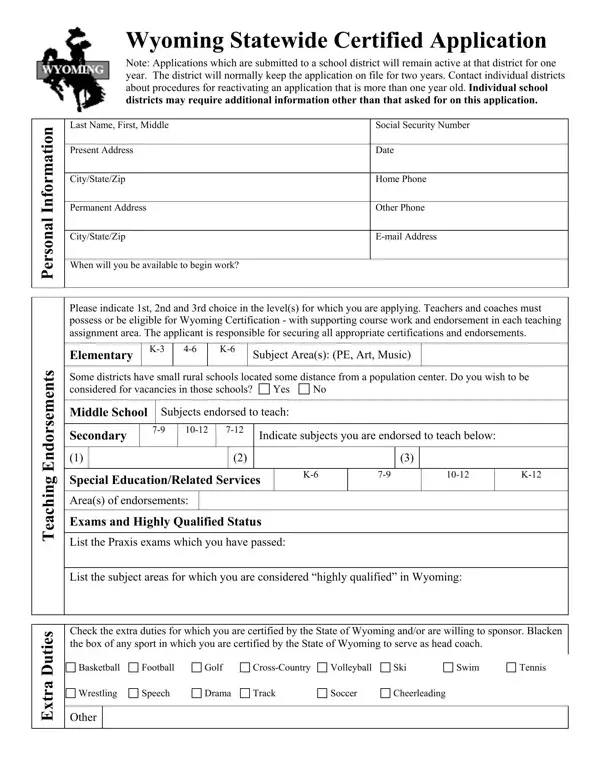
The Wyoming Statewide Certified Application is a comprehensive document designed for educators seeking employment within Wyoming's school districts. It ensures that all applicants provide a consistent set of information, facilitating the hiring process across various districts. The form remains active for one year once submitted to a district, with the possibility of extension upon contact with the respective district for reactivation if the application is older than a year. It meticulously collects personal information, including but not limited to, social security number, contact details, and availability for work. Importantly, it mandates candidates to disclose their certification status, including endorsements for specific teaching levels and subject areas, which is crucial given that teaching positions often require specific qualifications. The form also probes into applicants’ willingness to work in rural settings, a common scenario within the state. It includes sections on academic preparation and teaching experience, aiming to sketch a comprehensive picture of the applicant's educational background and professional trajectory. Furthermore, the application addresses extra-curricular competencies, asking candidates to list sports or activities they are certified to lead, highlighting the multifaceted roles teachers often play. References are a significant component, with the application allowing districts the discretion to contact non-listed individuals, underscoring the thoroughness of the background check process. The form culminates in a declaration portion where applicants must disclose any criminal history, affirm their ability to perform job-specific functions, and confirm their legal work status in the U.S. The application's comprehensive nature demonstrates Wyoming's meticulous approach to ensuring quality education through thorough vetting of its educators, also emphasizing an inclusive, non-discriminatory hiring process aligned with federal and state laws.

QuestionAnswer
Form NameWyoming Certified Application Form
Form Length4 pages
Fillable?No
Fillable fields0
Avg. time to fill out1 min
Other namessnap application printable, online snap application, printable snap application for richmond va, snap application

How to Edit Wyoming Certified Application Form Online for Free

Using PDF forms online is actually quite easy with our PDF editor. You can fill in snap application here within minutes. Our tool is constantly evolving to grant the very best user experience attainable, and that is because of our commitment to constant development and listening closely to testimonials. To get started on your journey, go through these simple steps:

Step 1: Access the PDF form in our tool by clicking on the "Get Form Button" in the top part of this page.

Step 2: As soon as you open the file editor, you will see the document prepared to be completed. Apart from filling out various blanks, you may also do various other actions with the Document, specifically adding your own words, editing the original text, inserting images, placing your signature to the form, and more.

Filling out this PDF requires care for details. Ensure all mandatory areas are filled in accurately.

1. Whenever completing the snap application, be certain to include all needed fields in their associated part. This will help speed up the work, enabling your information to be handled efficiently and properly.

Guidelines on how to fill out statewide certified part 1

2. Immediately after this part is filled out, go to enter the relevant details in these: Special EducationRelated Services, Areas of endorsements, Exams and Highly Qualified Status, List the Praxis exams which you, List the subject areas for which, Check the extra duties for which, Basketball, Football, Golf, CrossCountry, Volleyball, Ski, Swim, Tennis, and Wrestling.

Filling out part 2 in statewide certified

It is easy to make a mistake when completing the List the subject areas for which, for that reason be sure to reread it before you submit it.

3. This next portion is mostly about n o i t a r a p e r P c i m e d a, Name of School Location, Dates, Inclusive, Degree Major Minor, Major Minor, g n h c a e T, t n e d u t S, e c n e i r e p x E, Name of School Location, Supervisor, Phone, List all teaching experience and, Name of SchoolBusiness, and Location - fill in these blanks.

statewide certified completion process shown (stage 3)

4. The subsequent subsection needs your input in the following parts: e c n e i r e p x E, s e c n e r e f e R, Location, Leaving, Please list three to five persons, NameTitle, AddressCity, Email, and Phone. Remember to enter all of the needed information to go onward.

Step # 4 for submitting statewide certified

5. To conclude your document, the particular segment has some additional blank fields. Filling in s e c n e r e f e R should finalize the process and you'll certainly be done before you know it!

Best ways to fill in statewide certified portion 5

Step 3: Prior to submitting the document, ensure that blank fields were filled out right. As soon as you determine that it's fine, click “Done." Acquire the snap application as soon as you subscribe to a 7-day free trial. Readily use the pdf file within your personal account page, together with any modifications and changes automatically kept! FormsPal offers protected document editing with no personal information record-keeping or any sort of sharing. Rest assured that your data is secure here!