
Xviepo Form PDF Details

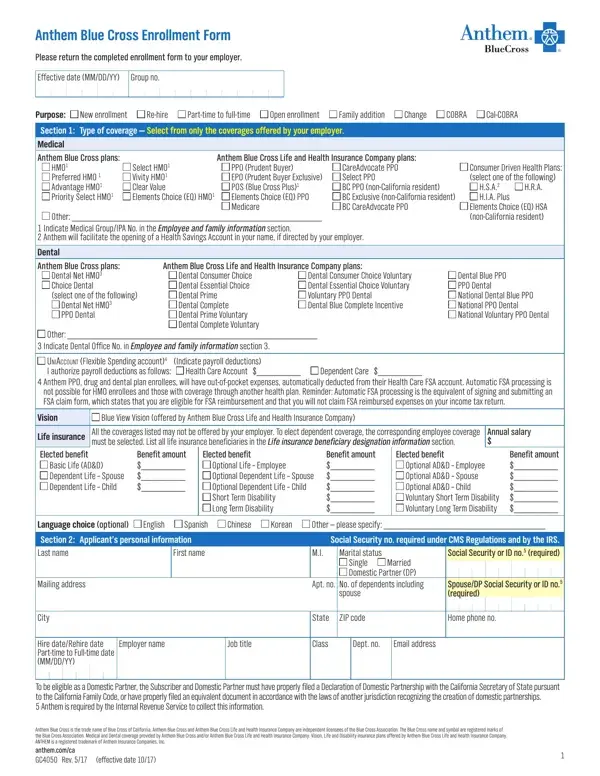
The Anthem Blue Cross Enrollment Form is an extensive document designed to facilitate the process of enrolling employees and their family members into a variety of health, dental, vision, life, and disability insurance plans provided by Anthem Blue Cross and/or Anthem Blue Cross Life and Health Insurance Company. It outlines options for new enrollments, re-hires, and changes in employment status or family situations that might affect coverage types and needs. The form is divided into several sections, capturing comprehensive personal and family information, insurance choice preferences including medical and dental plans, life, and disability insurance options, and provisions for COBRA or Cal-COBRA continuation of coverage. It also addresses other insurance coverage applicants might have, Medicare eligibility, and previous coverage details to ensure proper credit and seamless transition. Applicants are required to provide social security numbers under IRS regulations, select their language preference, and specify any declination of coverage with reasoned explanations. The importance of accurate and truthful information is stressed, along with acknowledgment of the conditions under which coverage may cease or change. Moreover, the form includes provisions for COBRA continuation coverage, offering a lifeline for continuing healthcare in situations of employment change or loss. The form ends with an attestation by the applicant concerning the veracity of the provided information, a mandatory arbitration clause for resolving disputes, and signature fields to confirm understanding and agreement with the terms of enrollment. This comprehensive approach ensures clarity, compliance, and ease of access to health benefits, highlighting Anthem Blue Cross’s commitment to serving the varied needs of its members.

QuestionAnswer
Form NameXviepo Form
Form Length4 pages
Fillable?No
Fillable fields0
Avg. time to fill out1 min
Other namesgc4050, anthem blue cross enrollment form, california blue cross enrollment, california anthem blue cross form

How to Edit Xviepo Form Online for Free

When you wish to fill out anthem enrollment form, you won't have to download any software - simply use our online tool. FormsPal team is aimed at giving you the ideal experience with our tool by regularly adding new capabilities and improvements. With all of these improvements, using our tool becomes easier than ever before! Here's what you will want to do to get going:

Step 1: First of all, open the pdf tool by clicking the "Get Form Button" in the top section of this site.

Step 2: Once you open the PDF editor, you'll notice the form ready to be completed. Aside from filling in various blanks, you may also perform some other things with the PDF, namely adding custom words, editing the initial textual content, inserting illustrations or photos, affixing your signature to the form, and a lot more.

As for the blanks of this particular document, here is what you need to know:

1. It's important to fill out the anthem enrollment form accurately, so pay close attention when filling in the areas comprising all of these blanks:

Part # 1 for filling out anthem blue cross enrollment

2. Once your current task is complete, take the next step – fill out all of these fields - UNIACCOUNT Flexible Spending, Health Care Account, Dependent Care, Anthem PPO drug and dental plan, Vision, Blue View Vision offered by Anthem, Life insurance, Elected benefit, Basic Life ADD Dependent Life, All the coverages listed may not, Annual salary, Benefit amount, Elected benefit, Optional Life Employee Optional, and Benefit amount with their corresponding information. Make sure to double check that everything has been entered correctly before continuing!

Part # 2 of completing anthem blue cross enrollment

Regarding Benefit amount and Life insurance, be certain you do everything properly here. Those two are certainly the most important ones in the document.

3. Completing Employer name, Job title, Class, Dept no, Email address, Hire dateRehire date Parttime to, To be eligible as a Domestic, Anthem Blue Cross is the trade, and effective date is essential for the next step, make sure to fill them out in their entirety. Don't miss any details!

Part # 3 in completing anthem blue cross enrollment

4. The fourth section comes next with the next few empty form fields to consider: Section Employee and family, Social Security or ID no required, Last Name Employee, SpouseDP, Sex, M F, M F, M F, M F, M F, M F, First Name, Birthdate MMDDYY, Social Security, and or ID no required.

Ways to complete anthem blue cross enrollment step 4

5. To finish your document, the last area has a couple of extra fields. Entering A Medical coverage declined for, Reason for declining coverage, Myself, SpouseDP, Children, B Dental coverage declined for, Myself, SpouseDP, Children, C Vision coverage declined for, Myself, SpouseDP, Children, D Life insurance coverage declined, and Myself will wrap up the process and you're going to be done very fast!

anthem blue cross enrollment completion process shown (stage 5)

Step 3: Before finalizing this form, make certain that form fields were filled in right. When you believe it is all fine, click “Done." Get your anthem enrollment form the instant you register online for a free trial. Conveniently use the document from your personal cabinet, with any edits and adjustments conveniently preserved! We do not sell or share the details you type in while dealing with documents at our website.