
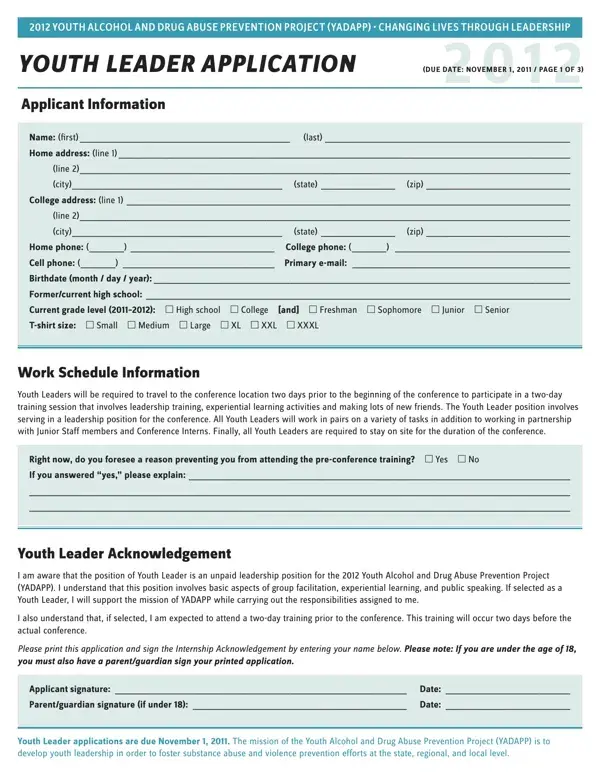
The Youth Alcohol and Drug Abuse Prevention Project (YADAPP) stands as a beacon of hope, driving the change towards a healthier future for young individuals by emphasizing the importance of leadership in combating substance abuse and violence at all levels—state, regional, and local. In its 2012 iteration, YADAPP offered a leadership opportunity for motivated youths through its Youth Leader Application process, demanding applications by November 1, 2011. The application process was designed not only to gather basic applicant information but also to delve into the applicants' passion for leadership and their vision for a substance-abuse-free community. Prospective Youth Leaders were expected to attend a preparatory two-day training session before the conference, highlighting the project's commitment to building well-rounded leaders capable of facilitating groups and handling various tasks throughout the conference duration. Furthermore, they had to navigate through reflective short answer questions that explored their personal motivations, experiences with leadership, and desire to be a part of YADAPP, underscoring the project's aim at fostering insightful, committed individuals who can spearhead change. Alongside the application, recommendation forms required endorsements from adults familiar with the applicants’ capabilities, ensuring a well-rounded view of their potential as leaders. This meticulously structured application process demonstrates YADAPP’s rigorous approach towards crafting a youth-driven movement aimed at eradicating alcohol and drug abuse through leadership, making it a transformative experience for the participants and a pioneering initiative in youth empowerment and substance abuse prevention.
| Question | Answer |
|---|---|
| Form Name | Yadapp Form |
| Form Length | 5 pages |
| Fillable? | No |
| Fillable fields | 0 |
| Avg. time to fill out | 1 min 15 sec |
| Other names | yadapp, yadsapp, yadapp intern application, yadapp application |
Yadapp Form isn’t the one you’re looking for?