
Updated:
Get Form Now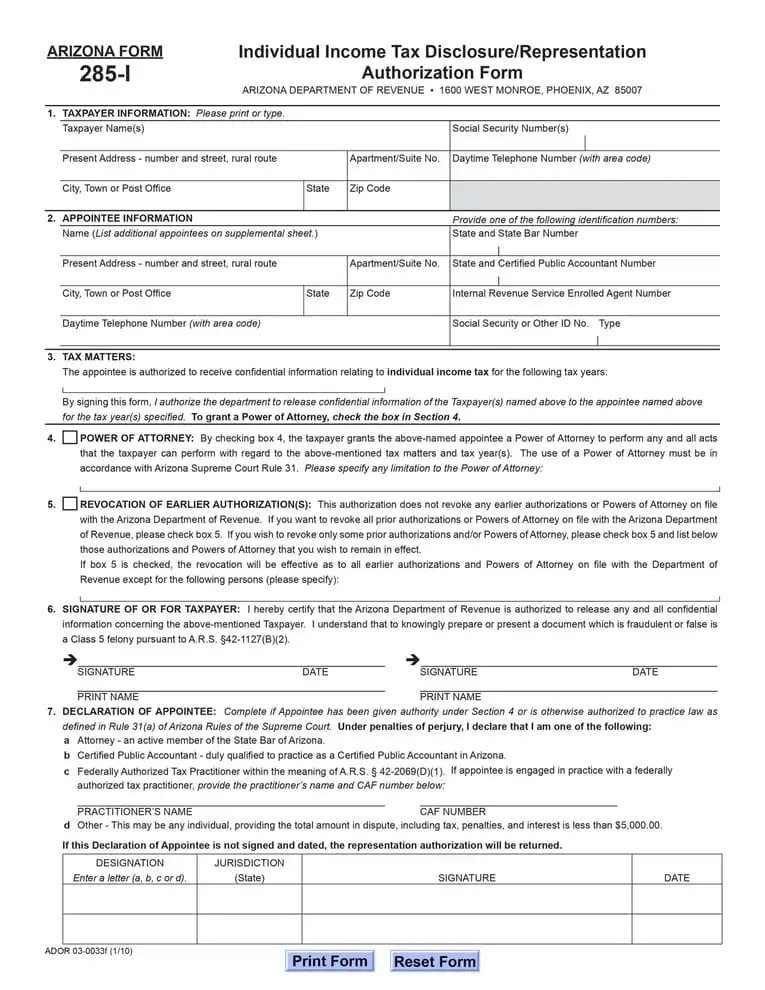
An Arizona tax power of attorney is a document that lets you name another person, such as a tax preparer, to handle your state tax matters for you. You can build the template with our tools, fill in the fields on screen, and download it as a PDF.
To transfer some or all of your authority over tax matters, you will need to use the Arizona Tax Power of Attorney form. The Arizona Revised Statutes regulate taxation in Arizona. Arizona Department of Revenue (ADOR) is the central state authority responsible for resolving tax matters and issuing all kinds of legal documents.
Before proceeding to the fillable power of attorney form, let us get acquainted with the local legal procedures and peculiarities. Usually, preparers deal with all tax-related issues. They are specialists responsible for:
In plain terms, the form lets a person you trust, such as a tax preparer, talk to the state about your tax matters so you do not have to handle every step yourself.
Browse all the Arizona POA documents you can use in our Arizona guide.
Here are the key facts about the Arizona tax power of attorney form at a glance. The state calls it Arizona Form 285-I. It has 36 fillable fields and takes about 10 minutes to fill out. You can get it as an Adobe PDF.
| Document Name | Arizona Tax Power of Attorney Form |
| State Form Name | Arizona Form 285-I |
| Relevant Link | Arizona Department of Revenue |
| Where to File? | Arizona Department of Revenue Individual Income Tax Section 1600 W. Monroe Phoenix, AZ 85007 |
| Avg. Time to Fill Out | 10 minutes |
| # of Fillable Fields | 36 |
| Available Formats | Adobe PDF |
You might need a preparer to take care of all proceedings and ensure that your documents comply with the existing requirements. The ADOR has an electronic filing system that makes the whole process much simpler. Yet, according to the revised legislation, the Department retains the right to decline your electronic filing.
Preparers are familiar with the order and will do the work more efficiently. But to use the preparer’s services, you need to assign them the authority to act on your behalf in tax matters.
Ask your preparer which tax types and case numbers they need from you, then have them ready before you fill in step 4 of the form.
Any tax report contains confidential information. Therefore, this particular sphere of socio-economic relations, including the transfer of authority, is regulated differently. ADOR has transferred its authority to resolve tax cases to the state Office of Administrative Hearings. Thus, the Arizona Statutes make it obligatory to provide written authorization before the Office of Administrative Hearings reveals confidential tax data.
Pick the form that matches your situation:
Collect these details before you open the template. With everything at hand, the power of attorney form goes quickly and you avoid stopping halfway to look up a number or a street address.
Check that every name you enter matches the name on the matching ID before you start filling in the fields.
You may find and download the Arizona Tax Power of Attorney form on the official website of the Department of Revenue. But for your convenience, we suggest using our software tools to build and download the template.
Follow these steps in order to complete the form.


The taxpayer’s appointee(s) have to verify the document as a sign of their consent. Pay special attention to this section. Only the signature of the Attorney-in-Fact is required. Without proper verification, the document will not be accepted.
All legal representatives will have to put down their printed names, signatures, and titles (if applicable). By expressing their consent, the representatives confirm that the state Director of Administrative Hearings Office can release confidential information on the concerned tax matters and is not liable for this action.

Upon completion, you will need to mail the signed form to the state Office of Administrative Hearings. You will find the necessary address at the bottom of the second page of your form.
Look over the finished form one more time and compare each entry with your records before you print and sign it.
The form has 36 fillable fields and takes about 10 minutes to fill out. Have your numbers and the representatives’ contact details ready so you do not need to stop.
Yes. Build the template with our tools and download it as a PDF. Then fill in the PDF with the FormsPal PDF editor, or print it and write by hand.
Have the taxpayer’s name, address, and phone number, the tax ID numbers, and each representative’s contact details. The list above gathers everything in one place.
Make a copy for your records and give each representative a copy. Then send the signed original as shown in the last step of the guide.
General information, not legal or tax advice.
