
Updated:
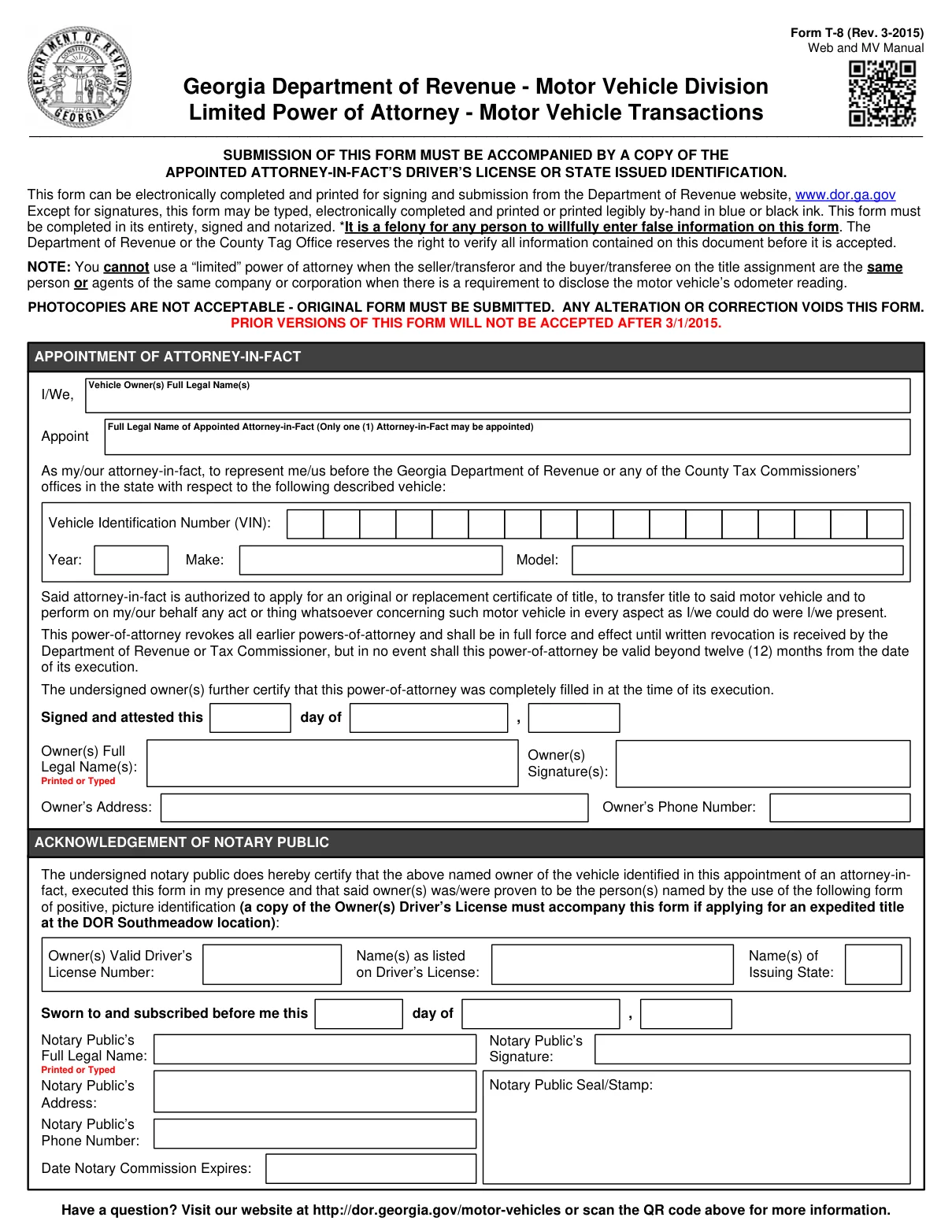
A Georgia motor vehicle power of attorney is a limited power of attorney. The vehicle owner, called the principal, gives another person the authority to act on their behalf in title and registration matters for one vehicle. You can create the FormsPal template online with Create My Document, or download the official Georgia Form T-8 as a PDF and complete it with the steps below.
Build Your Document
Answer a few simple questions to make your document in minutes
Save and Print
Save progress and finish on any device, download and print anytime
Sign and Use
Your valid, lawyer-approved document is ready
The Georgia Vehicle Power of Attorney makes it legitimate to grant the designated Attorney-in-Fact all DOR-issues-related rights as if the owners of the vehicle dealt with the matters themselves. The list of possible powers includes:
Keep in mind that it is not possible to use the “limited” POA in the state if the transferor and the transferee on the title are the same persons (or agents of the same corporation) when you need to attach the Odometer Reading Disclosure.[1] Form T-8 itself says it must be completed in its entirety, signed and notarized.[1]
Should you want to learn more about other Georgia power of attorney templates, check our dedicated state article linked in this section.
The table below lists the document name, the state form title, the official link, the file format and other basics of Georgia Form T-8, the official form this page hands out. The form has fillable fields, so you can type into the PDF on a screen before you print it, or print it and write the answers by hand.
| Document Name | Georgia Motor Vehicle Power of Attorney Form |
| State Form Name | Limited Power of Attorney - Motor Vehicle Transactions, Form T-8 (Rev. 3-2015) |
| Relevant Link | Georgia Department of Revenue |
| Valid for | 12 Months |
| Avg. Time to Fill Out | 8 minutes |
| # of Fillable Fields | 22 |
| Available Formats | Adobe PDF |
These steps follow Georgia Form T-8, Limited Power of Attorney - Motor Vehicle Transactions (Rev. 3-2015), the official form this page hands out, part by part, in the order the form runs. You may choose to type, electronically print, or print the information by-hand.[1] The form should be completed in its entirety.[1] Any alteration or correction voids the form, so check each entry before you print.[1]
The screenshots under each step show Georgia Form T-8, the official Georgia Department of Revenue form, filled with sample entries in blue, so you can see where each answer goes. The names, addresses, dates and vehicle details are examples only.
I/We
In the Appointment of Attorney-in-Fact section, print the full legal name of each vehicle owner in the box after “I/We”. Check that the names match your IDs.

Appoint
In the box after “Appoint”, print the full legal name of the person you choose as your attorney-in-fact. Only one Attorney-in-Fact may be chosen to represent the owner.[1]

Vehicle Identification Number (VIN), Year, Make and Model
The form appoints your attorney-in-fact to represent you before the Georgia Department of Revenue or any of the County Tax Commissioners’ offices for the vehicle you describe here.[1] Enter the VIN one character per box, then the year, make and model. Copy them from the vehicle’s title or registration to avoid typos.

Signed and attested this day of
The paragraphs above this line are printed on the form, so there is nothing to enter there. They let your attorney-in-fact apply for an original or replacement certificate of title, transfer title and act for you on the vehicle. They also say the form revokes all earlier powers of attorney and is never valid beyond twelve months from the date you sign it, and that you certify it was completely filled in when you signed.[1] On the “Signed and attested this” line, enter the day, the month and the year you sign.

Owner(s) Full Legal Name(s), Signature(s), Address and Phone Number
Print or type each owner’s full legal name, then add the owner’s address and phone number. The Owner(s) Signature(s) box has no fillable field. Except for signatures, the form may be typed, so sign it by hand after you print.[1]

Acknowledgement of Notary Public
This part is for the notary public. The notary certifies that the owner executed the form in the notary’s presence and was proven to be the person named by positive, picture identification.[1] The lines for the owner’s valid driver’s license number, the name as listed on the driver’s license and the issuing state record that identification. The form adds that a copy of the owner’s driver’s license must accompany it if you apply for an expedited title at the DOR Southmeadow location.[1]

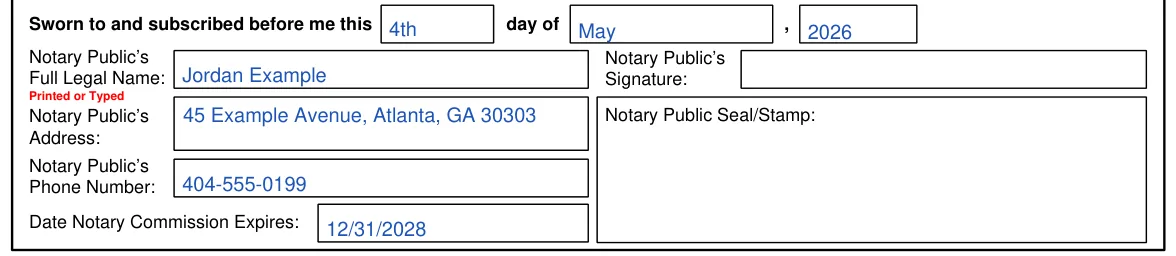
Sworn to and subscribed before me
The notary enters the day, month and year, signs, and adds their full legal name, address, phone number, seal or stamp and the date their notary commission expires.[1]
Remember that providing false or misleading facts in the paper is considered a felony.[1]
Complete the PDF on a screen first and print it afterward. Typed answers are easier to read, and you can fix a typo without starting over. Review every entry before you print.
Once every part of the form is complete, these steps take it from a finished draft to a signed paper you can use. What signing takes depends on the document you use: Form T-8, the official form this page hands out, or the FormsPal template you get from Create My Document. Go through the steps in order.
Add Your Signature
Check each entry against your IDs before signing. On Form T-8, the notary certifies that the owner executed the form in the notary’s presence, so sign the Owner(s) Signature(s) box when you are with the notary.[1]
Notarize Form T-8
Form T-8 must be completed in its entirety, signed and notarized.[1] In its Acknowledgement of Notary Public, the notary certifies that the owner was proven to be the person named by positive, picture identification, and the form records the owner’s driver’s license number, the name as listed on the license and the issuing state. The notary then adds the date, a signature, a seal or stamp and the date their notary commission expires.[1]
Signing the FormsPal template
The FormsPal template from Create My Document is a different document from Form T-8. For the template, the signing rule comes from Georgia’s power of attorney law, O.C.G.A. Title 10, Chapter 6B. Under it, a power of attorney must be signed by the principal, or by another individual in the principal’s presence at the principal’s express direction. It must be attested in the principal’s presence by a competent witness who is not named as an agent in it. It must also be attested as set forth in Code Section 44-2-15, in the principal’s presence, by an individual who is not that witness and is not named as an agent.[3] The template’s acknowledgment is the part a notary public or other officer completes.
Hand In the Form
Form T-8 can be electronically completed and printed for signing and submission.[1] Your attorney-in-fact then uses the signed original before the Georgia Department of Revenue or a County Tax Commissioner’s office, and the Department of Revenue or the County Tag Office may verify all information on it before it is accepted.[1] Keep a copy of the signed form for your records.
When you submit Form T-8, it is necessary to provide a copy of the Attorney-in-Fact’s valid driving license or state issued identification.[1] Only an original version of Form T-8 will be accepted, because photocopies are not acceptable.[1]
Completing Form T-8, this power of attorney form, revokes all earlier chosen POAs and shall be effective until the DOR receives the revocation in writing.[1] Form T-8 loses validity after 12 months.[1]
Laws regulating POA forms are included in Title 10 of the Georgia Code (Chapter 6B).[2]
It is a limited, legal form that gives another person the authority to act on behalf of a vehicle owner in title and registration matters. The owner is the principal, and the person chosen is the agent. It is narrower than a general power of attorney, which covers a wider range of tasks. This page hands out the official Georgia Form T-8 as a PDF, and FormsPal also offers a power of attorney template you can complete online.
Yes. Use the Create My Document button at the top of this page and answer a few questions to build the FormsPal template. You can then save your progress, download it and print it. Form T-8, the official PDF this page hands out, can also be electronically completed and printed for signing.[1]
Open the file in the FormsPal PDF editor to type your answers, or print it and write them in by hand. Follow the steps above so each answer goes in the right place.
Gather these items before you start. Form T-8 asks for:
Yes. If you are also selling the vehicle, FormsPal has a Georgia bill of sale page. For the notary public step, see the Georgia notary acknowledgement page, or read the vehicle power of attorney overview for the wider picture.
General information, not legal or tax advice.
