
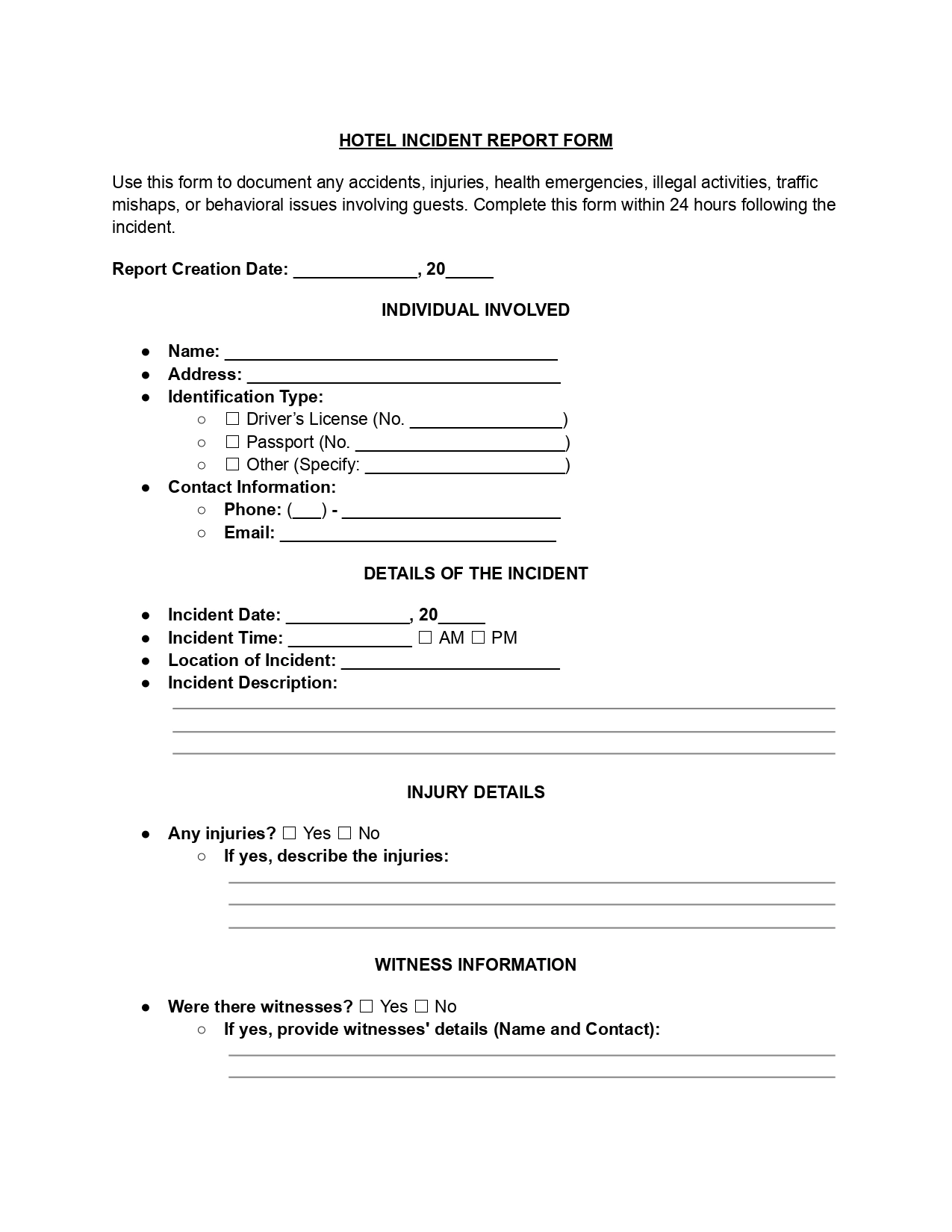
A hotel guest incident report is a document hotels use to record any incidents or accidents involving guests on their premises. This form is essential to the hotel’s risk management and safety protocols.
Last Updated: October 2026. This guide is reviewed and updated regularly to reflect current law. If you notice an error or outdated information, please contact us.
The purpose of the guest incident report is to document the details of cases that may involve injury, property damage, theft, or other significant occurrence. This will help hotel management handle the situation appropriately and provide a record for future reference in insurance claims and legal matters.
A completed report gives management, security teams, and insurers the same consistent set of facts. Careful reporting also helps your team spot repeat problems, such as a wet floor near the pool entrance that keeps causing accidents.
A guest incident report template should be used whenever an event occurs within hotel premises that could potentially impact the safety, security, or satisfaction of guests, staff, or the property. These incidents could range from minor accidents to more severe situations requiring immediate attention and possibly follow-up actions to prevent future occurrences.
Here are some common scenarios where this template would be handy:
The form includes sections for recording the incident’s date, time, and location, a detailed description of what happened, and any witnesses’ names and contact information. It also asks for the details of the person involved, including a phone number and room number.
Our guest incident report form contains a field for internal use and a description of follow-up actions, such as notifying hotel security, contacting emergency services, or other procedures.
Here is a step-by-step guide on properly filling out a hotel incident report template (Word or PDF). You can download a file or use our document editor. Before you start, have these details at hand:
Start by filling in the date when the incident report is being created. This helps to establish a timeline for the incident and the reporting process.
Include the full name, address, and contact information of the individual involved in the incident. Select the type of identification provided (Driver’s License, Passport, or Other) and fill in the respective identification number. Check that the name on the report matches the name on the ID.
Record the date and time of the incident, specifying AM or PM. Clearly describe the location within the hotel where the incident occurred. Provide a detailed description of what happened during the incident. Stick to facts you saw or heard.
If there were any injuries, check “Yes” and describe the injuries sustained. If no injuries occurred, check “No.” Describe what you can see, such as a cut or swelling, and add what the injured person says about how it happened.
If there were witnesses to the incident, check “Yes” and provide their names and contact information. If there were no witnesses, check “No.”
Indicate whether the police were notified. If a police report was filed, check “Yes.” Detail if medical assistance was given, refused, or if treatment was provided on-site, at a hospital, or elsewhere.
The person filling out the report should sign their name and print it below the signature. Also, include the date on which the report is submitted. Keep a signed copy for your records.
This section is for office use only and should be filled out by hotel management or the relevant department. Document who received the report, its date, and any actions taken in response to the incident.
A clear account makes the report useful to everyone who reads it later, from the manager to an insurance adjuster. Good reporting starts soon after the accident, while the details are still fresh. These habits keep a report useful:
Tip: Take photos of the area, such as a wet floor or a damaged door, and note in the report that photos exist. Store them together with the report.
A good account reads like a short news report. It covers the time, the place, the people involved, and what employees did next. Here is a sample you can adapt, with made-up names and room numbers:
Sample entry: At about 9:15 PM, Anna Baker slipped on a wet tile floor near the pool entrance on the ground level. She fell onto her left arm and reported pain in her wrist.
The front desk agent, Mark Lee, called the night manager and an ambulance. Two other visitors, Tom Rivera in room 214 and Priya Shah in room 218, saw the fall. Paramedics checked her arm at the scene, and she declined a trip to the hospital.
Most problems with incident reporting come from rushing or guessing. Reports with gaps or opinions are harder for managers and insurers to review, and they help no one if questions come up later. Watch for these common mistakes:
An incident report holds names, phone numbers, room numbers, and sometimes medical information. Information on these forms is often sensitive. Hotels must handle them with a high degree of confidentiality and in accordance with privacy laws.
Once the report is signed, hand it to the management team or the department that handles these issues. Prompt reporting lets a quick review catch missing details while everyone still remembers the event. Then work through this list:
A hotel incident report is a written record of an accident, injury, theft, property damage, or other unusual event involving a guest. It documents the people involved, the sequence of events, the witnesses, and the response of the team, so that anyone reviewing the file understands the circumstances.
Usually the employee who saw or handled the incident, such as a front desk agent, a manager, or a security officer in charge. That individual signs the completed report, which confirms responsibility for the information it contains.
Yes. Open the form in the online editor, type your answers, and save the completed file. Alternatively, you can download the Word or PDF version, print it, and complete it by hand.
The form requests the following information about the person involved:
Check that every detail matches what the person told you or showed you.
Write it as soon as the accident scene is under control and the injured person is safe. A report finished the same day is considerably more accurate, because times, names, and other details are still clear in everyone’s memory.
Mention in the report that photographs or video recordings exist, then store them in the same folder as the report. Label each file with the time and location so that employees can identify the correct one afterward.
Check “No” in the witness question, then describe what happened as completely as you can. Note who discovered the scene and at what time, together with the names of the employees who responded.
Check “Yes” in the injury question and write what you can see, such as a cut, a bruise, or swelling. Add what the person tells you about how it happened and whether medical help was offered.
General information, not legal or tax advice.
