
Aadhar Card Form PDF Details

The Aadhaar Card is a 12-digit unique identification number issued by the Unique Identification Authority of India (UIDAI) to residents of India. It serves as a foundational document for accessing government services, subsidies, and welfare schemes.

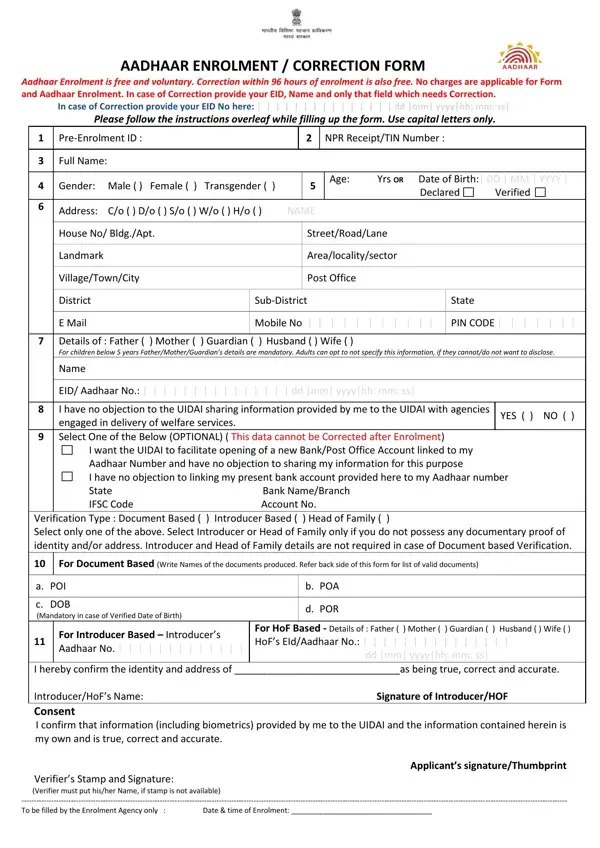
The Aadhaar Enrolment/Correction Form is provided free of charge and covers two main uses: enrolling for a new Aadhaar number, or correcting existing details such as your name, address, date of birth, or biometric information. Corrections made within 96 hours of initial enrolment are processed at no cost.

Three verification paths are available: document-based (using a valid government ID), introducer-based, and head-of-family-based. When completing the form, accurate information is required across personal details, biometric data, and demographic sections. The form also allows residents to link their Aadhaar to a bank account or update other linked services.

QuestionAnswer
Form NameAadhar Card Form
Form Length2 pages
Fillable?No
Fillable fields0
Avg. time to fill out30 sec
Other namescertificate for aadhaar enrolment update form pdf download 2021, aadhaar form pdf, aadhar form pdf, aadhaar form

How to Edit Aadhar Card Form Online for Free

Follow these steps to complete your Aadhaar Enrolment or Correction Form and submit it at an authorized UIDAI centre.

Step 1: Download or Collect the Form

Download the Aadhaar Card form from this page as a PDF file. You can also collect a physical copy at any UIDAI-authorized enrolment centre near you. The form is free to obtain and submit.

Step 2: Fill in Your Personal Information

Enter your full legal name, date of birth, gender, and residential address. All personal details must match the supporting documents you plan to submit. Avoid abbreviations in the name field to prevent rejection.

Step 3: Choose Your Verification Method

Select one of three verification types listed on the form. Document-based verification is the most common and requires a valid government ID such as a passport, voter ID, or driving license. Introducer-based and head-of-family-based options are available when standard documents are not accessible.

Step 4: Submit at an Enrolment Centre

Take your completed form along with original supporting documents to the nearest UIDAI enrolment centre. Biometric data including fingerprints and iris scans will be captured during your visit. You will receive an enrolment ID slip as proof of submission.

What Documents Are Required for Aadhaar Enrolment?

You must provide proof of identity and proof of address. Accepted identity documents include a passport, voter ID, PAN card, or driving license. For address proof, a recent bank statement, utility bill, or ration card are valid options. A birth certificate may also be used as supporting proof of age.

How to Link Your Aadhaar to a Bank Account

After receiving your Aadhaar number, you can link it to your bank account through your bank's branch or online portal. Aadhaar linking is required to receive government subsidies and direct benefit transfers. To open a new bank account, refer to the Bank of India Account Opening Form or the Indian Bank Account Opening Form.

Frequently Asked Questions About the Aadhaar Card Form

Is Aadhaar enrolment mandatory?

No. Aadhaar enrolment is voluntary for Indian residents. However, it is required to access many government services and welfare schemes across India.

What is the cost of Aadhaar corrections?

Demographic corrections such as name, address, or date of birth updates carry a nominal fee at enrolment centres. Corrections submitted within 96 hours of the original enrolment are processed free of charge.

Can I update my Aadhaar details online?

Yes. UIDAI allows address updates and some demographic changes through the myAadhaar self-service portal. Biometric updates must be completed in person at an enrolment centre.

How long does Aadhaar processing take?

After submitting your enrolment form, your Aadhaar number is typically generated within 90 days. You will receive an SMS notification on your registered mobile number once it is ready for download or postal delivery.