Please rate Advocate Classifieds Form

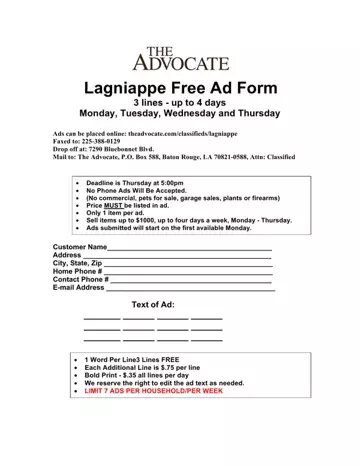
The Advocate Classifieds form connects private sellers in the Baton Rouge area with local buyers through The Advocate newspaper's classified section. The form covers personal, non-commercial transactions involving household items, electronics, furniture, and similar goods.
The Advocate Classifieds form accepts ads for personal property priced at or below $1,000. Ads run free for up to three lines, Monday through Thursday. Each submission covers one item only and must include a listed price. The following categories are not eligible: commercial sales, pets, garage sales, plants, and firearms.
All submissions must arrive by Thursday at 5:00 p.m. to run in the following week's edition. The Advocate accepts submissions online, by fax, by mail, and by in-person drop-off. Phone submissions are not accepted. Additional lines beyond the free three-line limit and bold formatting are available for a small extra fee.
Each ad should state the item name, its condition, a clear price, and a contact method. Short descriptions perform better than lengthy ones. The Advocate's Lagniappe Ads section uses the same form and covers the same categories. After a sale, use the Furniture Bill of Sale or the Declaration of Buyer and Seller to document the transaction.
If you are listing business property rather than personal items, the Commercial Listing Form is a better fit. Sellers who post job openings in the Baton Rouge Advocate classifieds can browse the Employment Forms collection for hiring paperwork.
| Question | Answer |
|---|---|
| Form Name | Advocate Classifieds Form |
| Form Length | 1 pages |
| Fillable? | No |
| Fillable fields | 0 |
| Avg. time to fill out | 15 sec |
| Other names | the advocate garage sales, 2 the advocate classifieds, advocate newspaper classifieds, the advocate classifieds garage sales |
Advocate Classifieds Form isn’t the one you’re looking for?
Please rate Advocate Classifieds Form
