Aetc Form 29B PDF Details

What the Form Covers

The predeparture safety briefing record is a structured guide for unit commanders conducting predeparture counseling. It starts with instructions for the briefing officer, followed by a detailed checklist covering the most common causes of accidents among young military personnel. The checklist addresses planning the journey carefully, confirming the vehicle is in good mechanical condition, and avoiding driving late at night when the risk from fatigued or impaired drivers is highest.

The briefing also covers financial readiness for longer trips, such as carrying sufficient funds and planning for unexpected expenses. It covers awareness of weather and road conditions along the planned route. Personnel who ride motorcycles, operate ATVs, use personal watercraft, or participate in other high-risk recreational activities must receive an additional specialized briefing. Commanders document this extra briefing in Part I of the form and both parties sign to confirm it took place.

Who Must Complete This Briefing

The requirement applies to all Air Force military personnel under age 26, regardless of rank or duty status. It is required for every qualifying trip, whether personal leave, temporary duty (TDY) orders, or a permanent change of station (PCS) move. The rule covers both short weekend trips and extended travel.

Both the service member and the briefing officer must sign the completed document before departure. The briefing officer is typically the unit commander or a designated representative. Units must retain completed forms in accordance with Air Force records management schedules. Failure to complete the predeparture briefing before departure is a regulatory violation that can result in disciplinary action.

Form Structure and Key Sections

The form is organized into four main parts, each serving a distinct purpose in the predeparture process.

Part I is the individual predeparture briefing record. This section captures the name, grade, and organization of the individual being briefed. It records the briefing date and the signatures of both the individual and the briefing officer. If a high-risk recreational activity briefing is required, it is documented and signed here as well.

Part II is the commander's briefing guide. It provides a structured agenda that the briefing officer can follow during the counseling session. The guide covers each topic in a logical order, from departure planning through return expectations. Having a written agenda ensures every briefing covers all required areas consistently.

Part III contains the proposed travel itinerary. Service members record the trip destination, planned route, emergency contact information, and the expected return date. Commanders review and approve the itinerary as part of the predeparture process. This documentation helps units locate personnel quickly in the event of an emergency during the trip.

Part IV supports group briefings and installation-specific information. When several personnel depart at the same time, the commander can complete a single group briefing record instead of separate individual records for each person. This section also holds current local safety alerts, road hazard warnings, and any unit-specific travel restrictions in effect at the time.

Related Air Force Forms You May Need

Units frequently use this form alongside other Air Force safety documents. The AETC Form 410 applies specifically when personnel plan motorcycle travel. It documents completion of the Air Force Motorcycle Safety Program and is required before any motorcycle trip on or off the installation. For pre-trip vehicle checks, the vehicle safety inspection checklist covers the mechanical items commanders should verify before approving a road trip. Personnel traveling on official TDY orders will also need the DD Form 1351-2 to claim travel expense reimbursement.

QuestionAnswer
Form NameAetc Form 29B
Form Length2 pages
Fillable?No
Fillable fields0
Avg. time to fill out30 sec
Other names29b air force, air force 29b form, 29b pdf, aetc form 29b

Form Preview Example

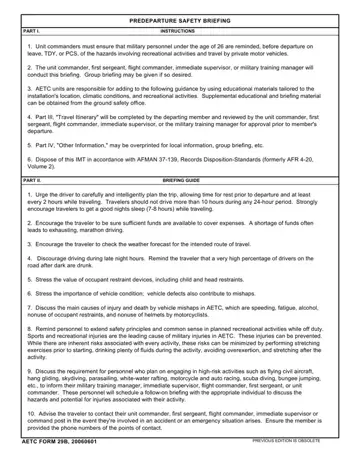
PREDEPARTURE SAFETY BRIEFING

PART I.

INSTRUCTIONS

1.Unit commanders must ensure that military personnel under the age of 26 are reminded, before departure on leave, TDY, or PCS, of the hazards involving recreational activities and travel by private motor vehicles.

2.The unit commander, first sergeant, flight commander, immediate supervisor, or military training manager will conduct this briefing. Group briefing may be given if so desired.

3.AETC units are responsible for adding to the following guidance by using educational materials tailored to the installation's location, climatic conditions, and recreational activities. Supplemental educational and briefing material can be obtained from the ground safety office.

4.Part III, "Travel Itinerary" will be completed by the departing member and reviewed by the unit commander, first sergeant, flight commander, immediate supervisor, or the military training manager for approval prior to member's departure.

5.Part IV, "Other Information," may be overprinted for local information, group briefing, etc.

6.Dispose of this IMT in accordance with AFMAN 37-139, Records Disposition-Standards (formerly AFR 4-20, Volume 2).

PART II.

BRIEFING GUIDE

1.Urge the driver to carefully and intelligently plan the trip, allowing time for rest prior to departure and at least every 2 hours while traveling. Travelers should not drive more than 10 hours during any 24-hour period. Strongly encourage travelers to get a good nights sleep (7-8 hours) while traveling.

2.Encourage the traveler to be sure sufficient funds are available to cover expenses. A shortage of funds often leads to exhausting, marathon driving.

3.Encourage the traveler to check the weather forecast for the intended route of travel.

4.Discourage driving during late night hours. Remind the traveler that a very high percentage of drivers on the road after dark are drunk.

5.Stress the value of occupant restraint devices, including child and head restraints.

6.Stress the importance of vehicle condition; vehicle defects also contribute to mishaps.

7.Discuss the main causes of injury and death by vehicle mishaps in AETC, which are speeding, fatigue, alcohol, nonuse of occupant restraints, and nonuse of helmets by motorcyclists.

8. Remind personnel to extend safety principles and common sense in planned recreational activities while off duty. Sports and recreational injuries are the leading cause of military injuries in AETC. These injuries can be prevented. While there are inherent risks associated with every activity, these risks can be minimized by performing stretching exercises prior to starting, drinking plenty of fluids during the activity, avoiding overexertion, and stretching after the activity.

9.Discuss the requirement for personnel who plan on engaging in high-risk activities such as flying civil aircraft, hang gliding, skydiving, parasailing, white-water rafting, motorcycle and auto racing, scuba diving, bungee jumping, etc., to inform their military training manager, immediate supervisor, flight commander, first sergeant, or unit commander. These personnel will schedule a follow-on briefing with the appropriate individual to discuss the hazards and potential for injuries associated with their activity.

10.Advise the traveler to contact their unit commander, first sergeant, flight commander, immediate supervisor or command post in the event they're involved in an accident or an emergency situation arises. Ensure the member is provided the phone numbers of the points of contact.

AETC FORM 29B, 20060601

PREVIOUS EDITION IS OBSOLETE

PART III.

PROPOSED TRAVEL ITINERARY

CHECK THE APPLICABLE MODES OF TRANSPORTATION

PRIVATE MOTOR VEHICLE


AIRPLANE


BUS


TRAIN

OTHER (Specify)


DEPARTURE DATE

FINAL DESTINATION

PROVIDE INFORMATION BELOW FOR EACH DAY OF TRAVEL:

DATE

DEPARTURE POINT

ARRIVAL POINT

LENGTH OF

REST PERIOD

APPROXIMATE

MILEAGE

PART IV.

OTHER INFORMATION (Local information, group briefings, etc.)

I understand that injuries incurred as a result of my driving under the influence of alcohol or failure to utilize required

safety devices may result in a loss of medical benefits, as well as potential UCMJ action.

NAME, GRADE AND ORGANIZATION OF INDIVIDUAL BRIEFED

DATE BRIEFED

SIGNATURE OF INDIVIDUAL BRIEFED

BRIEFED AND REVIEWED BY (

AETC FORM 29B, 20060601 (REVERSE)

How to Edit Aetc Form 29B Online for Free

Our free online PDF editor makes it straightforward to complete this Air Force safety form directly in your browser. There is no download or software installation required. The tool works on desktop computers, tablets, and mobile phones, and your completed document can be downloaded, printed, or sent by email.

How to Complete the Form Online

Step 1: Open the Form. Click the orange "Get Form Now" button at the top of the page to load the form in the editor. The editor opens in your browser window and displays the form fields ready for input.

Step 2: Fill in the Briefing Record Fields. Enter the name, grade, and organization of the individual being briefed. Select or type the briefing date. Fill in the signature fields for both the individual and the briefing officer. If a high-risk activity briefing is also required, complete the additional signature block in Part I.

portion of empty spaces in form 29b download

Step 3: Complete the Travel and Administrative Fields. Enter the required data in the NAME GRADE AND ORGANIZATION OF, DATE BRIEFED, SIGNATURE OF INDIVIDUAL BRIEFED, BRIEFED AND REVIEWED BY, and AETC FORM B REVERSE fields. Fill in Part III with the trip destination, planned route, emergency contact information, and expected return date.

step 2 to completing form 29b download

Step 4: Save Your Completed Form. Click the "Done" button when all required fields are filled in. You can then download the PDF to your device, print it immediately, or email it to the appropriate parties. Your information is kept private and will not be shared.

Helpful Tips for Commanders and Personnel

  • Complete the form at least 24 hours before the planned departure date to allow time for review and any necessary follow-up.
  • Confirm both signatures are on the form before filing. An unsigned form does not satisfy the regulatory requirement.
  • Retain a copy of every completed form in unit records according to Air Force records management schedules.
  • For motorcycle and ATV travel, complete the additional high-risk activity briefing in Part I and document it with a separate signature from the individual.
  • Fill in Part III with accurate destination, route, and return date information. Vague itineraries reduce the unit's ability to respond quickly in an emergency.
  • Use Part IV to capture any current installation safety notices, road closures, or weather advisories relevant to the departure date.
  • When briefing multiple personnel departing at the same time, use Part IV to record a group briefing instead of completing separate forms for each individual.

Frequently Asked Questions

Who signs the completed form? Both the individual being briefed and the briefing officer must sign. The briefing officer is typically the unit commander or a designated safety representative.

Is this the same as AETC Form 29B? Yes. "AF Form 29B," "Air Force Form 29B," and "AETC Form 29B" all refer to the same official predeparture safety briefing form. The full official designation is AETC Form 29B.

Does a prior briefing carry over to a new trip? No. The form must be completed separately for each departure. A briefing completed for a prior leave period does not satisfy the requirement for a new trip, even if the destination is the same.

Can the form be completed and saved online? Yes. Use the editor at the top of this page to fill in all required fields and then download the completed PDF. The download is ready to print or save to your device.

What if a service member plans to ride a motorcycle? Motorcycle travel requires an additional high-risk activity briefing beyond the standard predeparture safety briefing. Both briefings are recorded and signed in Part I of the form. The AETC Form 410 may also be required to document Motorcycle Safety Program completion.

What is the consequence of not completing the form? Departing without a completed predeparture briefing is a violation of AETC safety regulations. Commanders are responsible for ensuring every qualifying personnel member completes the briefing before departure. Non-compliance can result in disciplinary action for both the individual and the unit commander.

For related Air Force administrative forms, the Air Force Form 1168 is used for additional administrative requirements. The vehicle safety inspection checklist supports pre-trip vehicle verification for road travel.

Watch Aetc Form 29B Video Instruction

Please rate Aetc Form 29B

1 Votes
If you believe this page is infringing on your copyright, please familiarize yourself with and follow our DMCA notice and takedown process - click here to proceed .
